
Beurer BM 65: Correct posture Measuring blood pressure
Correct posture Measuring blood pressure: Beurer BM 65
Table of contents
- 2. Important information Signs and symbols 1. Getting to know your instrument
- Advice on use
- Storage and Care Advice on batteries
- 3. Unit description Repair and disposal
- Icons in the display: System requirements for the Beurer “Health Manager” computer software 1. Supported operating systems: 2. Supported architectures: 3. Hardware requirements:
- 4. Prepare measurement Setting date and time Inserting battery Operation with the mains part
- 5. Measuring blood pressure Positioning cuff
- Correct posture Measuring blood pressure
- 6. Evaluating results Cardiac arrhythmia: WHO classification: Range of blood pressure values Systolic
- 8. Error messages/trouble-shooting 7. Saving, retrieving and deleting results
- 10. Specifications Technical alarm – description 9. Cleaning and storing the instrument
- Technical information is subject to change without notifica- tion to allow for updates.
- 11. Adapter
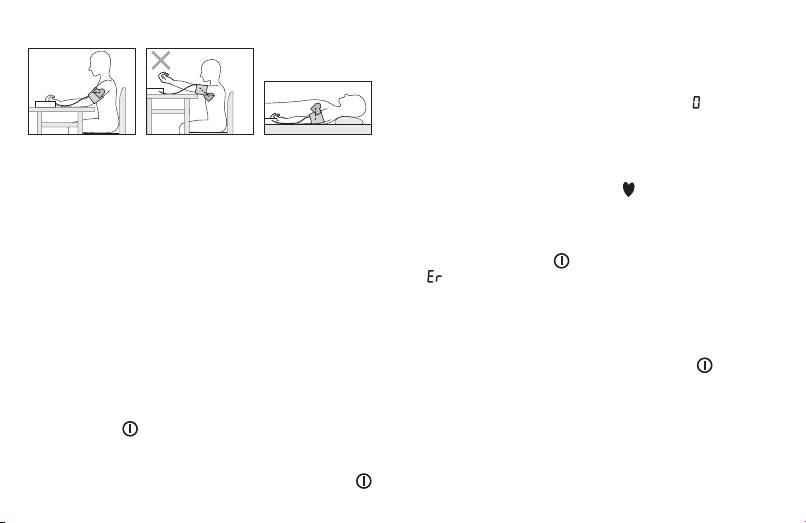
Correct posture
If no button is pressed, the most recently used user
memory is automatically used after 5 seconds.
•
Before the measurement, the last saved test result is
briefly displayed. If there is no measurement in the memo-
ry, the instrument always displays the value
.
•
The cuff automatically inflates. Cuff air pressure is re-
leased slowly. If a tendency towards high blood pressure
•
Rest for approx. 5 minutes before each measurement.
is already detectable, the cuff is pumped up again and
Otherwise there may be divergences.
cuff pressure increased further. As soon as a heart rate is
•
You can perform the measurement either sitting or lying
detected, the heart beat symbol is displayed.
down. Always make sure that the cuff is on a level with
•
Heart rate, systolic and diastolic blood pressure are dis-
your heart.
played.
•
To carry out a blood pressure measurement, make sure
•
Measuring can be cancelled at any time by pressing the
you are sitting comfortably with your arms and back lean-
START/STOP button
.
ing on something. Do not cross your legs. Place your feet
•
appears if it has not been possible to perform the
flat on the ground.
measurement properly. Observe the section in these in-
•
In order not to distort the result, it is important to keep still
structions on error messages/troubleshooting and repeat
during the measurement and not talk.
the measurement.
•
The test result is saved automatically.
Measuring blood pressure
•
To switch off, press the START/STOP button . If you
•
Put on the cuff as described previously and assume the
forget to turn off the device, it will switch off automatically
position in which you want to carry out the measurement.
after approx. 1 minute.
•
Switch on the blood pressure monitor with the START/
Wait at least 5 minutes before taking another measurement!
STOP button . After the full-screen display, the most
recently used user memory appears ( U0, U1....U9 ). To
change the user memory, press the MEM button and
confirm your selection with the START/STOP button .
23
