
Beurer BM 65: 3. Unit description Repair and disposal
3. Unit description Repair and disposal: Beurer BM 65
Table of contents
- 2. Important information Signs and symbols 1. Getting to know your instrument
- Advice on use
- Storage and Care Advice on batteries
- 3. Unit description Repair and disposal
- Icons in the display: System requirements for the Beurer “Health Manager” computer software 1. Supported operating systems: 2. Supported architectures: 3. Hardware requirements:
- 4. Prepare measurement Setting date and time Inserting battery Operation with the mains part
- 5. Measuring blood pressure Positioning cuff
- Correct posture Measuring blood pressure
- 6. Evaluating results Cardiac arrhythmia: WHO classification: Range of blood pressure values Systolic
- 8. Error messages/trouble-shooting 7. Saving, retrieving and deleting results
- 10. Specifications Technical alarm – description 9. Cleaning and storing the instrument
- Technical information is subject to change without notifica- tion to allow for updates.
- 11. Adapter
•
Batteries should not be charged or reactivated with any
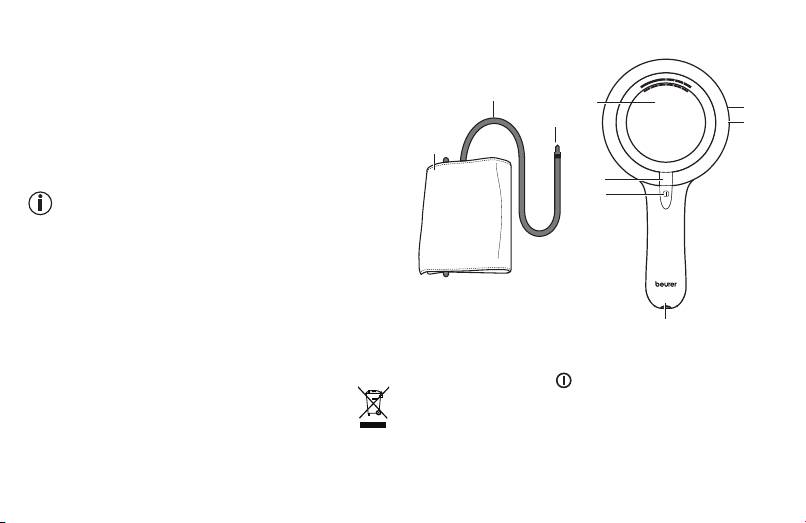
3. Unit description
other means, nor should they be taken apart, thrown in
the fire or short-circuited.
•
Remove the batteries from the instrument if they are worn
out or if you are not going to use the instrument for any
1
4
9
length of time. This prevents any damage as a result of
3
8
leakage. Always replace all the batteries at the same time.
•
Never use different types of battery, battery brands or
2
batteries with different capacities. You should preferably
use alkaline batteries.
5
MEM
6
Repair and disposal
•
Batteries do not belong in domestic refuse. Used batteries
should be disposed of at the collection points provided.
•
Never open the instrument. If these instructions are not
heeded, the warranty will be null and void.
•
Never attempt to repair the instrument or adjust it yourself.
1. Cuff tube
We can no longer guarantee perfect functioning if you do.
2. Cuff
•
Repairs may only be performed by Beurer Customer
3. Cuff connector
7
Service or authorized dealers. However, always check the
4. Display
batteries and replace them if necessary prior to making
5. MEM memory button
any complaint.
6. START/STOP button
•
The appliance should be disposed of according to
7. Connection for cuff connector
Regulation 2002/96/EC-WEEE (Waste Electrical
8. USB interface
and Electronic Equipment). In case of queries,
9. Connection for mains part
please contact the municipal authorities responsible for
waste disposal in your area.
19
