
Beurer BM 65: 4. Prepare measurement Setting date and time Inserting battery Operation with the mains part
4. Prepare measurement Setting date and time Inserting battery Operation with the mains part: Beurer BM 65
Table of contents
- 2. Important information Signs and symbols 1. Getting to know your instrument
- Advice on use
- Storage and Care Advice on batteries
- 3. Unit description Repair and disposal
- Icons in the display: System requirements for the Beurer “Health Manager” computer software 1. Supported operating systems: 2. Supported architectures: 3. Hardware requirements:
- 4. Prepare measurement Setting date and time Inserting battery Operation with the mains part
- 5. Measuring blood pressure Positioning cuff
- Correct posture Measuring blood pressure
- 6. Evaluating results Cardiac arrhythmia: WHO classification: Range of blood pressure values Systolic
- 8. Error messages/trouble-shooting 7. Saving, retrieving and deleting results
- 10. Specifications Technical alarm – description 9. Cleaning and storing the instrument
- Technical information is subject to change without notifica- tion to allow for updates.
- 11. Adapter
4. Prepare measurement
Setting date and time
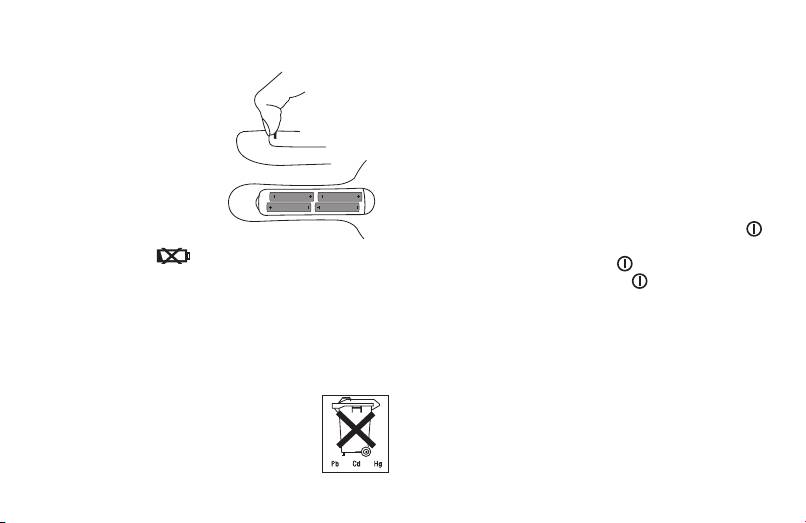
Inserting battery
You should set the date and time without fail. Otherwise,
you will not be able to save your measured values correctly
•
Replace the battery cover
with a date and time and to access them again later.
carefully.
Tip: If you press and hold the MEM button, you can set the
•
Insert four AAA 1.5 V alkaline
values more quickly.
(LR 03) batteries. making
To set the date and time, proceed as follows:
absolutely sure that you
•
Press the START/STOP and MEM buttons simultane-
insert them with the correct
ously, 24h begins to flash. Select 12h or 24h mode using
polarity as marked. Never use
the MEM button. Press START/STOP to confirm your
rechargeable batteries.
selection. The year display will start to flash. Set the year
•
Replace the battery cover
with the MEM button and confirm with START/STOP .
carefully.
•
Then set the month, day, hour and minutes and confirm
If the battery change
is continuously illuminated,
each setting with START/STOP .
measurement is no longer possible and you must replace all
•
Pressing the START/STOP button again will switch the
the batteries. Once batteries have been removed from the
display off; the date and time are permanently displayed.
device, the time must be reset.
Note: In 24h mode, the date is displayed as day/month. In
Used batteries do not belong in the household waste. You
12h mode, as month/day.
are legally obliged to dispose of the batteries. Dispose of
them via your specialist electrical supplier or local collec ting
Operation with the mains part
point for recyclable waste.
You can also operate this device with a mains part.
When doing so, there must not be any batteries in the bat-
Note: Batteries containing pollutant substances
tery compartment. The mains part can be obtained from
are marked as follows:
specialist retailers or from the service address using order
Pb = Battery contains lead,
number 071.19.
Cd = Battery contains cadmium,
Hg = Battery contains mercury.
21
