
Beurer BM 45: 8. Cleaning and storing the instrument
8. Cleaning and storing the instrument: Beurer BM 45
Table of contents
- 1. Getting to know your instrument
- 2. Important information Signs and symbols Advice on use
- Storage and Care Advice on batteries
- 3. Device description Repair and disposal
- Information on the display: 4. Preparing the measurement Inserting the batteries Setting the hour format, date and time
- Operation with the mains part
- 5. Measuring blood pressure 5.1 Positioning cuff 5.2 Correct posture
- Performing the blood pressure measurement 6. Evaluating results Cardiac arrhythmia:
- WHO classification: Range of blood pressure values Systolic (in mmHg) Diastolic (in mmHg) Measure 7. Displaying and deleting measurements
- 8. Cleaning and storing the instrument
- 10. Specifications 9. Rectifying faults
- 11. Mains part
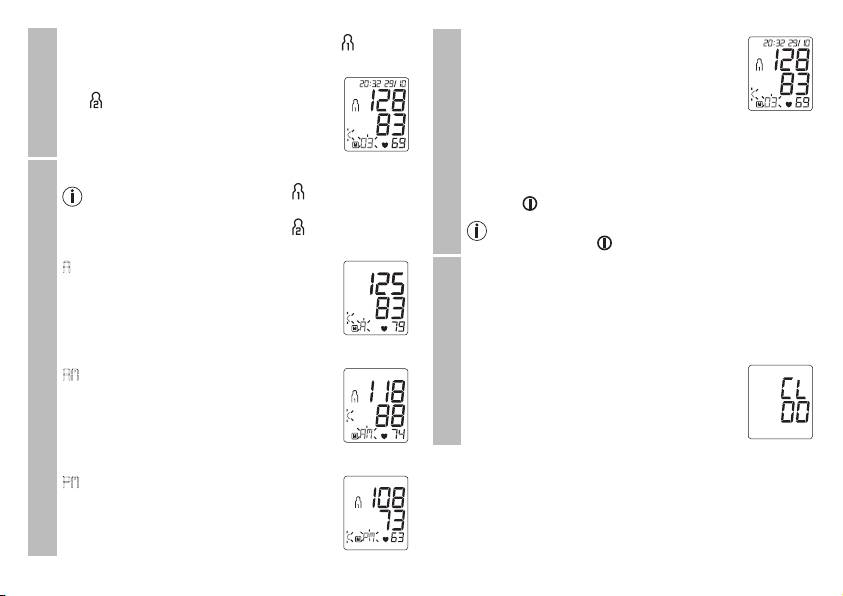
– To view the measurements for user memory , press
•
When the relevant memory button (M1 or
the M1 memory button.
M2) is pressed again, the last individual
measurement is displayed (in this example,
– To view the measurements for user memo-
measurement 03).
ry
, press the M2 memory button.
Your last measurement will appear on the
User memory
•
When the relevant memory button (M1 or M2) is
display.
pressed again, you can view your individual measure-
ments.
•
Press the relevant memory button (M1 or M2).
•
To switch the device off again, press the Start/stop
If you have selected user memory , the M1 memory
button or wait 30 sec.
button must be pressed.
If you have selected user memory , the M2 memory
Individual measured values
You can exit the menu at any time by pressing the
button must be pressed.
Start/stop button
.
A
flashes on the display.
•
To clear the memory of the relevant user memory, you
The average value of all saved measured
must first select a user memory.
values in this user memory is displayed.
•
Start individual measurement access.
•
Press and hold the M1 & M2 memory buttons for
•
Press the relevant memory button (M1 or M2).
5 seconds.
All the values in the current user memory are
AM
flashes on the display.
deleted.
The average value of the morning measure-
Average values
ments for the last 7 days is displayed (morn-
ing: 5.00 a.m. – 9.00 a.m.).
Deleting measured values
•
Press the relevant memory button (M1 or M2).
8. Cleaning and storing the instrument
PM
flashes on the display.
•
Clean your device and cuff carefully only with a slightly mois-
The average value of the evening measure-
tened cloth.
ments for the last 7 days is displayed (even-
•
The frequency of cleaning depends on the contamination
ing: 6.00 p.m. – 8.00 p.m.).
level of the device. Clean the blood pressure device and cuff
as soon as any dirt appears on the device.
25
