
Beurer BM 45: Operation with the mains part
Operation with the mains part: Beurer BM 45
Table of contents
- 1. Getting to know your instrument
- 2. Important information Signs and symbols Advice on use
- Storage and Care Advice on batteries
- 3. Device description Repair and disposal
- Information on the display: 4. Preparing the measurement Inserting the batteries Setting the hour format, date and time
- Operation with the mains part
- 5. Measuring blood pressure 5.1 Positioning cuff 5.2 Correct posture
- Performing the blood pressure measurement 6. Evaluating results Cardiac arrhythmia:
- WHO classification: Range of blood pressure values Systolic (in mmHg) Diastolic (in mmHg) Measure 7. Displaying and deleting measurements
- 8. Cleaning and storing the instrument
- 10. Specifications 9. Rectifying faults
- 11. Mains part
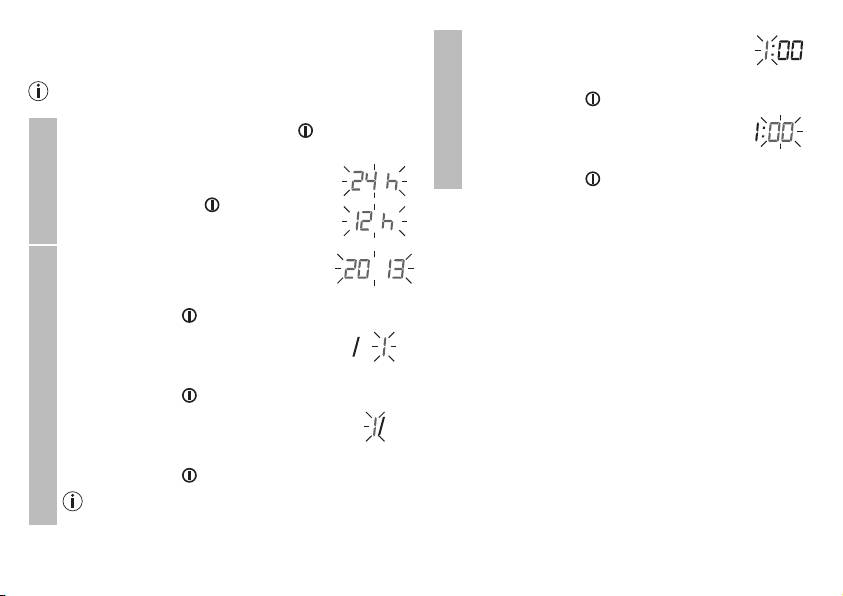
It is essential to set the date and time. Otherwise, you will not
The hour flashes on the display.
be able to save your measured values correctly with a date and
•
Choose the desired hour with the M1/
time and access them again later.
M2 memory buttons and confirm with the
If you press and hold the M1 or M2 memory button, you
Start/stop button .
can set the values more quickly.
Time
The minute flashes on the display.
•
Press and hold the Start/stop button for
•
Choose the desired minute with the M1/
5 seconds.
M2 memory buttons and confirm with the
•
Choose the desired hour format with the
Start/stop button .
M1/M2 memory buttons and confirm with
the Start/stop button .
Operation with the mains part
Hour format
You can also operate this device with a mains part.
When doing so, there must not be any batteries in the battery
The year flashes on the display.
compartment. The mains part can be obtained from specialist
•
Choose the desired year with the M1/
retailers or from the service address using order number 071.60.
M2 memory buttons and confirm with the
•
To prevent possible damage to the device, the blood pres-
Start/stop button .
sure monitor must only be used with the mains part de-
The month flashes on the display.
scribed here.
•
Insert the mains part into the connection provided for this
•
Choose the desired month with the M1/
purpose on the right-hand side of the blood pressure moni-
M2 memory buttons and confirm with the
tor. The mains part must only be connected to the mains
Date
Start/stop button .
voltage that is specified on the type plate.
The day flashes on the display.
•
Then insert the mains plug of the mains part into the mains
•
Choose the desired day with the M1/M2
socket.
memory buttons and confirm with the
•
After using the blood pressure monitor, unplug the mains
Start/stop button .
part from the mains socket first and then disconnect it from
the blood pressure monitor. As soon as you unplug the
If the hour format is set as 12h, the day/month dis-
mains part, the blood pressure monitor loses the date and
play sequence is reversed.
time setting but the saved measurements are retained.
21
