
Beurer BY 77: Parent unit “Monitor” Display description
Parent unit “Monitor” Display description: Beurer BY 77
Table of contents
- ENGLISH
- 1. Getting to know your instrument 2. Explanation of symbols 3. Intended use
- 4. Notes
- 5. Unit description Camera “Baby”
- Parent unit “Monitor” Display description
- 6. Initial use Initial use of camera Initial use of parent unit with battery Initial use of parent unit with mains part plug
- 7. Operation 7.1 Infrared night vision 7.2 Set the volume 7.3 Set the brightness 7.4 Intercom function 7.5 Settings menu Zoom function
- Lullabies Alarm Temperature unit Add camera
- Delete camera View camera Alternating camera image Energy-saving mode
- 8. Useful information about the baby monitor 9. Maintenance and cleaning
- 10. What if there are problems?
- 11. Disposal 12. Technical data
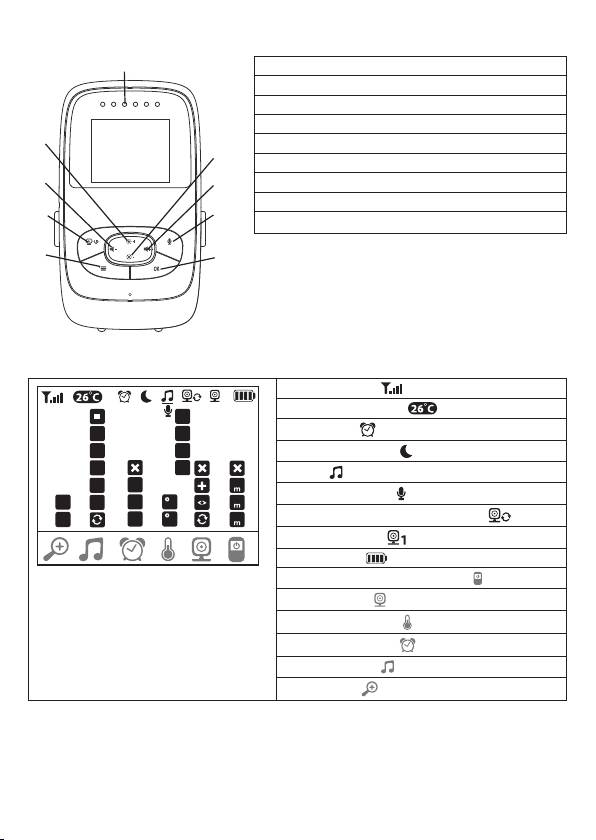
Parent unit “Monitor”
1
1. Noise LEDs
2. Lower arrow button / Reduce brightness
3. Right arrow button / Increase volume
4. Intercom function
9
5. OK button
2
6. Menu button
8
7. ON/OFF button
3
8. Left arrow button / Reduce volume
7
4
9. Top arrow button / Increase brightness
6
5
Display description
Signal strength
1
Temperature display
*
1
1
2
Alarm clock
2
*
3
Infrared night light
3
4
Lullaby
5
4
2h
15
Intercom function
1X
5
4h
C
60
2X
6h
F
Alternating camera image mode
Camera number
Battery state
Menu for power-saving mode
Camera menu
Temperature menu
Alarm clock menu
Lullabies menu
Zoom menu
19
Top 10 manuals
100.00
NZXT HALE90 1000W99.99
Samsung SM-R38099.97
AEG BSB 18C99.97
Dell 2700W99.97
Smeg KSEC70X99.96
Beurer HDE 4099.96
Pyramida KH 50 v.299.96
MSI CSM-H81M-P3299.96
AEG HR 562799.95
Melissa 640-048