
Dell PowerEdge T300: Connecting the Keyboard, Mouse, and Monitor Connecting the Power
Connecting the Keyboard, Mouse, and Monitor Connecting the Power: Dell PowerEdge T300
Table of contents
- Notes, Notices, and Cautions
- System Features
- 4 Getting Started With Your System
- Supported Operating Systems
- Other Information You May Need
- Obtaining Technical Assistance Installation and Configuration Unpacking the System
- Connecting the Keyboard, Mouse, and Monitor Connecting the Power
- Turning on the System Complete the 0perating System Setup
- Technical Specifications Processor Expansion Buses Memory
- Drives Connectors
- Video Power Physical
- Environmental
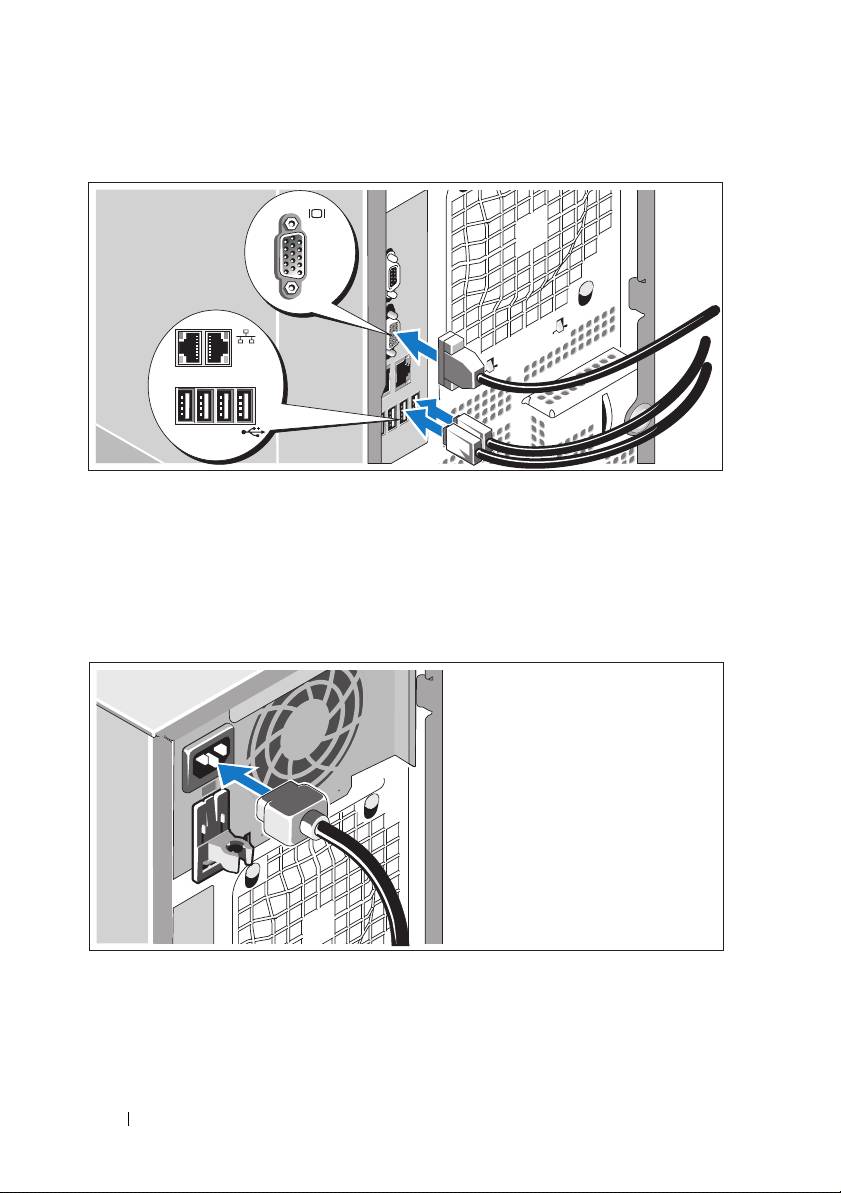
Connecting the Keyboard, Mouse, and Monitor
Connect the keyboard, mouse, and monitor (optional).
The connectors on the back of your system have icons indicating which cable
to plug into each connector. Be sure to tighten the screws (if any) on the
monitor's cable connector.
Connecting the Power
Connect the system’s power cable(s) to the system.
Plug the other end of the cable into a grounded electrical outlet or a separate
power source such as an uninterrupted power supply (UPS) or a power
distribution unit (PDU).
8 Getting Started With Your System
Top 10 manuals
100.00
NZXT HALE90 1000W99.99
Samsung SM-R38099.97
AEG BSB 18C99.97
Dell 2700W99.97
Smeg KSEC70X99.96
Beurer HDE 4099.96
Pyramida KH 50 v.299.96
MSI CSM-H81M-P3299.96
AEG HR 562799.95
Melissa 640-048