
Dell PowerEdge RAID Controller 6i: Removing the Transportable Battery Backup Unit (TBBU) from a PERC x/E Adapter Figure 1. PERC x/E Adapter Dirty Cache LED Location
Removing the Transportable Battery Backup Unit (TBBU) from a PERC x/E Adapter Figure 1. PERC x/E Adapter Dirty Cache LED Location: Dell PowerEdge RAID Controller 6i
Table of contents
- Notes, Notices, and Cautions
- Removing and Installing the Battery and Battery Cable on PERC Controllers Important Safety Information
- Removing the Transportable Battery Backup Unit (TBBU) from a PERC x/E Adapter Figure 1. PERC x/E Adapter Dirty Cache LED Location
- Figure 2. Removing the BBU
- Installing the New BBU and Battery Cable
- Figure 3. Installing the BBU and Battery Cable
- Installing the TBBU on a PERC x/E Adapter
- Figure 4. Installing a Dual In-line Memory Module
- Removing the DIMM from a PERC x/i Controller
- Disconnecting the BBU from a PERC x/i Controller
- Installing the DIMM and BBU to a PERC x/i controller
Removing the Transportable Battery Backup Unit (TBBU)
from a PERC x/E Adapter
This section describes the procedure to remove the TBBU from a PERC
x
/E
Adapter installed in a system.
NOTE: The TBBU on the PERC x/E Adapter consists of a dual in-line memory
module (DIMM) and a battery backup unit (BBU).
1
Perform a controlled shutdown of the system in which the PERC
x
/E
Adapter is installed, as well as any attached storage enclosures, and remove
the PERC
x
/E Adapter from the system. See the
Dell PowerEdge Expandable
RAID Controller x/i and x/E User’s Guide
for more information.
2
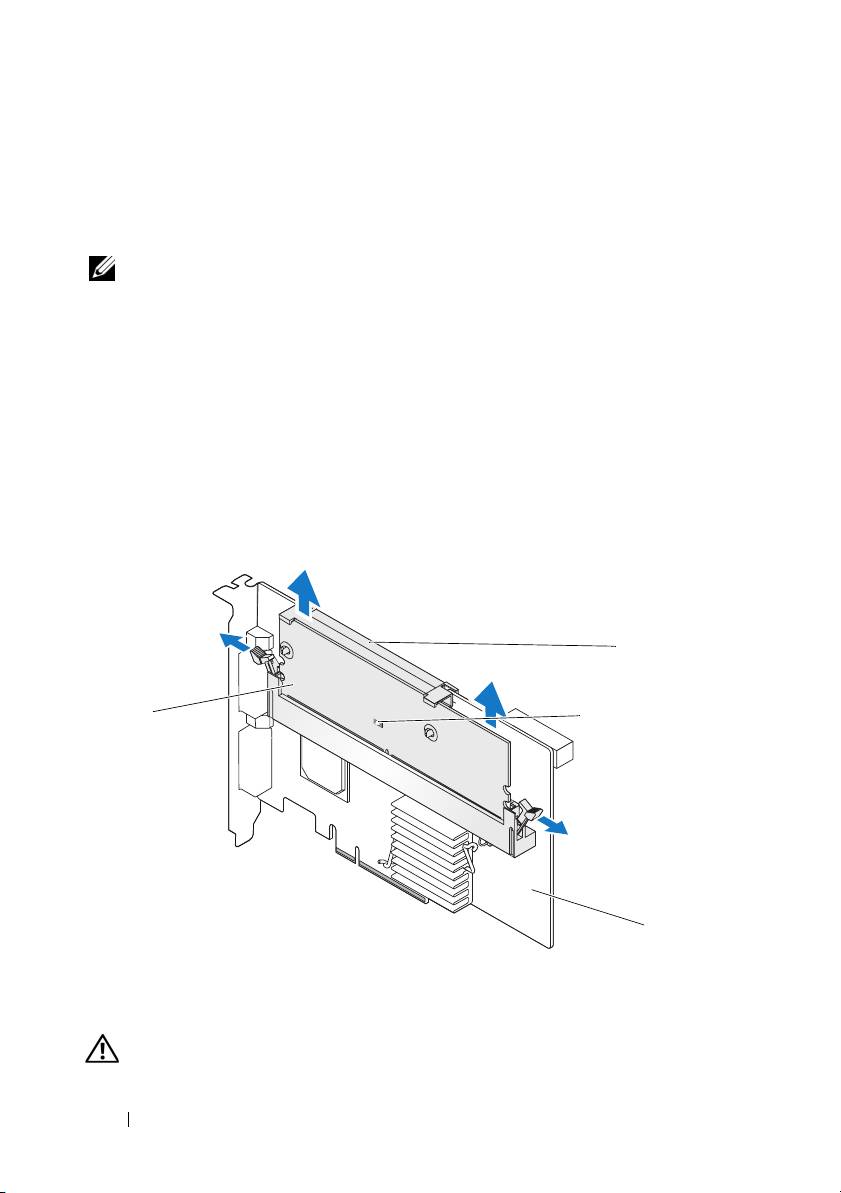
Visually inspect the controller and determine whether the dirty cache LED
on the memory module is turned on. See Figure 1. If the LED is turned on,
reinsert the controller into the system, replace the system cover, reconnect
the system to the electrical outlet, turn on the system, and repeat step 1.
Figure 1. PERC x/E Adapter Dirty Cache LED Location
2
1
3
4
1 memory module 2 battery
3 dirty cache LED 4 PERC x/E Adapter
CAUTION: Running a system without the system cover installed may cause
damage due to improper cooling.
4 Removing and Installing the Battery and Battery Cable on PERC Controllers
