
Dell PowerEdge RAID Controller 6i: Figure 4. Installing a Dual In-line Memory Module
Figure 4. Installing a Dual In-line Memory Module: Dell PowerEdge RAID Controller 6i
Table of contents
- Notes, Notices, and Cautions
- Removing and Installing the Battery and Battery Cable on PERC Controllers Important Safety Information
- Removing the Transportable Battery Backup Unit (TBBU) from a PERC x/E Adapter Figure 1. PERC x/E Adapter Dirty Cache LED Location
- Figure 2. Removing the BBU
- Installing the New BBU and Battery Cable
- Figure 3. Installing the BBU and Battery Cable
- Installing the TBBU on a PERC x/E Adapter
- Figure 4. Installing a Dual In-line Memory Module
- Removing the DIMM from a PERC x/i Controller
- Disconnecting the BBU from a PERC x/i Controller
- Installing the DIMM and BBU to a PERC x/i controller
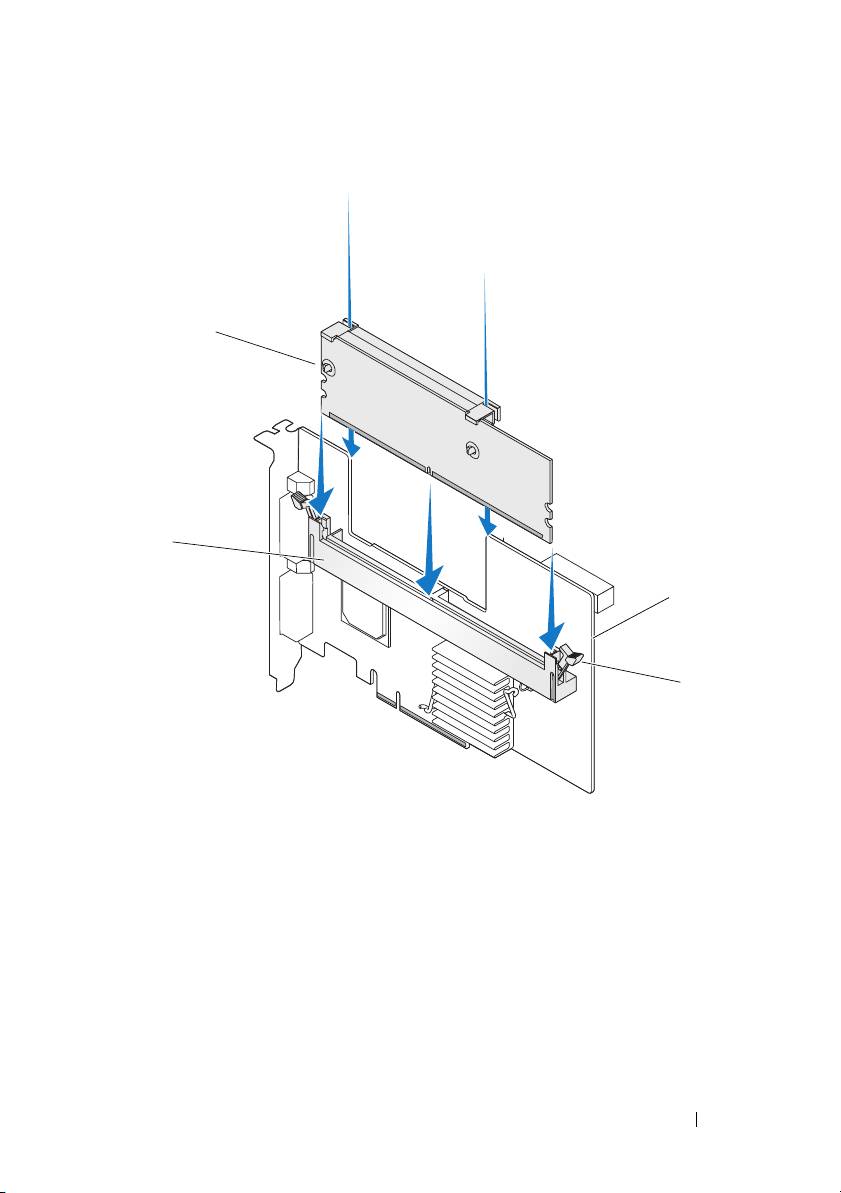
Figure 4. Installing a Dual In-line Memory Module
1
2
3
4
1 memory module 2 memory socket
3PERC x/E Adapter 4 retention clip
Removing and Installing the Battery and Battery Cable on PERC Controllers 9
Top 10 manuals
100.00
NZXT HALE90 1000W99.99
Samsung SM-R38099.97
AEG BSB 18C99.97
Dell 2700W99.97
Smeg KSEC70X99.96
Beurer HDE 4099.96
Pyramida KH 50 v.299.96
MSI CSM-H81M-P3299.96
AEG HR 562799.95
Melissa 640-048