
Dell Latitude D410: Installing a Battery Storing a Battery Solving Problems
Installing a Battery Storing a Battery Solving Problems: Dell Latitude D410
Table of contents
- Notes, Notices, and Cautions Abbreviations and Acronyms
- Contents
- Finding Information What Are You Looking For? Find It Here
- What Are You Looking For? Find It Here
- What Are You Looking For? Find It Here
- What Are You Looking For? Find It Here Setting Up Your Computer
- Quick Reference Guide 9
- 10 Quick Reference Guide
- About Your Computer
- Front View
- Left View
- Right View Back View
- Bottom View Using a Battery Battery Performance
- Checking the Battery Charge
- Microsoft Windows Power Meter Charge Gauge Health Gauge
- Low-Battery Warning Charging the Battery Removing a Battery
- Installing a Battery Storing a Battery Solving Problems
- Lockups and Software Problems The computer does not start up The computer stops responding A program stops responding
- A program crashes repeatedly A program is designed for an earlier Windows operating system A solid blue screen appears Other software problems
- Running the Dell Diagnostics When to Use the Dell Diagnostics Starting the Dell Diagnostics From Your Hard Drive
- Starting the Dell Diagnostics From the Optional Drivers and Utilities CD Dell Diagnostics Main Menu
- Option Function Tab Function
- Index
- 26 Index
FILE LOCATION: J:\DL\DL044402\DTP\Y4288eb0.fm
3
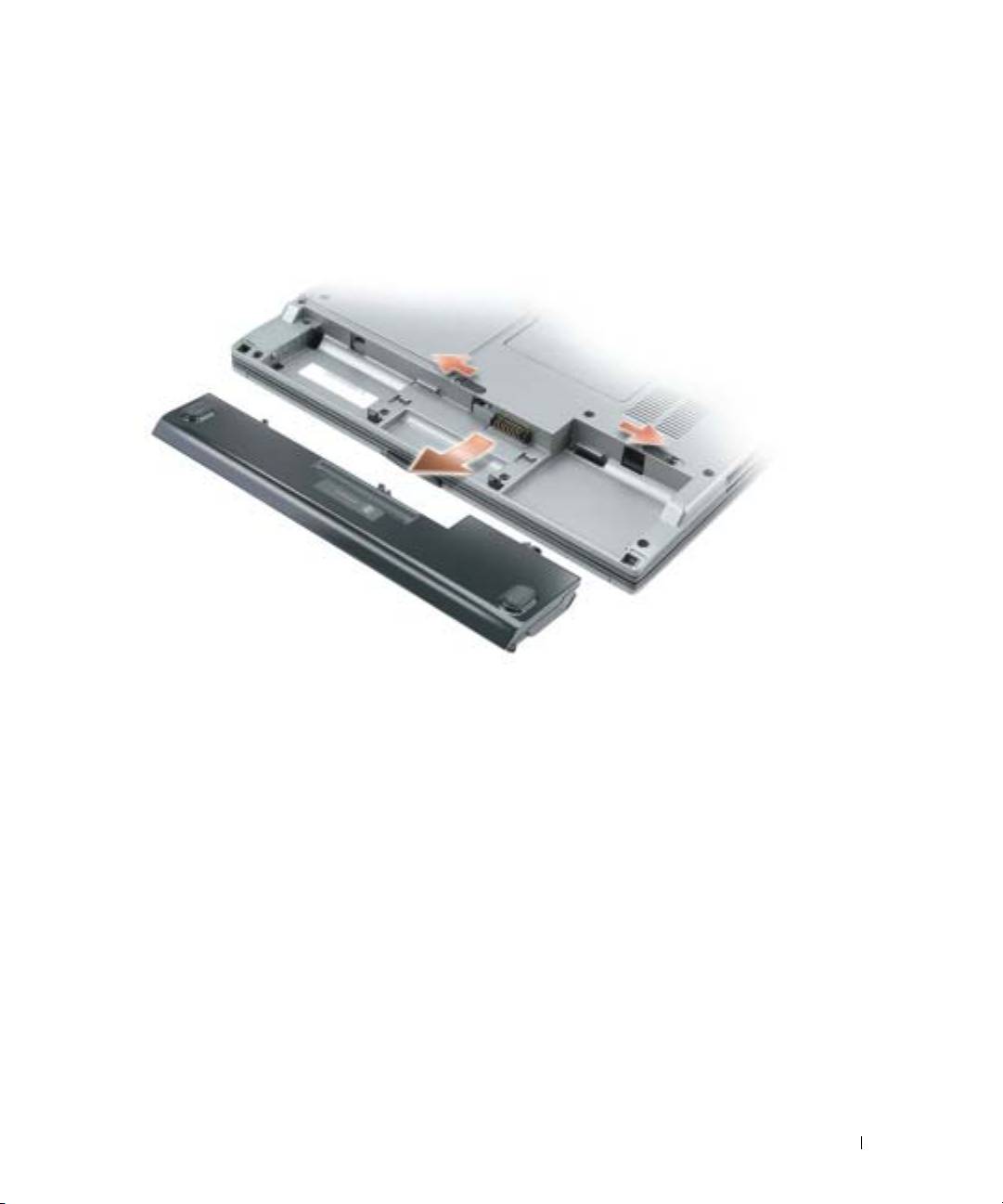
Slide the battery-bay latch releases on the bottom of the computer, and then remove the
battery from the bay.
Installing a Battery
Ensure that the computer is turned off. Slide the battery into the bay until the latch releases click.
Storing a Battery
Remove the battery when you store your computer for an extended period of time. A battery
discharges during prolonged storage. After a long storage period, recharge the battery fully before
you use it.
Solving Problems
Notebook System Software (NSS)
If you reinstall the operating system for your computer, you should also reinstall the NSS utility.
This utility is available on the optional
Drivers and Utilities
CD and on the Dell Support website at
www.support.dell.com
.
DELL CONFIDENTIAL – PRELIMINARY 12/9/04 – FOR PROOF ONLY
Quick Reference Guide 19
