
Beurer PM16: 4. Description of the monitor 5. Button functions MODE START/STOP
4. Description of the monitor 5. Button functions MODE START/STOP: Beurer PM16
Table of contents
- 1. Important information
- 2. Important information
- 3. General information for training
- The following example is for a 40 year old male: 220 - 40 = 180
- 4. Description of the monitor 5. Button functions MODE START/STOP
- RESET LIGHT 6. Mode overview:
- 7. Time mode Time and date display Setting the time and date
- 8. Heart rate measurement Advice and tips
- 9. Alarm function for heart rate 9.1 Setting training limits
- 9.2 Activating pulse alarm
- 10. Wake alarm mode
- Setting alarm time 11. Stopwatch mode
- 12. Countdown mode Setting countdown time
- 13. Troubleshooting 14. Battery and disposal
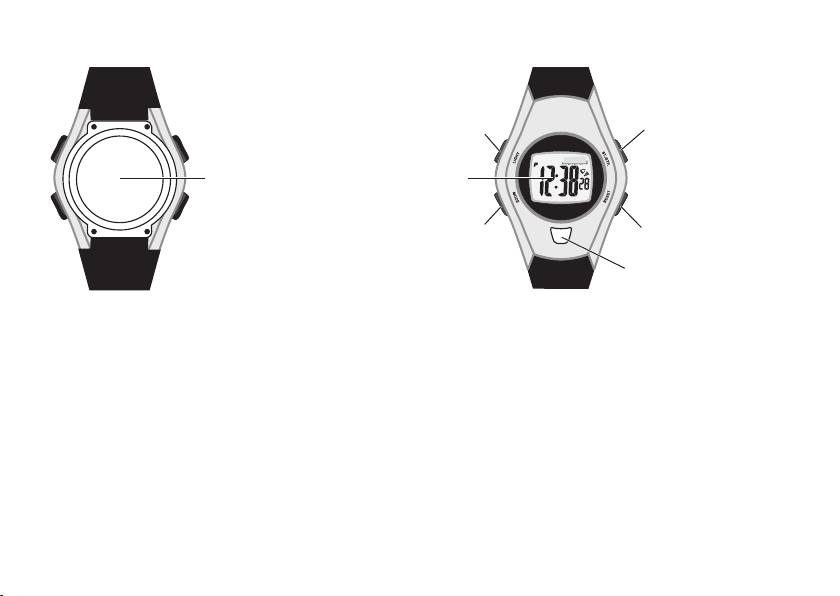
4. Description of the monitor
LIGHT button
Start/Stop button
Sensor
Display
MODE button
Reset button
Finger sensor button
Rear view of heart rate monitor
Front view of heart rate monitor
5. Button functions
MODE
– switches between individual modes
– held depressed: to switch to setting mode
– selection (in setting mode)
– held depressed: to exit setting mode
START/STOP
– time display/date display
– start/stop (in stopwatch and countdown mode)
22
Top 10 manuals
100.00
NZXT HALE90 1000W99.99
Samsung SM-R38099.97
AEG BSB 18C99.97
Dell 2700W99.97
Smeg KSEC70X99.96
Beurer HDE 4099.96
Pyramida KH 50 v.299.96
MSI CSM-H81M-P3299.96
AEG HR 562799.95
Melissa 640-048