
Beurer PM16: 12. Countdown mode Setting countdown time
12. Countdown mode Setting countdown time: Beurer PM16
Table of contents
- 1. Important information
- 2. Important information
- 3. General information for training
- The following example is for a 40 year old male: 220 - 40 = 180
- 4. Description of the monitor 5. Button functions MODE START/STOP
- RESET LIGHT 6. Mode overview:
- 7. Time mode Time and date display Setting the time and date
- 8. Heart rate measurement Advice and tips
- 9. Alarm function for heart rate 9.1 Setting training limits
- 9.2 Activating pulse alarm
- 10. Wake alarm mode
- Setting alarm time 11. Stopwatch mode
- 12. Countdown mode Setting countdown time
- 13. Troubleshooting 14. Battery and disposal
•YoucancontinuetimingatanytimewiththeStart/Stopbutton.
•UsetheResetbuttontozerothedisplayoncetiminghasstopped.
•Maximumtimingperiodis99hours,59minutesand59seconds.Ifthistimeisexceeded,thecounter
starts again at 0 hours, 0 minutes and 0 seconds.
12. Countdown mode
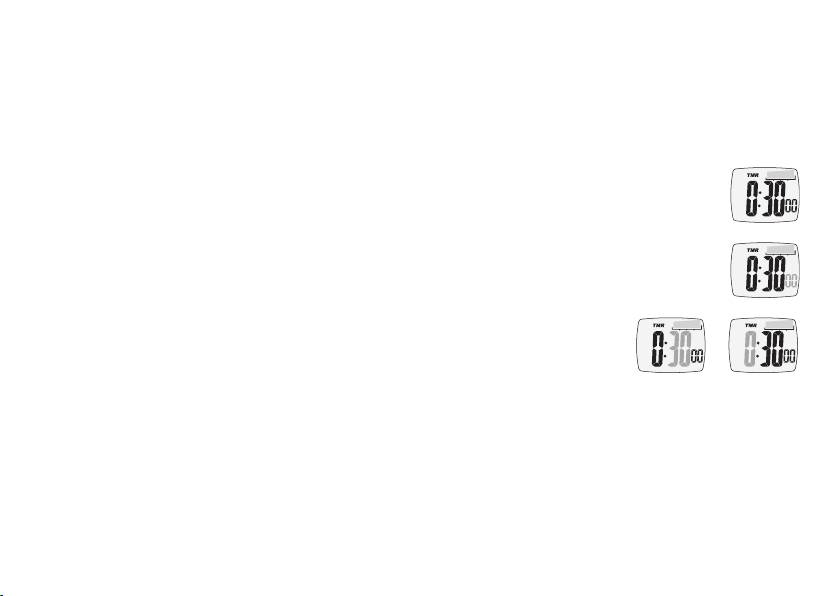
Setting countdown time
•Youareinthe„Countdown“menu.
•HoldtheMODEbuttondownfor3secondsinordertoentersettingmode.The
hours display starts flashing. Now you can set the hours using the Start/Stop
button and the Reset button.
•ConrminputusingtheMODEbutton.Enterminutesandsecondsinthesame
way. The maximum time is 99 hours, 59 minutes and 59 seconds.
•Oncealldatahasbeenset,presstheMODEbuttonfor3secondstoexitsettingmode.Ifnobuttonis
pressed in setting mode within 60 seconds, the heart rate monitor automatically reverts to time display.
Using countdown mode
•PresstheSTART/STOPbuttononcetostartcountdown.Remainingtimeiscontinuouslyshowninthe
display.
•Tointerruptcountdown,pressthestart/stopbuttonagain.
•Toresetcountdowntothesettime,presstheresetbuttonwhilecountdownhasstopped.
30
