
Canon i-SENSYS LBP6780x: RUS Регистрация формата бумаги. RUS Подробнее об использовании принтера см. в ОСТОРЖНО RUS
RUS Регистрация формата бумаги. RUS Подробнее об использовании принтера см. в ОСТОРЖНО RUS: Canon i-SENSYS LBP6780x
Оглавление
- RUS RUS RUS RUS Краткое руководство по настройке RUS RUS RUS Удалите всю ленту. RUS RUS RUS RUS Переместите
- RUS Регистрация формата бумаги. RUS Подробнее об использовании принтера см. в ОСТОРЖНО RUS
LAN
* English sample
or
E
C
D
* English sample
E
(1)
(2)
(2)
(1)
(3)
ON
ON
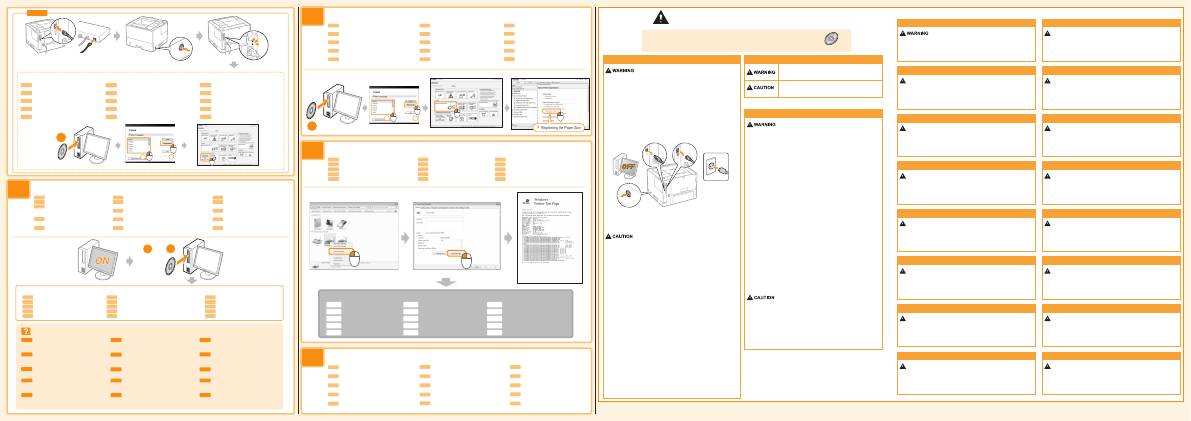
This manual describes only warnings and cautions for the installation and the power
supply. Be sure to read "Important Safety Instructions" described in the e-Manual
(HTML manual) included in the supplied User Manual CD-ROM also.
Important Safety Instructions
User Manual CD-ROM
Install the driver.
Register the paper size.
Check the printing operation.
For more about using the printer, see the e-Manual.
English
To avoid the risk of personal injury or damage to the printer, and for legal
information, make sure to read the "Legal Notices" and "Important Safety
Instructions" in the e-Manual included on the accompanying User Manual
CD-ROM carefully before using the printer.
See the e-Manual.
2
1
If you have any questions about operations, see the "Printer Driver Installation Guide."
FRA
Pour toute question sur ces opérations,
reportez-vous au manuel "Guide
d'installation du pilote d'imprimante".
SPA
Si tiene preguntas sobre las operaciones,
consulte la "Guía de instalación del
controlador de impresora".
NOR
Hvis du har spørsmål om hvordan du
angir innstillingene, går du til
"Installeringshåndbok for skriverdriver".
RUS
При возникновении вопросов,
касающихся операций, см.
"Руководство по установке драйвера
принтера".
HUN
Ha a szükséges műveletekről kérdései
merülnek fel, akkor lásd a következőt:
„Printer Driver Installation Guide”.
GER
Wenn Sie Fragen zu den Vorgängen
haben, lesen Sie im
"Installationshandbuch zum
Druckertreiber" nach.
DUT
Als u vragen heeft over de
bedieningshandelingen, raadpleeg dan
de "Installatiehandleiding
printerstuurprogramma".
FIN
Jos sinulla on mitä tahansa kysymyksiä
toiminnoista, katso "Tulostinajurin
asennusopas".
POL
Informacje dotyczące działania drukarki
można znaleźć w "Podręczniku instalacji
sterownika drukarki".
POR
Se tiver alguma pergunta sobre o
funcionamento, consulte o "Printer Driver
Installation Guide".
ITA
In caso di dubbi sulle operazioni,
consultare la "Guida di Installazione del
Driver Stampante".
DAN
Hvis du har nogen spørgsmål til
betjeningen, skal du læse i
"Installationsvejledning til printerdriver".
SWE
Om du har frågor angående förfarandet,
se "Installationsguide för skrivardrivrutin".
CES
Pokud máte v souvislosti s ovládáním nějaké
otázky, viz „Printer Driver Installation Guide“.
TUR
İşlemlere ilişkin herhangi bir sorunuz
olursa, "Printer Driver Installation Guide"
bakın.
FRA Installez le pilote.
SPA Instale el controlador.
NOR Installer driveren. Last ned
skriverdriveren fra Canons nettsted.
RUS Установите драйвер. Загрузка
драйвера принтера с веб-сайта Canon.
HUN Telepítse az illesztőprogramot.
GER Installieren Sie den Treiber.
DUT Installeer het stuurprogramma. Download het
printerstuurprogramma van de website van Canon.
FIN
Asenna ohjain. Lataa tulostinohjain Canonin web-sivustosta.
POL Zainstaluj sterownik. Sterownik drukarki można
pobrać ze strony internetowej firmy Canon.
POR Instale o driver
ITA
Installare il driver.
DAN Installer driveren. Download
printerdriveren fra Canons websted.
SWE Installera drivrutinen. Hämta skrivardrivrutinen
från Canons webbplats.
CES Instalace ovladače.
TUR Sürücüyü yükleyin.
FRA Suivez les instructions à l'écran.
SPA Siga las instrucciones de la pantalla.
NOR Følg instruksjonene på skjermen.
RUS Следуйте инструкциям на экране.
HUN Kövesse a képernyőn megjelenő utasításokat.
GER Folgen Sie den Anleitungen im Dialog.
DUT Volg de instructies op het scherm.
FIN
Noudata näytön ohjeita.
POL Postępuj zgodnie z instrukcjami wyświetlanymi na ekranie.
POR Siga as instruções apresentadas no ecrã.
ITA
Seguire le istruzioni visualizzate a schermo.
DAN Følg vejledningen på skærmen.
SWE Följ anvisningarna på skärmen.
CES Postupujte podle pokynů na obrazovce.
TUR Ekrandaki talimatları izleyin.
Follow the instructions on the screen.
FRA Enregistrez le format papier.
Reportez-vous au manuel électronique.
SPA Registre el tamaño de papel.
Consulte el e-Manual.
NOR Registrer
papirstørrelsen.
Gå til e-Manual.
RUS Регистрация формата бумаги.
См. "Электронное руководство".
HUN Rögzítse a papírméretet.
Lásd az e-Kézikönyvet.
GER Registrieren Sie das Papierformat.
Siehe e-Anleitung.
DUT Papierformaat
vastleggen.
Zie de e-Handleiding.
FIN Rekisteröi
paperikoko.
Katso sähköinen opas.
POL Zarejestruj rozmiar papieru.
Patrz e-Podręcznik.
POR Registre o tamanho do papel.
Consulte o Manual electrónico.
ITA
Registrazione del formato carta.
Vedere l'e-Manual.
DAN Registrer
papirstørrelsen.
Se e-manualen.
SWE Registrera
pappersstorleken.
Se e-handboken.
CES Nastavení formátu papíru.
Viz e-Příručku.
TUR Kağıt boyutunu kaydedin.
Elektronik Kılavuza bakın.
GER Überprüfen Sie die Druckfunktion.
DUT Controleer de printerwerking.
FIN
Tulostimen toiminnan tarkistaminen
POL Sprawdzanie działania drukowania.
POR Verifique a impressão.
ITA
Controllare il funzionamento di stampa.
DAN Kontrol af printerfunktionen.
SWE Kontrollera att skrivaren fungerar.
CES Kontrola tiskové operace.
TUR Yazdırma işlemini inceleyin.
FRA Vérifiez que l'impression fonctionne.
SPA Compruebe el funcionamiento de la impresión.
NOR Kontrollere
skriverfunksjonen.
RUS Проверка операции печати.
HUN Ellenőrizze a nyomtatás működését.
GER Weitere Details zur Verwendung des
Druckers finden Sie in der e-Anleitung.
DUT Zie de e-Handleiding voor meer informatie
over het gebruik van de printer.
FIN
Katso lisätietoja tulostimen käyttämisestä
sähköisestä oppaasta.
POL Aby dowiedzieć się więcej na temat korzystania
z drukarki, zapoznaj się z e-Podręcznikiem.
POR Para mais informações sobre a impressora,
consulte o Manual electrónico.
ITA
Per maggiori info sull'uso della stampante,
vedere l'e-Manual.
DAN Se e-manualen for yderligere informationer
omkring brugen af denne printer.
SWE För mer information om att använda
skrivaren, se e-handboken.
CES Další informace o používání tiskárny
najdete v e-Příručce.
TUR Yazıcının kullanılmasına ilişkin daha fazla
bilgi edinmek için, Elektronik Kılavuza bakın.
Setup is finished.
FRA Pour plus d'informations sur l'utilisation de
l'imprimante, reportez-vous au manuel électronique.
SPA Para obtener más información sobre el uso de la
impresora, consulte el e-Manual.
NOR For mer om bruk av skriveren, se e-Manualen.
RUS Подробнее об использовании принтера см. в
Электронном руководстве.
HUN A nyomtató használatáról további információkért
lásd az e-Kézikönyvet.
Français
Pour éviter de vous blesser ou d'endommager l'imprimante, et pour consulter les
informations légales, veillez à bien consulter les rubriques "Publication judiciaire" et
"Consignes de sécurité importantes" du manuel électronique fourni sur le CD "User
Manual CD-ROM" qui accompagne le produit, avant toute utilisation de l'imprimante.
AVERTISSEMENT
Deutsch
Lesen Sie vor der Verwendung des Druckers auf der beiliegenden User Manual
CD-ROM in der e-Anleitung die Abschnitte "Rechtshinweise" und "Wichtige
Sicherheitsvorschriften", um Verletzungen oder Beschädigungen des Druckers zu
vermeiden und rechtliche Informationen zu erhalten.
WARNUNG
Italiano
Per evitare il rischio di infortunio o di danni alla stampante, nonché per
informazioni di carattere legale, leggere attentamente le sezioni
"Avvertenze legali" e "Istruzioni importanti per la sicurezza" dell'e-Manual
contenuto nell'User Manual CD-ROM prima di installare la stampante.
AVVERTENZA
Español
Para evitar el riesgo de sufrir lesiones personales o de causar daños a la impresora
(y para información legal), asegúrese de leer atentamente los "Avisos legales" y las
"Instrucciones de seguridad importantes" del e-Manual incluido en el disco User
Manual CD-ROM suministrado antes de utilizar la impresora.
ADVERTENCIA
Nederlands
Ter voorkoming van het risico van persoonlijk letsel of beschadiging van de printer en ter
kennisneming van de wettelijke informatie is het belangrijk dat u, voordat u de printer in
gebruik neemt, de "Juridische kennisgevingen" en de "Belangrijke veiligheidsvoorschriften"
aandachtig leest, die staan in de e-Handleiding op de begeleidende User Manual CD-ROM.
WAARSCHUWING
Dansk
For at undgå risiko for personskade eller beskadigelse af printeren og for at
få juridiske oplysninger bør du inden du bruger printeren omhyggeligt læse
"Juridiske bemærkninger" og "Vigtige sikkerhedsinstruktioner" i den
e-manual, der findes på den medfølgende User Manual CD-ROM.
ADVARSEL
Norsk
Hvis du vil unngå fare for personskade og skade på skriveren, og få juridisk
informasjon, må du lese nøye gjennom "Juridiske merknader" og "Viktige
sikkerhetsinstruksjoner" i e-Manual som ligger på User Manual CD-ROM som
følger med, før du begynner å bruke skriveren.
ADVARSEL
Suomi
Jotta vältät henkilövahinkojen tai tulostimen vaurioitumisen riskin ja jos
haluat lisätietoja lakiasioista, varmista ennen tulostimen käyttöä, että luet
"Lakitiedot" ja "Tärkeitä turvaohjeita" sähköisestä oppaasta, joka löytyy
toimitukseen kuuluvalta User Manual CD-ROM -levyltä.
VAROITUS
Čeština
Proto, abyste předešli riziku zranění nebo poškození tiskárny a abyste znali
právní informace, si určitě pečlivě přečtěte „Právní pokyny“ a „Důležité
bezpečnostní pokyny“ v e-Příručce obsažené na disku User Manual
CD-ROM, a to dříve, než tiskárnu začnete používat.
VAROVÁNÍ
Português
Para tomar conhecimento das informações legais e evitar riscos de lesão
corporal ou danos à impressora, leia cuidadosamente os "Avisos legais" e
as "Instruções de segurança importantes" no Manual electrónico fornecido
com o User Manual CD-ROM antes de usar a impressora.
AVISO
Magyar
A személyi sérülés, ill. a nyomtató károsodásának megelőzése, valamint a
jogi információk megismerése érdekében a nyomtató használata előtt
gondosan olvassa el a mellékelt User Manual CD-ROM-on megtalálható
e-Kézikönyv „Jogi tudnivalók” és „Fontos biztonsági előírások” c. részeit.
FIGYELEM
Türkçe
Bedensel yaralanma veya yazcının zarar görmesi riskini önlemek için ve yasal bilgileri
edinmek amacıyla, yazıcıyı kullanmaya başlamadan önce, yazıcıyla birlikte teslim edilmiş
olan User Manual CD-ROM içeriğinde bulunan Elektronik Kılavuz içindeki "Yasal
Bildirimler" ve "Önemli Güvenlik Talimatları" metinlerini okuduğunuzdan emin olun.
UYARI
Svenska
För att undvika risker för personskador eller skador på skrivaren och för
juridisk information se till att läsa "Juridiska meddelanden" och "Viktig
säkerhetsinformation" i e-handboken som finns i User Manual CD-ROM
noggrant innan du använder skrivaren.
VARNING
Русский
Во избежание травм и повреждения принтера, а также для получения юридической
информации внимательно прочтите разделы "Правовые вопросы" и "Важные указания
по технике безопасности" Электронного руководства, находящегося на компакт-диске
User Manual CD-ROM из комплекта поставки, перед началом использования принтера.
ОСТОРЖНО
Printed on non-chlorine bleached paper.
Gedruckt auf chlorfrei gebleichtem Papier.
Polski
Aby zminimalizować ryzyko obrażeń ciała i uszkodzenia drukarki oraz zapoznać się z
informacjami prawnymi, należy przed rozpoczęciem korzystania z drukarki przeczytać
rozdziały "Uwagi prawne" oraz "Ważne instrukcje dotyczące bezpieczeństwa" w
e-Podręczniku umieszczonym na dysku User Manual CD-ROM dołączonym do drukarki.
OSTRZEŻENIE
2
1
Configure the network settings, if necessary.
See the e-Manual.
FRA
Configurez les paramètres réseau si nécessaire.
Reportez-vous au manuel électronique.
SPA
Si es preciso, configure los ajustes de red.
Consulte el e-Manual.
NOR
Om nødvendig, konfigurer nettverksinnstillingene.
Gå til e-Manual.
RUS
При необходимости настройте параметры протокола.
См. "Электронное руководство".
HUN
Szükség esetén adja meg a hálózati beállításokat.
Lásd az e-Kézikönyvet.
GER
Konfigurieren Sie gegebenenfalls die Netzwerkeinstellungen.
Siehe e-Anleitung.
DUT
Configureer de netwerkinstellingen, indien nodig.
Zie de e-Handleiding.
FIN
Määritä verkkoasetukset tarvittaessa.
Katso sähköinen opas.
POL
Skonfiguruj ustawienia sieciowe, jeśli to konieczne.
Patrz e-Podręcznik.
POR
Ajuste as configurações de rede (se necessário).
Consulte o Manual electrónico
Symbols
Installation
Indicates a warning concerning operations that may lead to
death or injury to persons if not performed correctly. To use the
machine safely, always pay attention to these warnings.
Indicates a caution concerning operations that may lead to injury
to persons if not performed correctly. To use the machine safely,
always pay attention to these cautions.
- Do not install the printer in a location near alcohol, paint thinner, or other
flammable substances. If flammable substances come into contact with
electrical parts inside the printer, this may result in a fire or electrical
shock.
- Do not place the following items on the printer.
- Necklaces and other metal objects
- Cups, vases, flowerpots, and other containers filled with water or liquids
- When installing or removing the optional accessories, be sure to turn the
printer OFF, unplug the power plug, and then disconnect all the interface
cables and power cord from the printer. Otherwise, the power cord or
interface cables may be damaged, resulting in a fire or electrical shock.
Power Supply
- Do not damage or modify the power cord. Also, do not place heavy
objects on the power cord or pull on or excessively bend it, as this can
cause electrical damage, resulting in fire or electrical shock.
- Keep the power cord away from all heat sources. Failure to do so can
cause the power cord insulation to melt, resulting in a fire or electrical
shock.
- The power cord should not be taut, as this may lead to a loose
connection and cause overheating, which could result in a fire.
- The power cord may become damaged if it is stepped on, fixed with
staples, or if heavy objects are placed on it. Continued use of a
damaged power cord can lead to an accident, such as a fire or electrical
shock.
- Do not plug or unplug the power plug with wet hands, as this can result
in electrical shock.
- Do not plug the power cord into a multi-plug power strip, as this can
result in a fire or electrical shock.
- Do not bundle up or tie up the power cord in a knot, as this can result in
a fire or electrical shock.
- Insert the power plug completely in the
AC power outlet. Failure to do
so can result in a fire or electrical shock.
- If excessive stress is applied to the connection part of the power cord, it
may damage the power cord or the wires inside the machine may
disconnect. This could result in a fire. Avoid the following situations:
- Connecting and disconnecting the power cord frequently.
- Tripping over the power cord.
- The power cord is bent near the connection part, and continuous stress
is being applied to the power outlet or the connection part.
- Applying a shock to the power connector.
- Do not use power cords other than the one provided, as this can result in
a fire or electrical shock.
- As a general rule, do not use extension cords. Using an extension cord
may result in a fire or electrical shock.
- Do not install the printer in unstable locations, such as on unsteady
platforms or inclined floors, or in locations subject to excessive
vibrations, as this may cause the printer to fall or tip over, resulting in
personal injury.
- The ventilation slots are provided for proper ventilation of working parts
inside the printer. Never place the printer on a soft surface, such as a
bed, sofa, or rug. Blocking the slots can cause the printer to overheat,
resulting in a fire.
- Do not install the printer in the following locations, as this may result in a
fire or electrical shock.
- A damp or dusty location
- A location exposed to smoke and steam, such as near a cookery or
humidifier
- A location exposed to rain or snow
- A location near a water faucet or water
- A location exposed to direct sunlight
- A location subject to high temperatures
- A location near open flames
- When installing the printer, gently lower the printer to the installation site
so as not to catch your hands between the printer and the floor or
between the printer and other equipment, as this may result in personal
injury.
- When connecting the interface cable, connect it properly by following the
instructions in the e-Manual. If not connected properly, this may result in
malfunction or electrical shock.
- Be careful when handling the main board or the ROM. Touching the main
board or the sharp parts such as the edges of the ROM may result in
personal injury.
- When moving the printer, follow the instructions in the e-Manual to hold it
correctly. Failure to do so may cause you to drop the printer, resulting in
personal injury.
- Do not use a power supply voltage other than that listed herein, as this
may result in a fire or electrical shock.
- Always grasp the power plug when unplugging the power plug. Do not
pull on the power cord, as this may expose the core wire of the power
cord or damage the cord insulation, causing electricity to leak, resulting
in a fire or electrical shock.
- Leave sufficient space around the power plug so that it can be
unplugged easily. If objects are placed around the power plug, you may
be unable to unplug it in an emergency.
If these items come into contact with a high-voltage area inside the
printer, this may result in a fire or electrical shock.
If these items are dropped or spilled inside the printer, immediately turn
OFF the power switch (1) and disconnect the interface cables if they are
connected (2). Then, unplug the power plug from the AC power outlet (3)
and contact your local authorized Canon dealer.
ITA
Configurare le impostazioni di rete se necessario.
Vedere l'e-Manual.
DAN
Konfigurer netværksindstillingerne, hvis det er nødvendigt.
Se e-manualen.
SWE
Konfigurera nätverksinställningarna om så krävs.
Se e-handboken.
CES
Podle potřeby proveďte konfiguraci nastavení sítě.
Viz e-Příručku.
TUR
Eğer gerekiyorsa, ağ ayarlarını yapılandırın.
Elektronik Kılavuza bakın.
FRA
La configuration est terminée.
SPA
La instalación ha finalizado.
NOR
Oppsett er fullført.
RUS
Установка закончена.
HUN
A beállítás ezzel befejeződött.
GER
Die Installation ist abgeschlossen.
DUT
De installatie is beëindigd.
FIN
Asennus on suoritettu.
POL
Konfiguracja została zakończona.
POR
A configuração está concluída.
ITA
Installazione terminata.
DAN
Installationen er gennemført.
SWE
Installationen är avslutad.
CES
Instalace je hotová.
TUR
Kurulum tamamlanmıştır.
