
Dell UPS 5600R – page 6
Manual for Dell UPS 5600R
Table of contents
- Notes and Warnings
- System Features
- Finding Information What are You Looking For? Find It Here
- Installation and Startup Unpacking the System
- Lifting the Cabinet
- Identifying the UPS Figure 1. The Dell Online Rack UPS Front Panel Figure 2. 5600W, 208V Rear Panel
- Figure 3. 5600W, 230V Rear Panel
- Rackmount Setup Removing the Battery Retaining Bracket
- Removing the Battery Trays
- Installing the Rails
- Installing the Cabinet
- Securing the Cabinet Installing the Battery Trays
- Replacing the Battery Retaining Bracket and Connecting the Internal Battery Connectors
- Installing the UPS Front Cover Connecting the Equipment
- Hardwiring the UPS Input
- Removing the Terminal Block Cover
- Installing the Input and Ground Wires
- Starting the UPS
- Completing the Startup
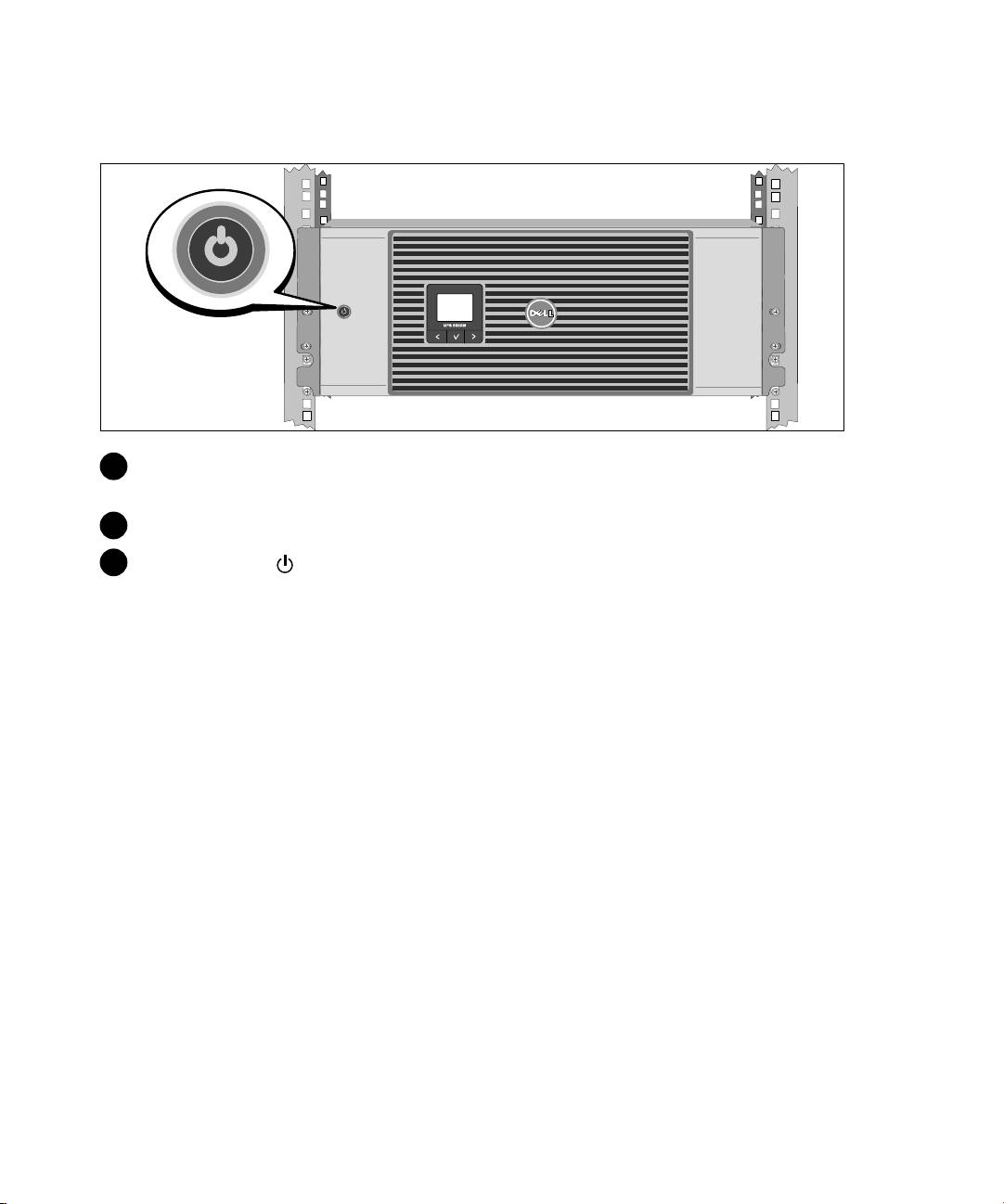
Inicio del UPS
1 Compruebe que todos los interruptores del circuito del segmento de carga se encuentren en la
posición de ENCENDIDO.
2 Encienda el interruptor principal del suministro eléctrico.
3 Presione el botón del panel frontal del UPS.
Instalación y arranque
|
99
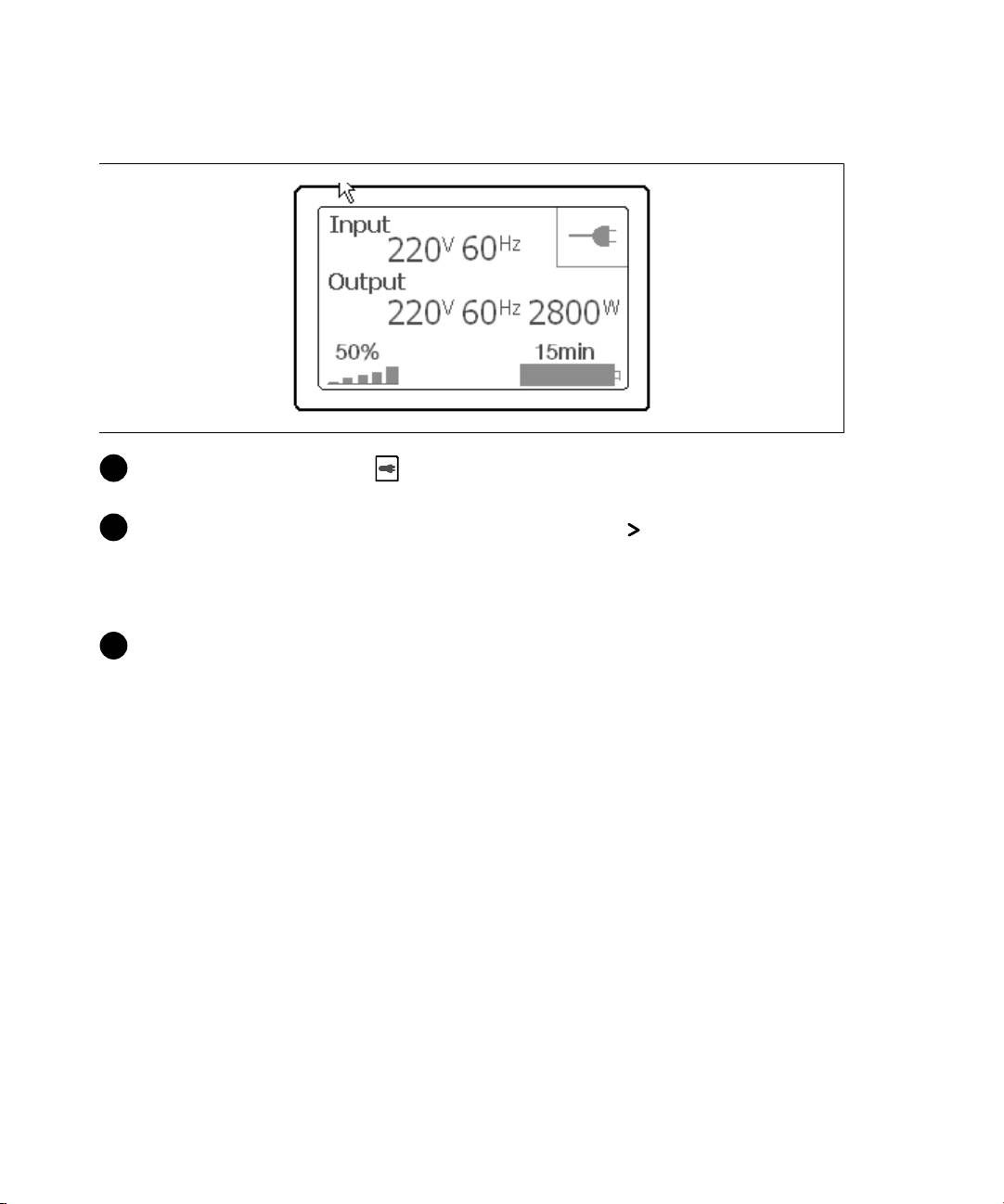
Cómo completar el arranque
1 Verifique que el ícono Normal aparezca en la pantalla de resumen del estado de UPS, que
indica que el UPS funciona normalmente y todas las cargas están energizadas.
2 En la pantalla de resumen de estado de UPS, presione el botón para comprobar las
notificaciones y las alarmas activas. Resuelva todas las alarmas activas antes de continuar. Consulte
la sección "Localización de averías" en la Guía del Usuario de la Tarjeta de Gestión de Red de Dell.
Si no hay ninguna alarma activa, se muestra el mensaje "No Alarmas Activas".
3 Para cambiar otros valores predeterminados establecidos de fábrica, consulte "Funcionamiento" en
la Guía del Usuario de la Tarjeta de Gestión de Red de Dell.
100
|
Instalación y arranque

Dellt 在机架式UPS
5600W
用
指南
Dell 5600R OL HV-US, Dell 5600R OL HV
K812N
w w w . d e l l . c o m | s u p p o r t . d e l l . c o m
: “注意”可帮助您更好用本的息。
: “”,,。
: “”,,。
: “”,, ,!"#$。
: %&'()*+,,,:
S 本 UPS 包含 -.。 所有和服务/012345。 UPS
6)789:4;。
<=>?@)AB,C:D(。
E 2009 Dell Inc. E?)3。
未 Dell Inc. ,形式复制。
本文用的商标:Dell 和 DELL 徽标是 Dell Inc. 的商标。
本文可用它商标或商名来指拥有商标或名权利的实或品。Dell Inc. 对属己的商
标和商品名,拥有权利。
2009 F 10 G

HIJK
UPS 提杰出的性可性,独特势包括:
S 有正弦波出的在式 UPS 。
S 真正在双换技术,提功率密度, 用电源!率,"容各#发电机。
S $压升压%&,'(%&电压波动)您的*+电压,定。
S UPS (滤和%&的流电力并您的备提,定的电力,"无-.用电池。
S 效 - /0利的最切换拓扑1构。
S 4U 的大小2合标准48厘3(195寸)机架。
S 即没有用电源,电池启动功7 UPS 电。
S 必8 UPS 即可安更换电池,因此护操9常:。
S '(可;的 扩展电池模块 (EBM) 延<工时=。
S '(>?应急电源8(REPO) @口A急机控制。
S 标准'B@口(USB 和 DB-9 口)。
S 加强电源护和控制,可;择增强'B力的 Dell CDE理卡。
S F电源E理,用Dell UPS E理平滑机和电力监控。
S '(出开控制的单独插座GH序机和*+E理。
S 必拨打服务电I,即可对固方升F。
S 提球理JK支持。
特性
|
103

LM@
: 、=NOPKQR@。
SLM?
ULM
S 我的 UPS 的用户指南
Dell UPS
S Dell CDE理卡 用户指南
S Dell UPS E理
: support.dell.com 。
104
|
查找息
V
S L格
Dell UPS 78W
S 如MN UPS 的N
用户指南可 Dell UPS 盘和 support.dell.com
S 如O断故P和Q决RS
得到。
S 如安T REPO 控制
S 安操U知
P、XYQR@
S 法L息
S 回收息
S 息
Dell Z[@
S 条款和条(VW国)
S 最X用户可协Y
S 支持息
Dell Z[\] — support.dell.com
: ,
。

P^
: _:<=`a,bcd%e 、 =Pf
ghOQR@。
本&描Z[次安T的步\。
ijHI^
1 打开外]包T^,取机^包T在_的`。
安T和启动
|
105

klm
: lmn (72 /158.7 o)。 lmpkqlrstuO。
1 a用b板的手柄小心将机^外的b^取出,并放到平坦、,定的平。
2 环的方式处理包T材料或回收循环利用,或c收_存放备将来用。
106
|
安T和启动
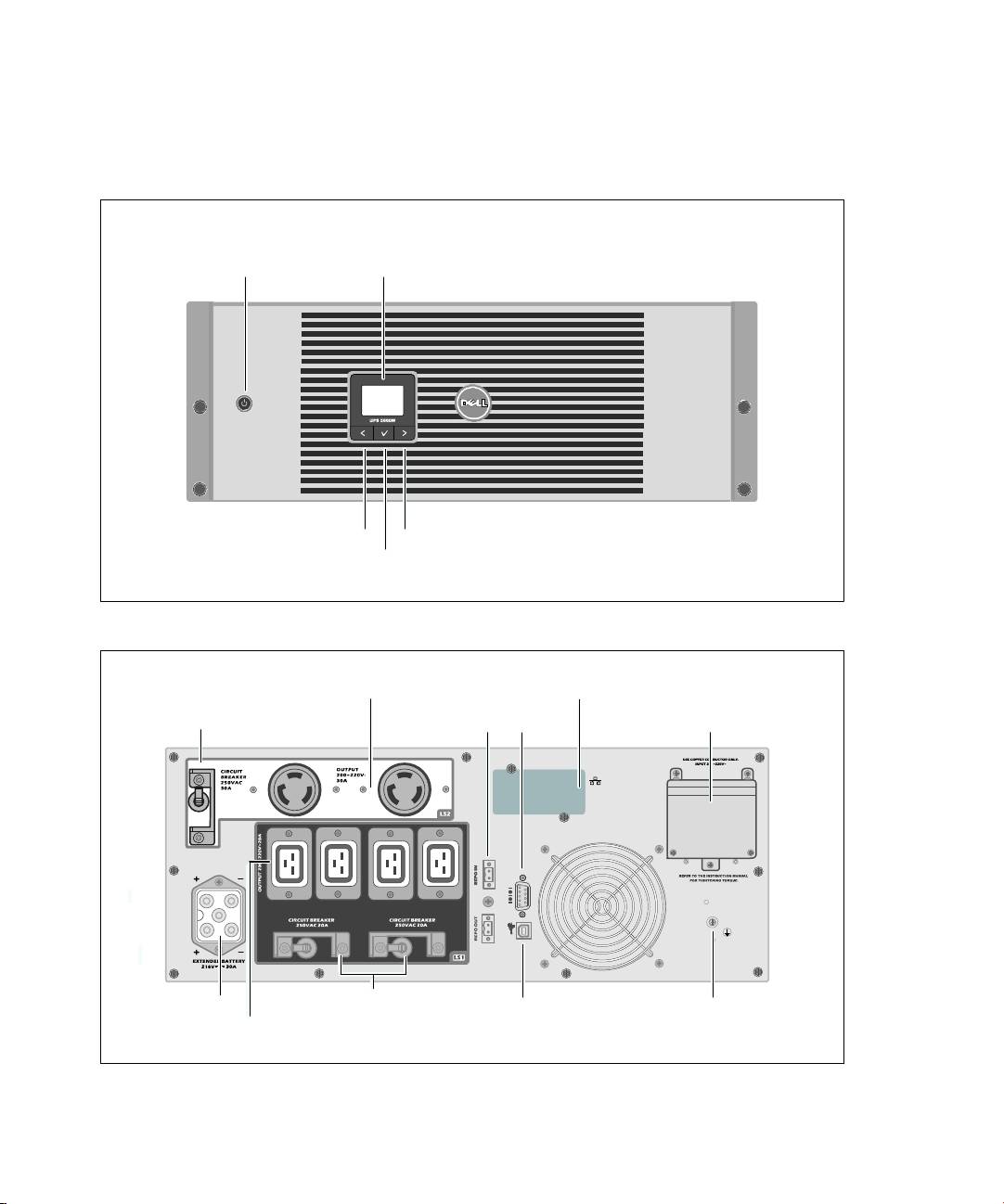
v UPS
本&d Dell 在机架式 UPS 的前板和后板。
开/按e LCD 显板
滚动按e(向或向后)
滚动按e(向或向前)
;择按e
w 21. Dell xlry UPS z{
NEMA L6-30R 插座
(出开控制2)
UPS 'B槽
出电g断电器
REPO @口
RS-232 @口
接@子模块
出电g断电器
EBM f接器
USB @口
地hij
四 IEC 320-C19 插座
(出开控制1)
w 22. 5600W, 208V z{
安T和启动
|
107
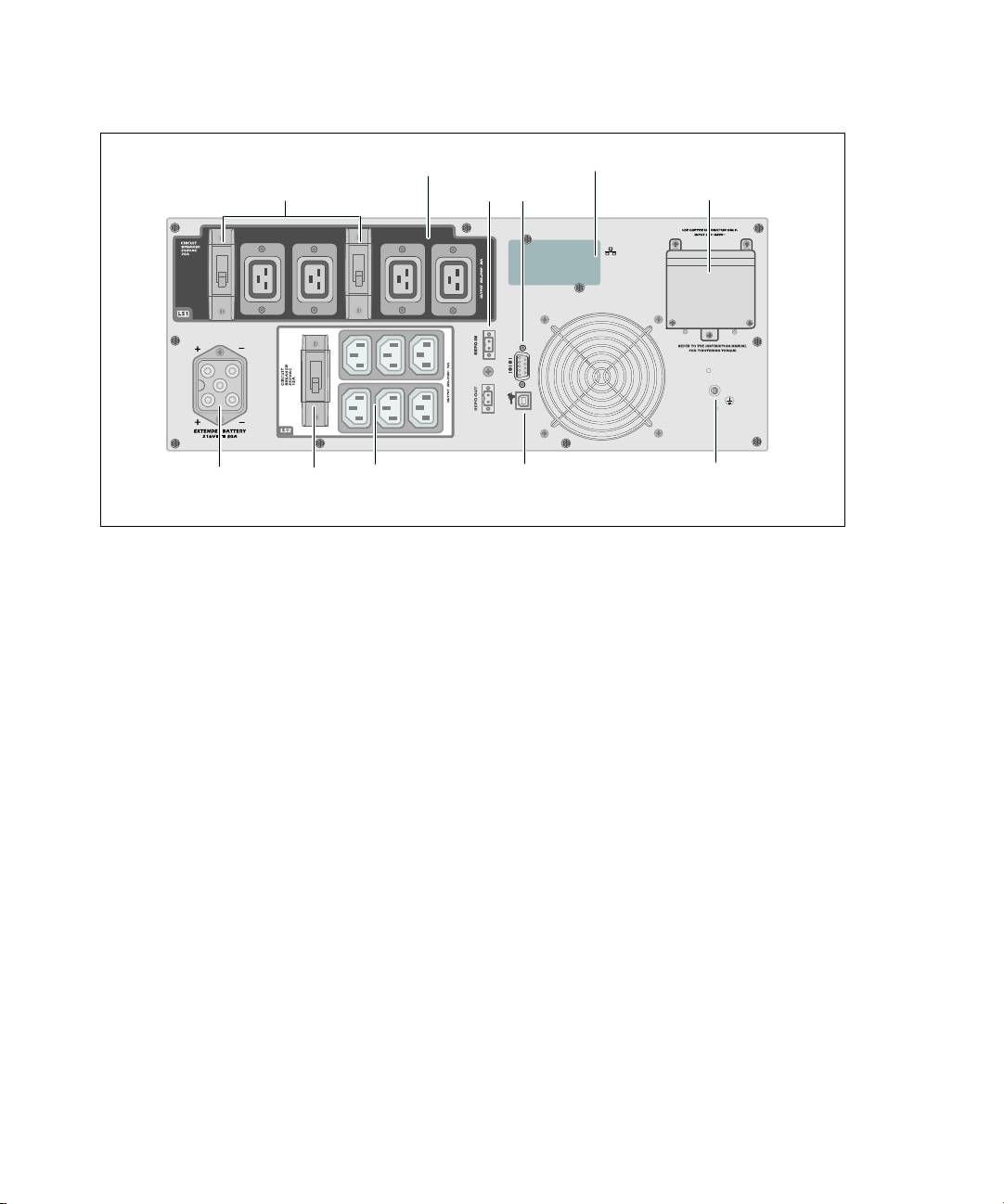
四 IEC 320-C19 插座
UPS 'B槽
(出开控制1)
出电g断电器
REPO @口
RS-232 @口
接@子模块
地hij
EBM f接器
IEC 320-C13 插座
出电g断电器
USB @口
(出开控制2)
w 23.5600W, 230V z{
108
|
安T和启动
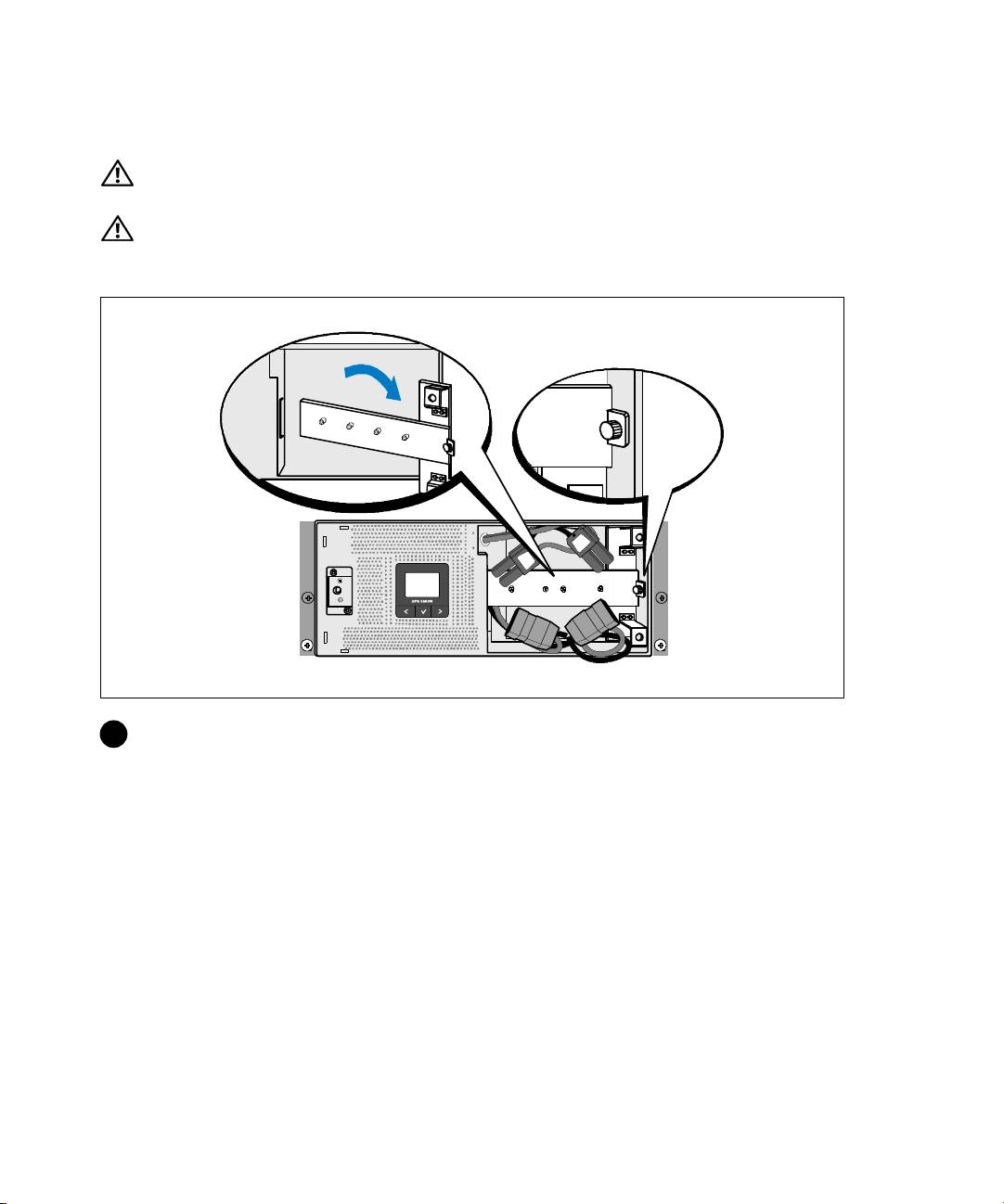
lrP^
: lmn (72 /158.7 o): 1) Dell |}~pkUPS .。
2) lmpkqlrstuO。
: i./(.?u5:W。 0235.。
.Zr
1 松开电池支架的k形ij,并取。
安T和启动
|
109
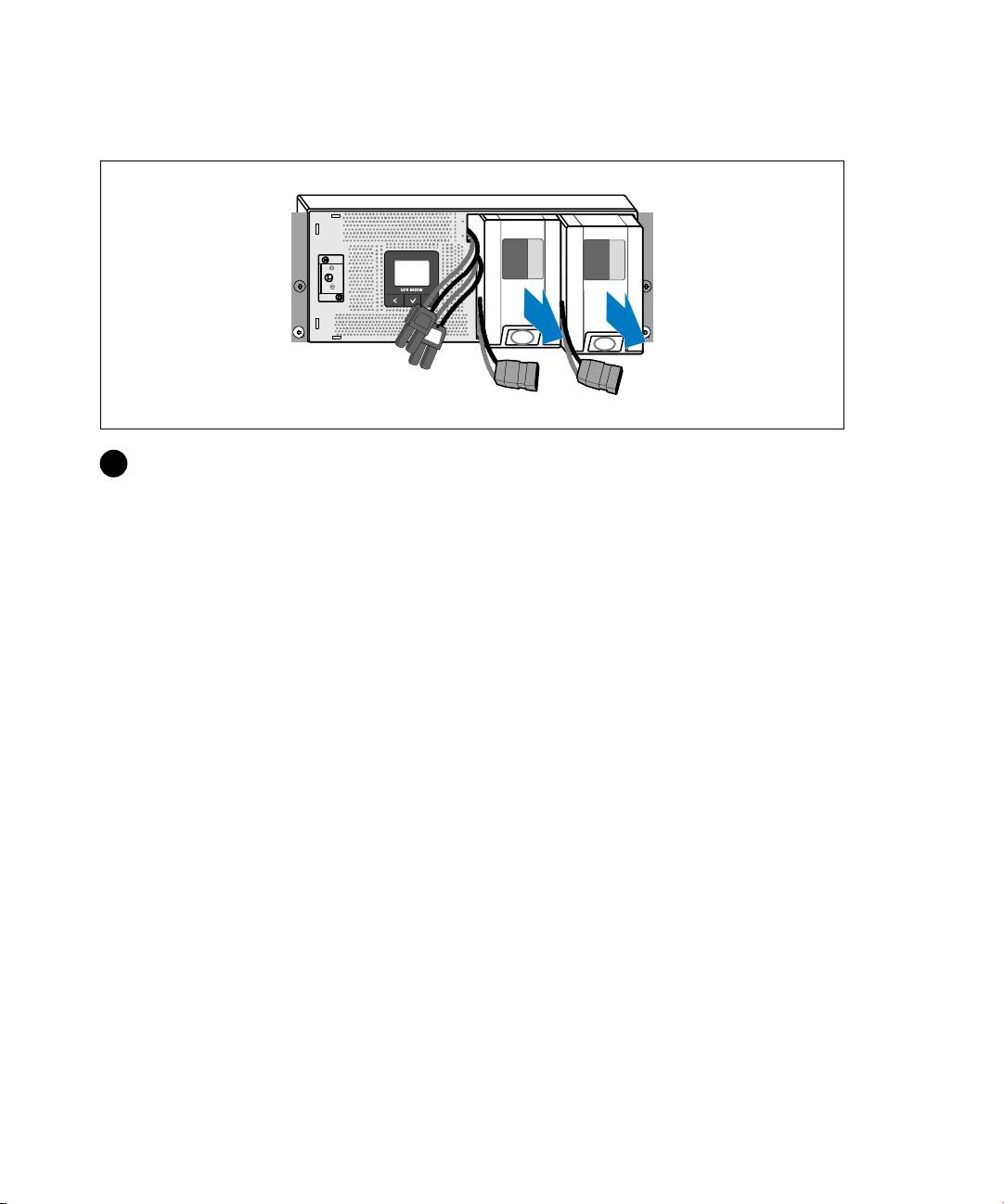
.
2 用塑料l片拉出电池座,然后将取。
110
|
安T和启动
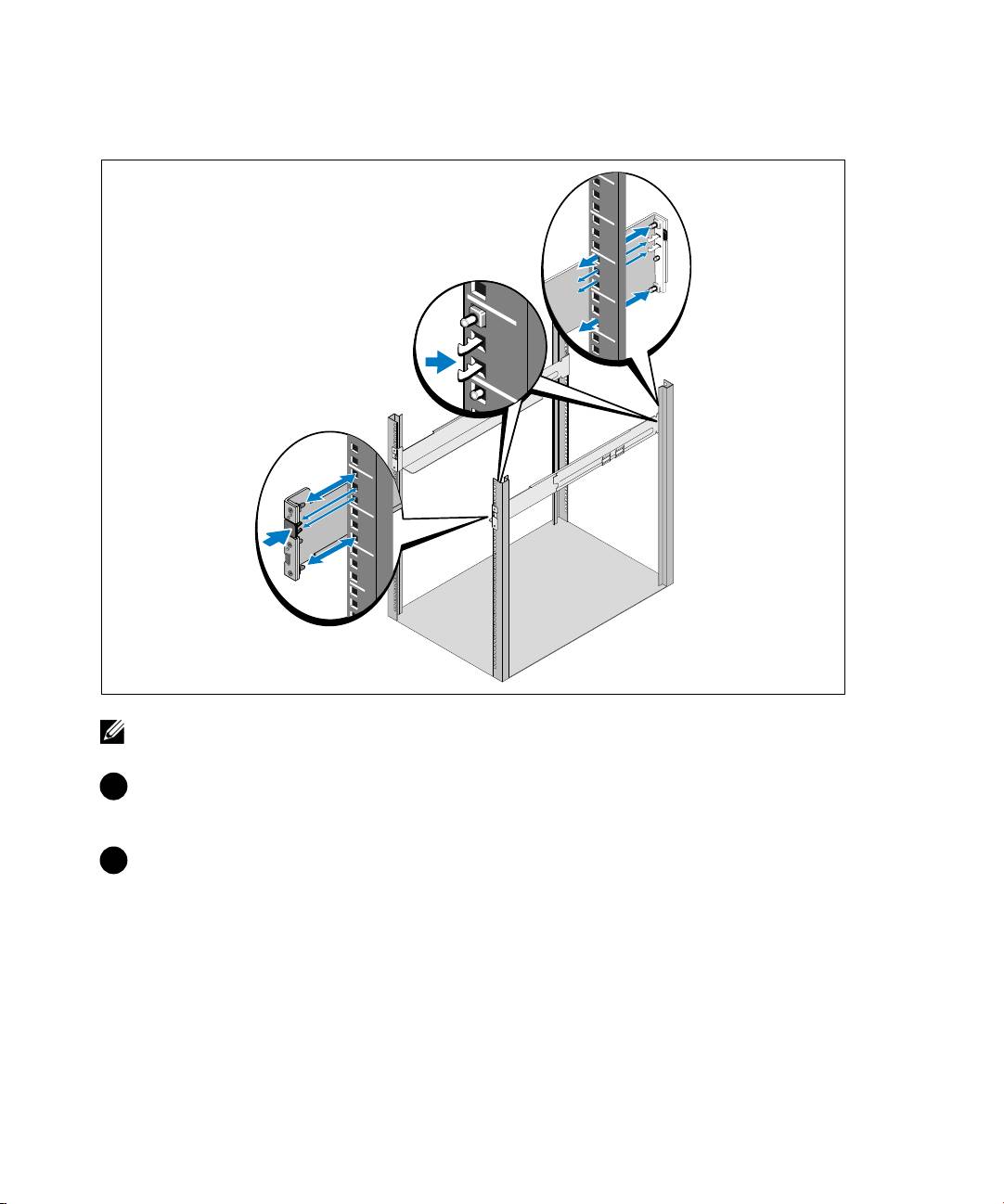
P^
: 方孔机架和无im的圆孔机架的操n明相同。 导o2用p#机架。
图所的方孔机架。
3 ;择导o合2的孔将 UPS 定机架所-的N。
导o应分M7 UPS 的 4U q=底],EBM 3U。
4 将左右导o标有“前”的@向朝。
安T和启动
|
111
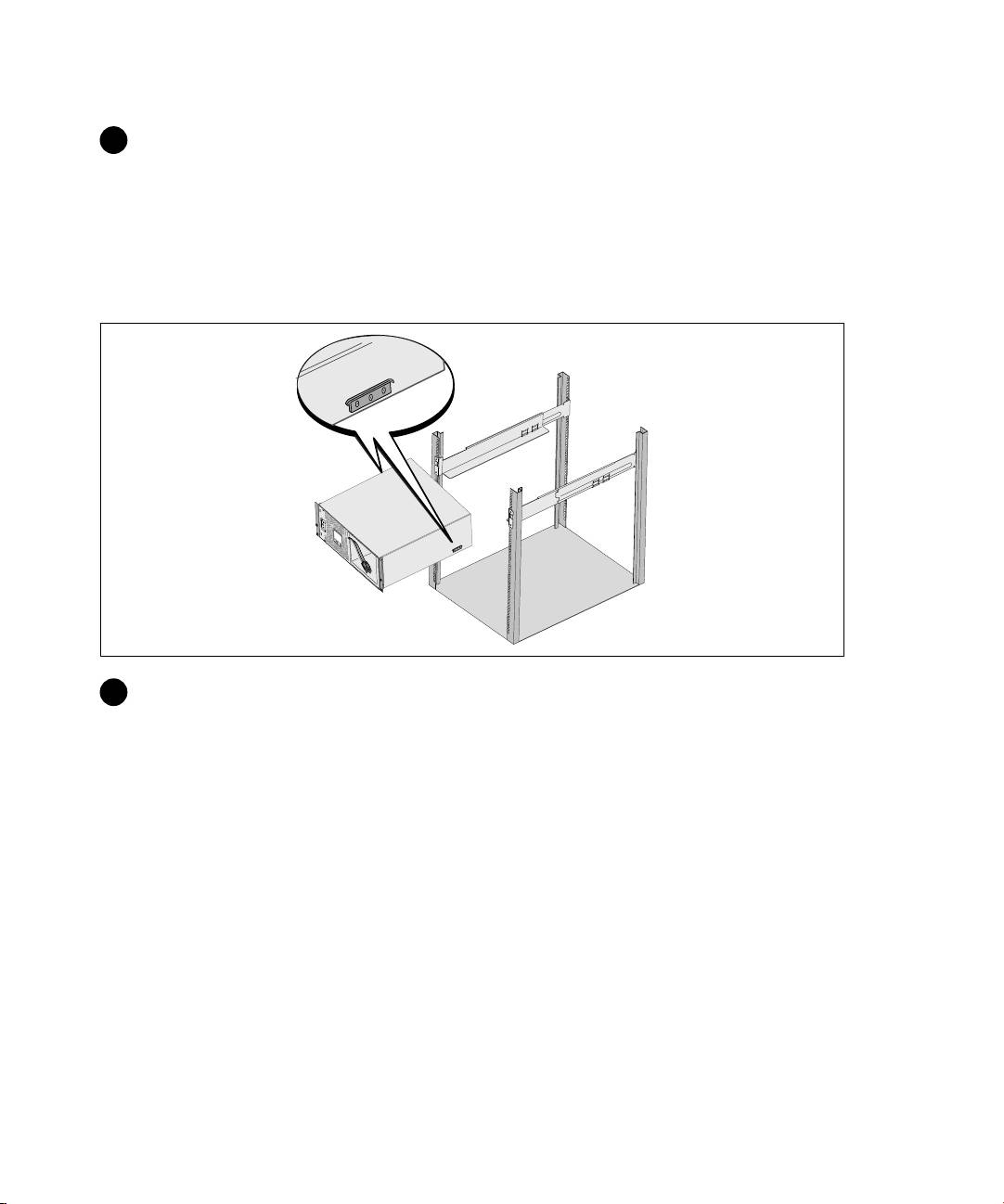
5 将导of接到机架:
啮合导o的后@,直到完卡在r向机架法,并stt定在N。
朝前拉动导o。
推动导o的前@,直到完卡在r向机架法,并stt定在N。
P^lm
6 将机^滑机架。 对机^复步\。
112
|
安T和启动
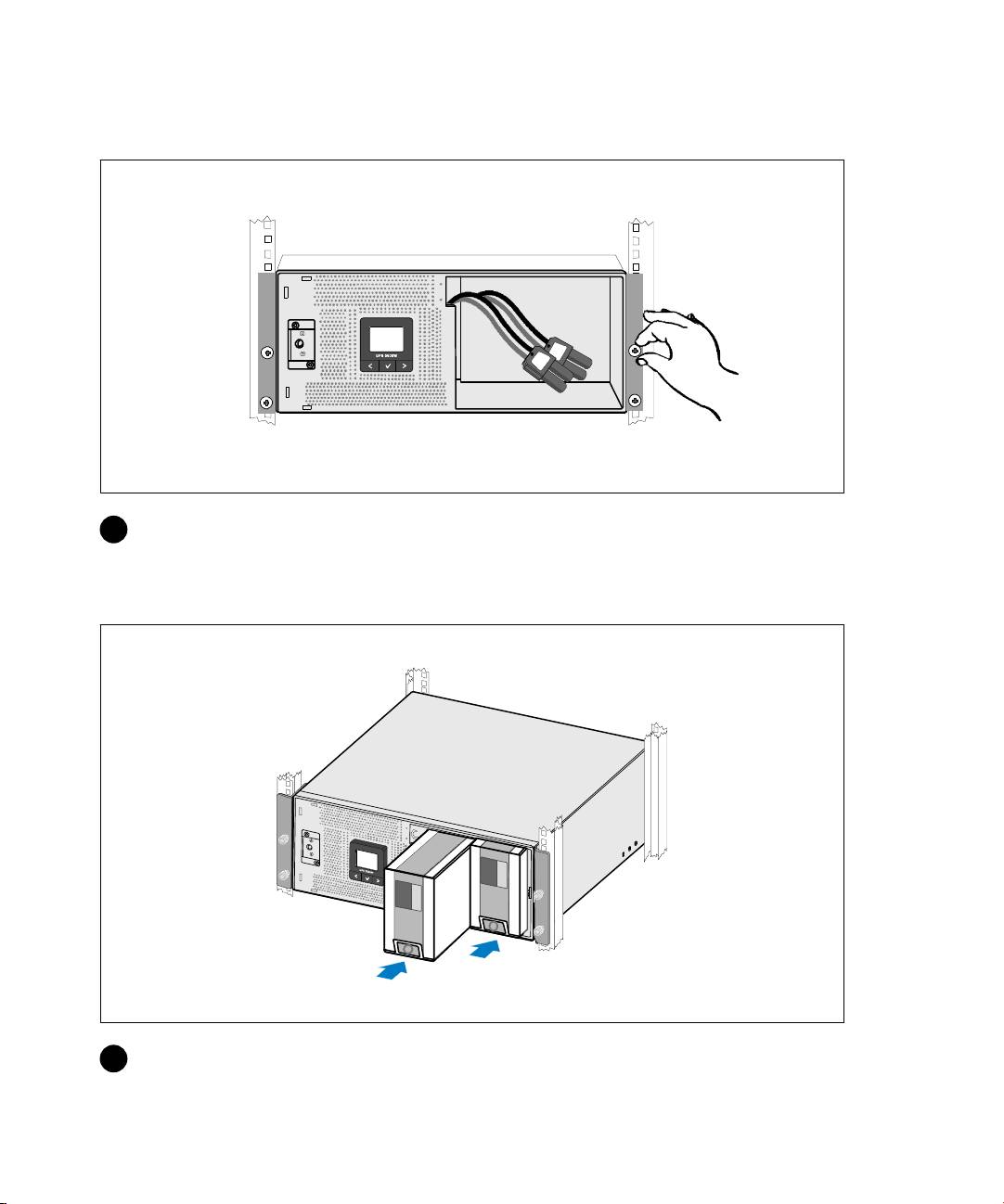
lm
7 用固定架的k形ij将机^前@固定到机架。 用手拧A;用电动工。
对机^复步\。
P^.
8 安T UPS 电池座。
安T和启动
|
113
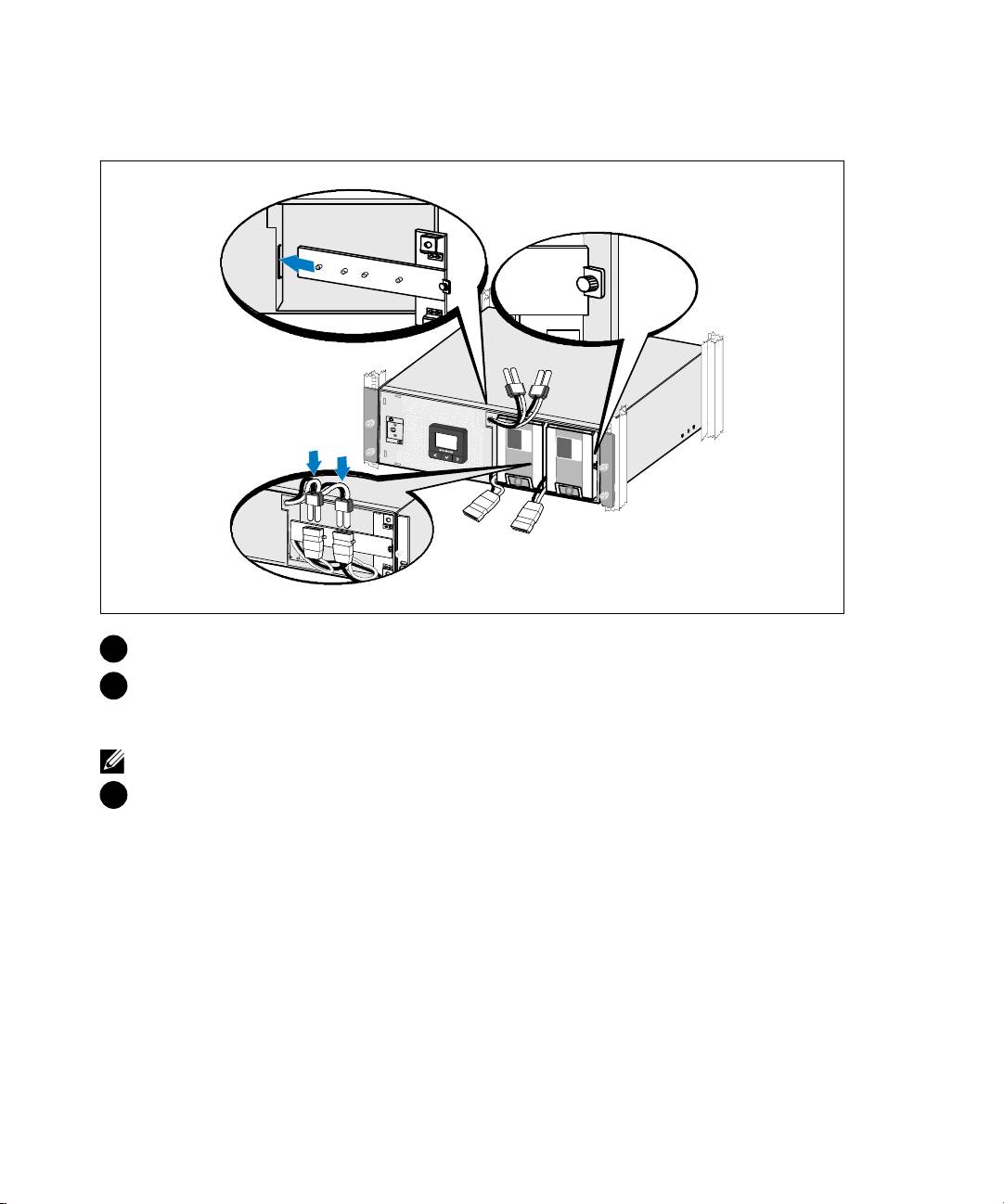
A.Zr;.
9 更换电池支架。
10 拧Ak形ij。
将ij拧v 0.7 牛3(Nm)(6.2 w5寸(lb in))。
:
f接电池时可发生少x电弧。 p是正常现y,损坏单或z成安{患。
11 f接]电池f接器,并将i栓=的电池支架相f。
114
|
安T和启动
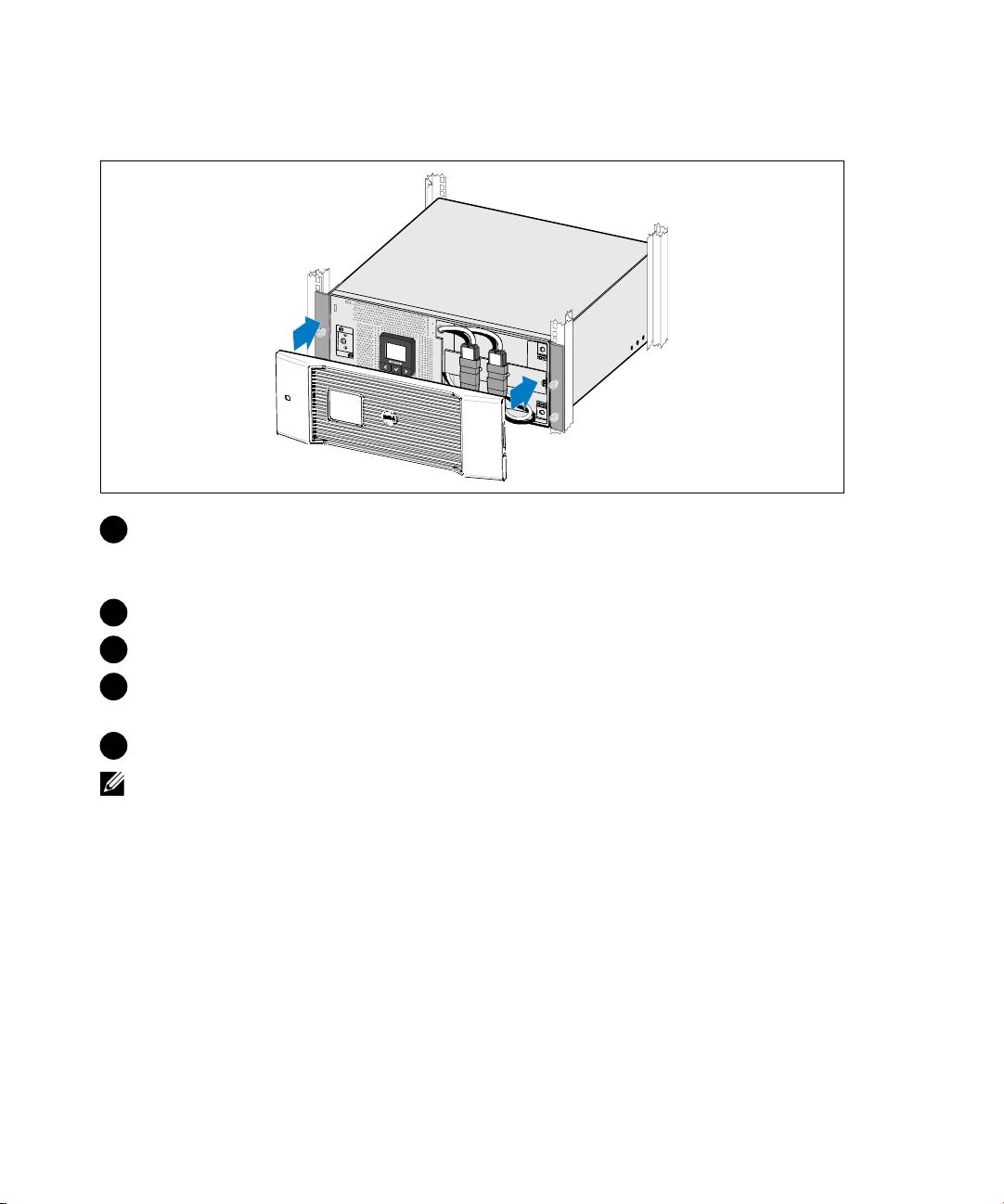
P^ UPS
12 安T UPS 前盖。
13
如果用 Dell UPS E理,|用提的电}将电~f接到 USB @口。
14 如果机架有接地或f接接地属块的导,|将接地电(未提)f接到接地ij。
15 如果地方法L求用应急电源8(断开)开,|参Dell UPS 5600W
的“安T>?应急电源8”(REPO)。
16 将-护的备插 UPS 出插座,启动受护的备。
:
)J所有备的总定( UPS 的*+力,止出现(+报。
安T和启动
|
115
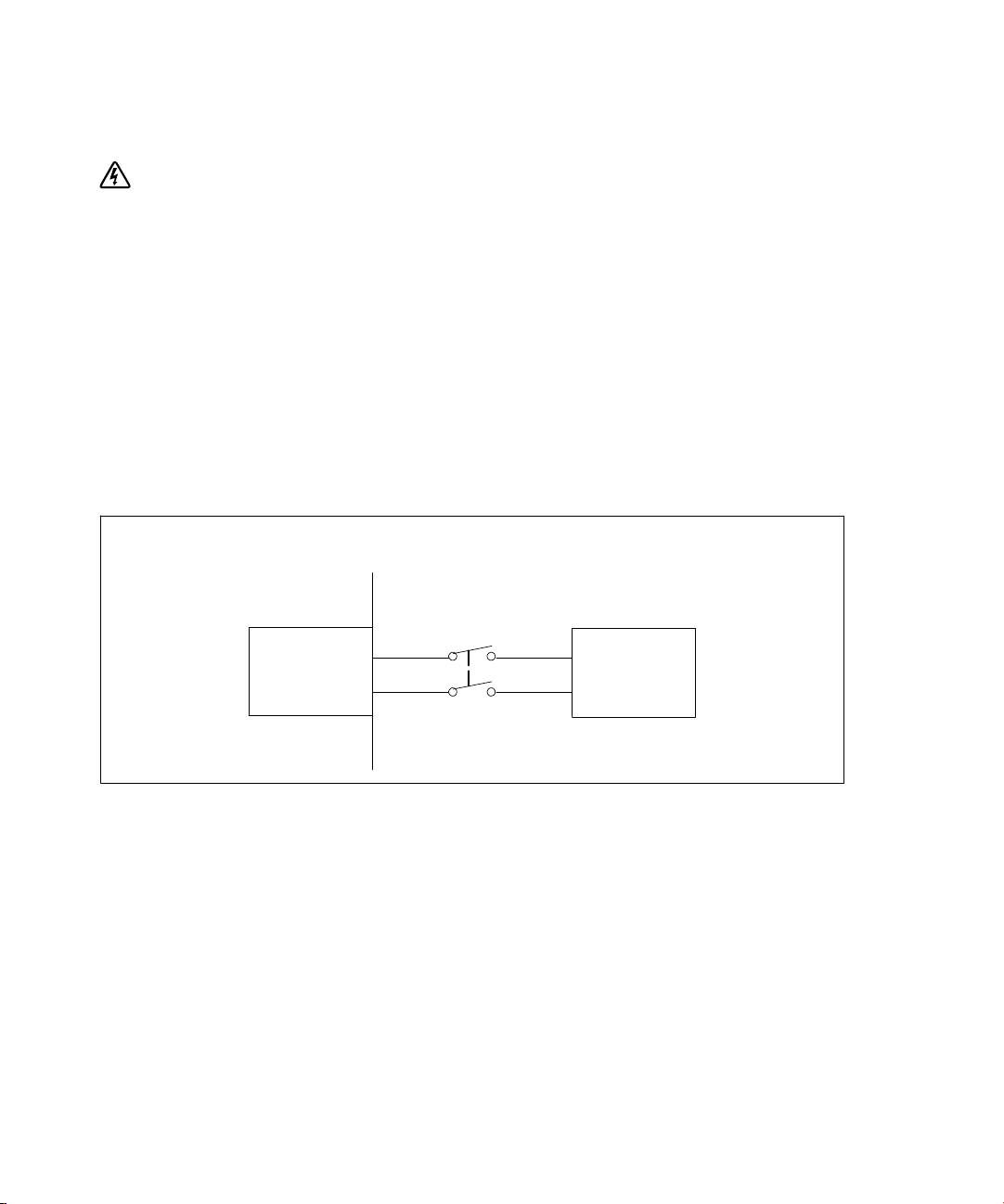
UPS x
: /5(,[.).P^。 .。
UPS -满求的用分支电g:
S 护备求在 UPS 出和*+=有双相断开备(参图 24)
S 断g器必U安T在墙壁,并操员操
S 在欧洲用时,断g器必U满 IEC/EN 60934 标准,接q气=v少 3 毫3
S 200-240 Vac(流)
S 单相
- 5600W/208V 型号相对相
- 5600W/230V 型号相对
S 50/60 Hz()
S 属E(推用,服务和护)
墙壁
双相断g器
流电源
UPS
/L2
w 24. .w
116
|
安T和启动
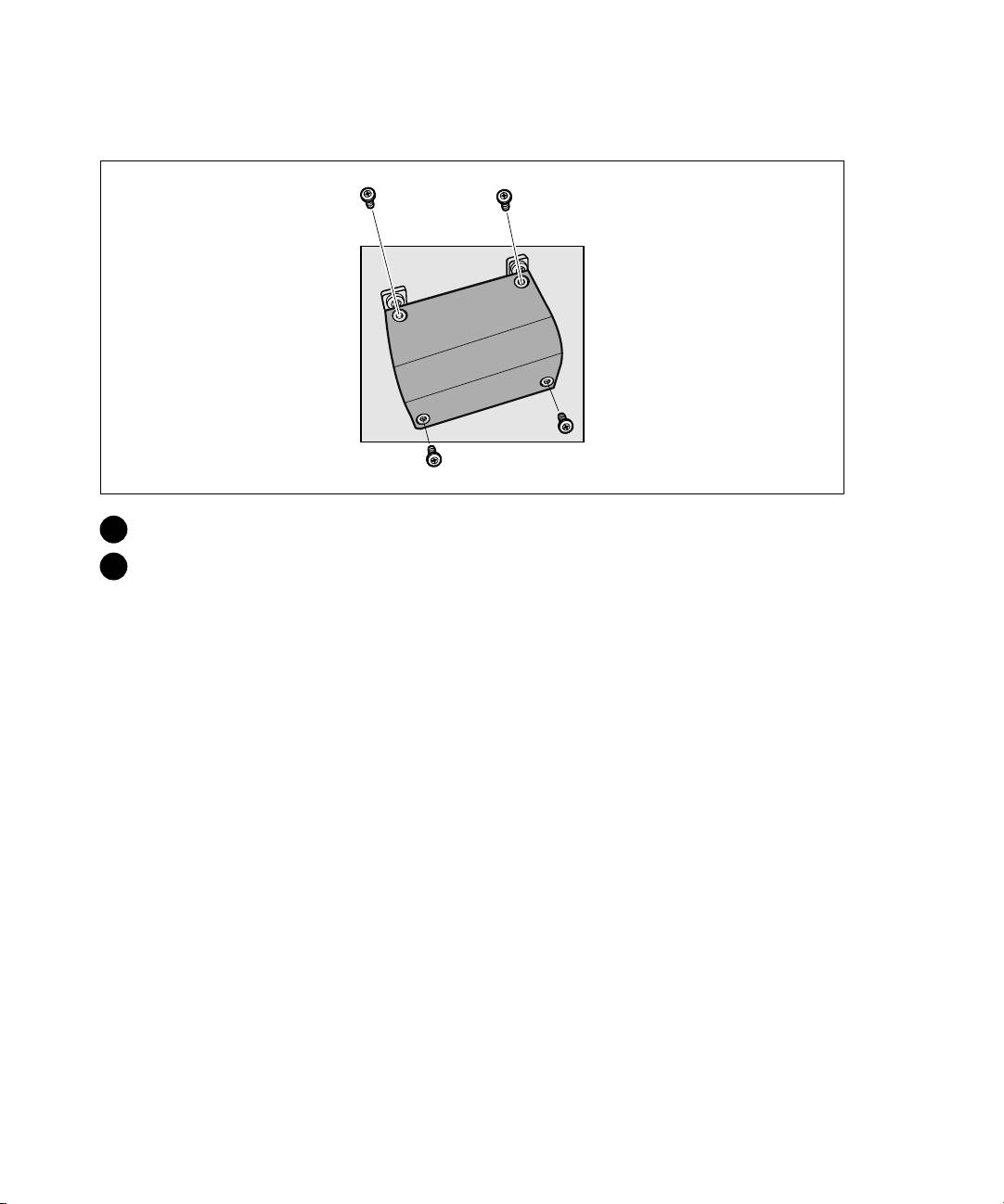
x¡
1 在f接 UPS 的分点8用电源。 对)未'电。
2 取接@子模块外盖(4 ij),并存。
安T和启动
|
117
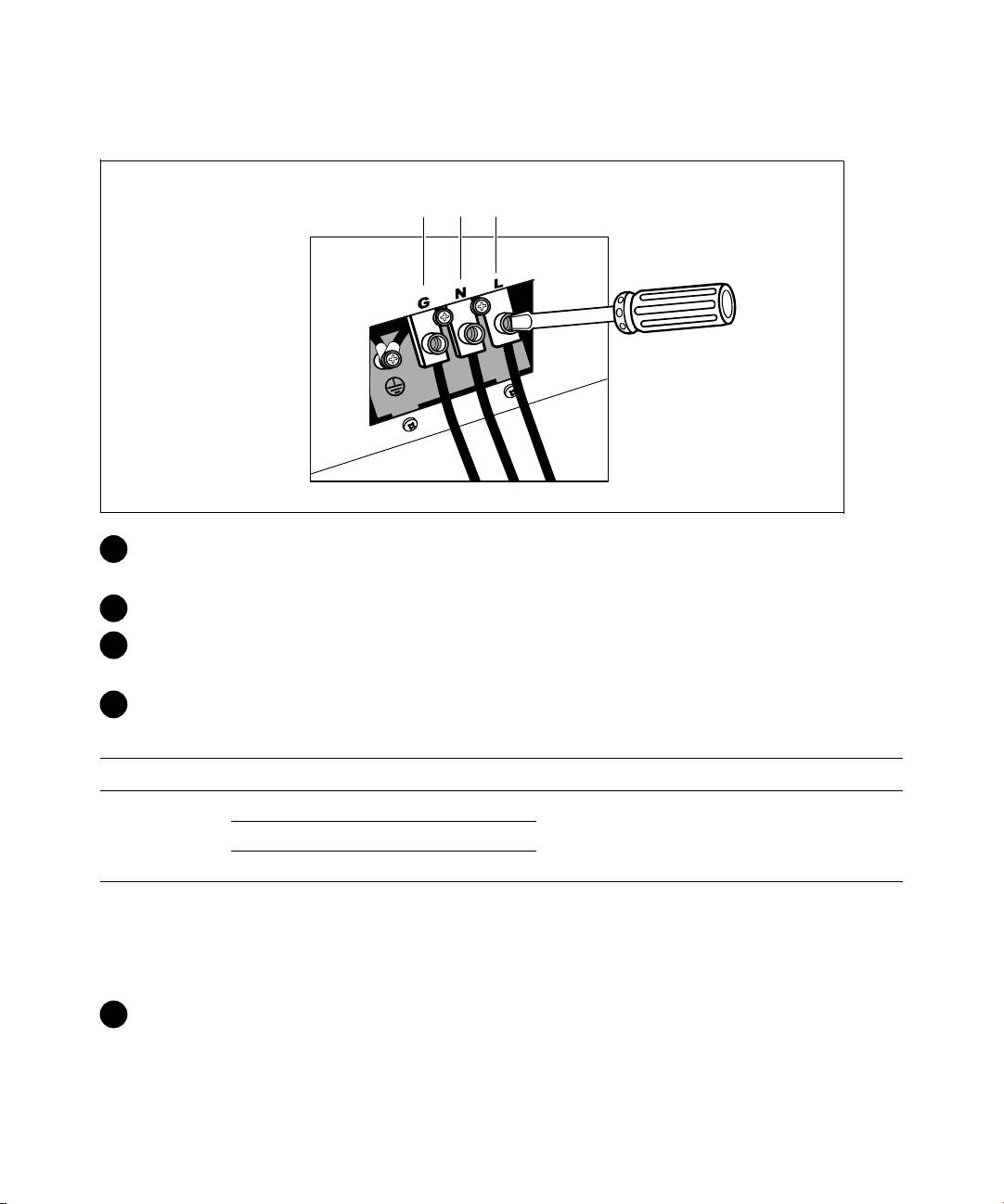
P^x¢x
接@子N
1
2
3
®
3 用 Greenlee
打孔器或备在接@子模块的外盖打孔,导E用。
孔应容 3/4” 或 1” IMC E。
4 将(导E,留出 2 5尺(0.5 3)<。 将属接头f接到导E的@。
5 将导E插M口,将导E接头f接到板。 每根电的末@剥 0.5” (1.5 厘3)
层。
6 根据 6 将接地f接到接@子模块。
6. UPS £xR
x¤
x¥ UPS £x xx ¦* §¨
1 接地
2
5.26-16 毫3
2.49 牛3
2 L2/接
(10-6 AWG)
(22 w 5寸)
3 L1 接
* 最用:
S 10 AWG(W国L),对备接地,最用 75°C
S 8 AWG(W国L),对接和,最用 75°C
7 更换接@子模块的外盖。
118
|
安T和启动
