
Dell PowerEdge C5230: Figure 1-1. Unlocking the Rail Latches Figure 1-2. Aligning the Rails on the Rack
Figure 1-1. Unlocking the Rail Latches Figure 1-2. Aligning the Rails on the Rack: Dell PowerEdge C5230
Table of contents
- Notes, Cautions, and Warnings
- CAUTION: Restricted Access Location Installation and Configuration Unpacking the System Installing the Tool-Less Rail Solution
- Figure 1-1. Unlocking the Rail Latches Figure 1-2. Aligning the Rails on the Rack
- Installing the System Empting the System Chassis Figure 1-3. Unplugging the Power Cable from the Power Supply Unit Figure 1-4. Releasing the Power Supply Unit Handle
- Figure 1-5. Removing the Power Supply Unit Figure 1-6. Removing the Sled
- Figure 1-7. Securing the Chassis on the Rails
- Populating the System Figure 1-8. Installing the Power Supply Unit Figure 1-9. Securing the Power Supply Unit Handle
- Figure 1-10. Connecting the Power Cable to the Power Supply Unit Figure 1-11. Locating the Power Supply Unit Sockets
- Figure 1-12. Installing the Sled Connecting the Keyboard, Mouse, and Monitor Figure 1-13. Connecting Perhipherals
- Connecting the Power Cables Figure 1-14. Connecting Power Cables Turning On the System Complete the Operating System Setup
- Other Information You May Need NOM Information (Mexico Only)
- Technical Specifications Processor (Per System Board) Memory (Per System Board) Drives (Per System Board) Connectors (Per System Board) Video
- Power Heat Dissipation Physical
- Environmental
- Environmental (continued) Acoustics
1
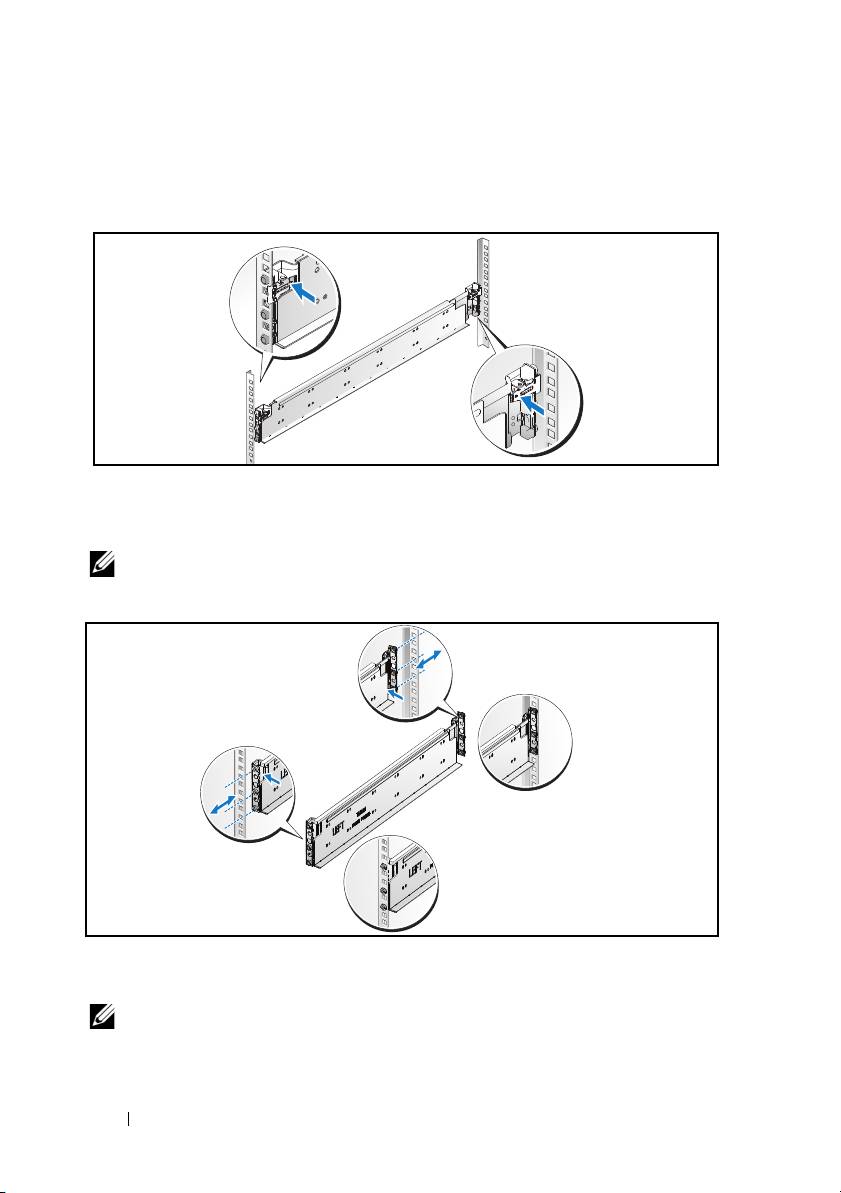
Pull on the latch release buttons on the end piece midpoints to open the
rail latches.
Figure 1-1. Unlocking the Rail Latches
2
Align the end pieces of the rails on the vertical rack flanges to seat the pegs
in the bottom hole of the first U and the top hole of the second U. Engage
the back end of the rail until the latch locks in place.
NOTE:
The rails can be used in both square-hole and round-hole racks.
Figure 1-2. Aligning the Rails on the Rack
3
Repeat steps 1 and 2 to position and seat the front end piece on the
vertical flange.
NOTE:
To remove the rails, pull on the latch release button on the end piece
midpoint and unseat each rail.
4
Installation and Configuration
Back
Front
Top 10 manuals
100.00
NZXT HALE90 1000W99.99
Samsung SM-R38099.97
AEG BSB 18C99.97
Dell 2700W99.97
Smeg KSEC70X99.96
Beurer HDE 4099.96
Pyramida KH 50 v.299.96
MSI CSM-H81M-P3299.96
AEG HR 562799.95
Melissa 640-048