
Dell Latitude XT2 (Early 2009): Undocking Your Tablet-PC From the Media Base
Undocking Your Tablet-PC From the Media Base: Dell Latitude XT2 (Early 2009)
Table of contents
- Notes, Cautions, and Warnings
- Media Base Back and Left View Features
- Top and Right View Features Before Docking or Undocking Your Tablet-PC to the Media Base
- Before Docking Your Tablet-PC
- Before Undocking Your Tablet-PC Securing the Media Base
- 1 Tablet-PC 2 media base
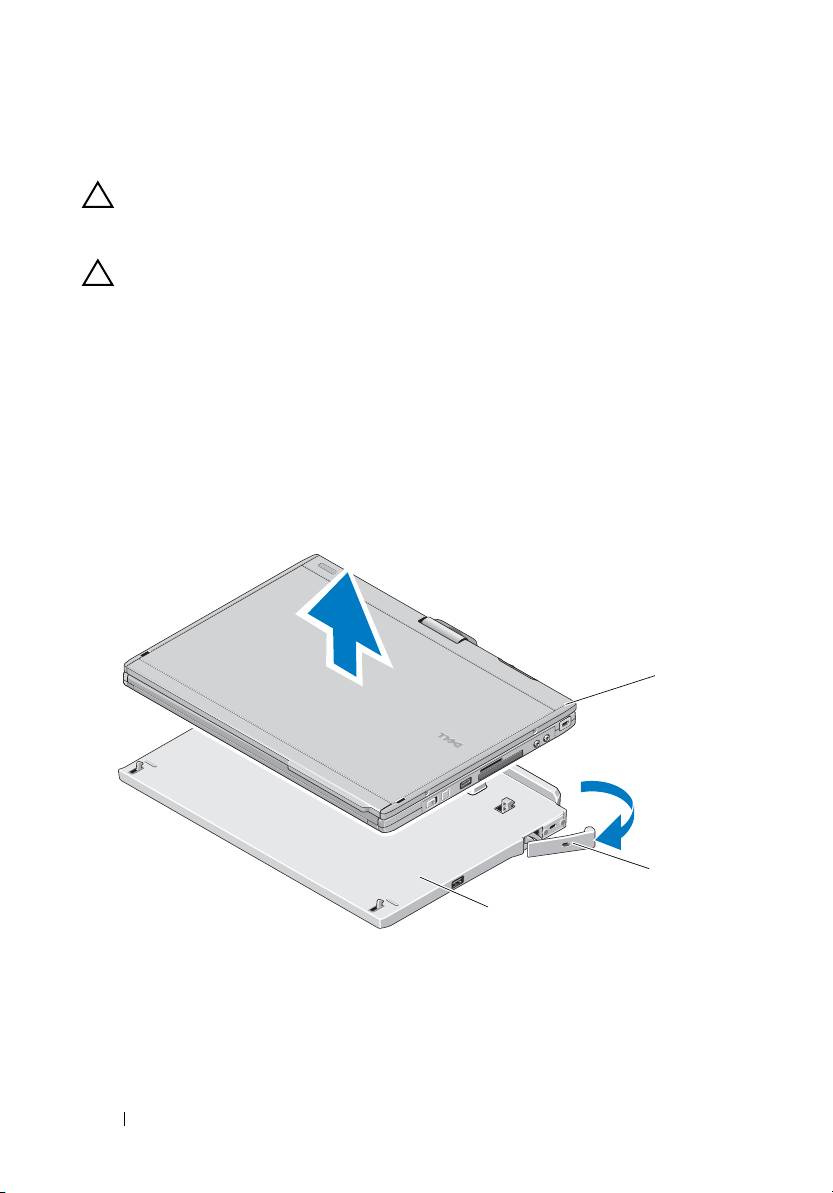
- Undocking Your Tablet-PC From the Media Base
- Removing and Installing the Optical Drive From the Media Base
- Media Base Specifications Physical Storage Ports and Connectors
book.book Page 8 Tuesday, December 2, 2008 1:03 PM
Undocking Your Tablet-PC From the Media Base
CAUTION: Never undock the Tablet-PC without first preparing the Tablet-PC for
undocking. If you undock before preparing the Tablet-PC, you will lose data and
the Tablet-PC may not recover normal operation for several minutes, if at all.
CAUTION: If the Tablet-PC does not have a charged battery in the battery bay, you
must shut down the Tablet-PC through the Windows Start menu and then undock
the Tablet-PC. If you undock the Tablet-PC without a battery before shutting it
down, you will lose data and the Tablet-PC may not recover normal operation for
several minutes, if at all.
1
Follow the procedures in "Before Docking or Undocking Your Tablet-PC to
the Media Base" on page 4.
2
If your media base is secured using an anti-theft device, unlock it.
3
Disconnect the AC adapter connector from the media base.
4
Pull the Tablet-PC release lever forward to release the Tablet-PC from the
media base.
1
2
3
1 Tablet-PC 2
release lever
3 media base
5
Lift the back of the Tablet-PC up and slide the Tablet-PC out towards the
back of the media base.
8 Media Base
