
Beurer GS 42: Accessing saved measurements
Accessing saved measurements: Beurer GS 42
Table of contents
- 1 Getting to know your instrument Function of the unit 2 Signs and symbols 3 Safety notes Safety notes
- Notes on handling batteries General notes 4 Unit description Overview
- 5 Initial use Inserting the batteries (3 x 1,5 V AAA Micro) Changing the weight unit Setting up the scale 6 Information The measuring principle General tips 7 Switch on the scale 8 Settings Set time and date
- Setting user data 9 Operation Weighing yourself and calculating BMI
- Accessing saved measurements
- 10 Evaluation of results Body mass index (BMI) 11 Replacing batteries 12 Storage and maintenance
- 13 Disposal 14 What if there are problems?
- No measurement possible Incorrect weight measurement
kg
USER
3 sec
cm
BMI
2 sec
kg
kg
The date, weight and BMI are each displayed.
The display changes colour depending on the BMI (see page 10, Evaluate results).
One value will be saved per day, per person. If you take several measurements per day, the
most recent value will be saved. The data saved previously on that day up will be overwritten.
The scale switches itself o after approx. 10 seconds.
Accessing saved measurements
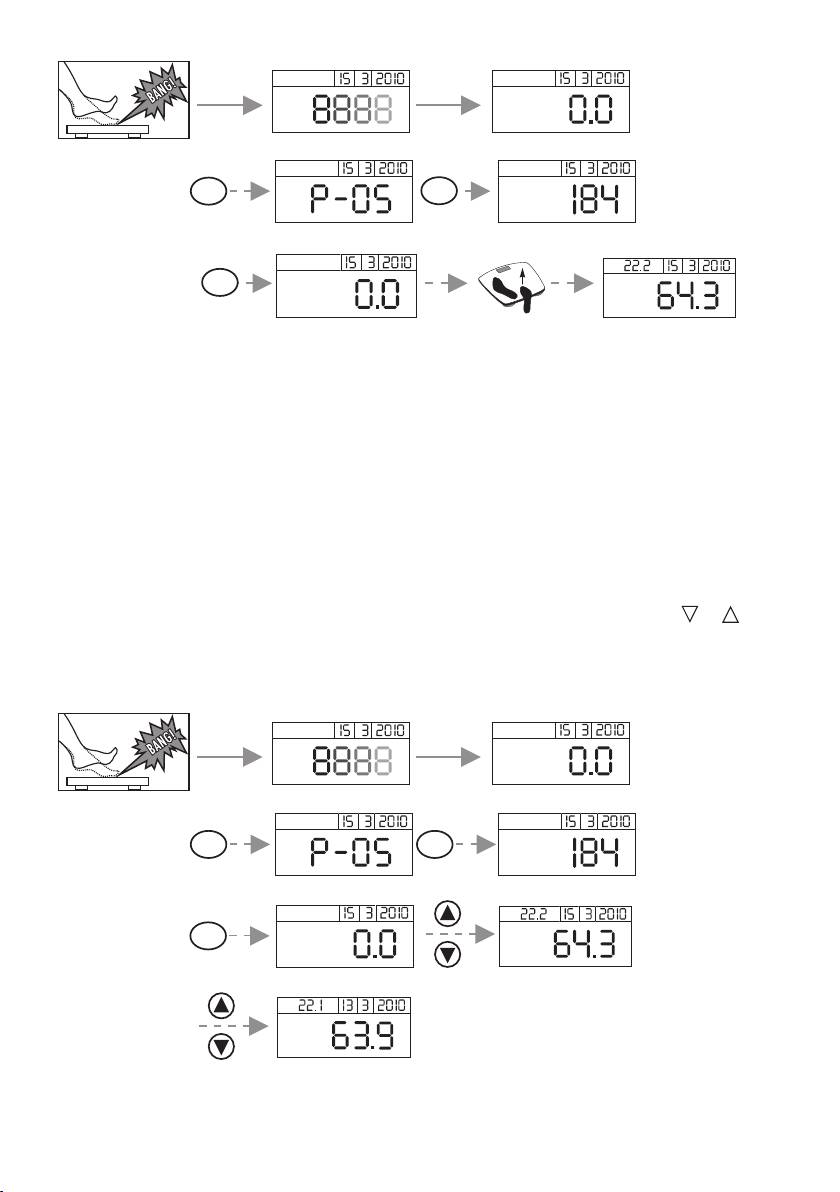
To access the saved measurements of the currently selected user:
• Switch on the scale (see 7. Switch on the scale). '0.0 kg' is displayed after the self-test display.
• Select the memory space by pressing the 'USER' button several times, if necessary. The height
of the selected user and then his/her last saved result is displayed again if you do not press any
buttons for three seconds after that '0.0 kg' will appear.
• Then browse through the memory spaces for the saved values one by one using the
or
buttons.
• The date, weight and BMI are each displayed. The display changes colour depending on the BMI
(see 10, Evaluation of results).
kg
USER 3 sec
cm
BMI
2 sec
kg
kg
BMI
kg
15
