
Beurer GS 42: 5 Initial use Inserting the batteries (3 x 1,5 V AAA Micro) Changing the weight unit Setting up the scale 6 Information The measuring principle General tips 7 Switch on the scale 8 Settings Set time and date
5 Initial use Inserting the batteries (3 x 1,5 V AAA Micro) Changing the weight unit Setting up the scale 6 Information The measuring principle General tips 7 Switch on the scale 8 Settings Set time and date: Beurer GS 42
Table of contents
- 1 Getting to know your instrument Function of the unit 2 Signs and symbols 3 Safety notes Safety notes
- Notes on handling batteries General notes 4 Unit description Overview
- 5 Initial use Inserting the batteries (3 x 1,5 V AAA Micro) Changing the weight unit Setting up the scale 6 Information The measuring principle General tips 7 Switch on the scale 8 Settings Set time and date
- Setting user data 9 Operation Weighing yourself and calculating BMI
- Accessing saved measurements
- 10 Evaluation of results Body mass index (BMI) 11 Replacing batteries 12 Storage and maintenance
- 13 Disposal 14 What if there are problems?
- No measurement possible Incorrect weight measurement
5 Initial use
Inserting the batteries (3 x 1,5 V AAA Micro)
Please remove the battery insulating strips and/or position the batteries correctly with regards to
the polarity displayed in the battery compartment. If the scale fails to operate, remove the batteries
completely and reinsert them.
Changing the weight unit
The scale shows the values in kg. You can set the device to measure in kilograms ('kg'), pounds ('lb')
and stones ('st') using the button on the back of the device.
Setting up the scale
Set up the scale on a level and solid surface. A solid surface is a prerequisite for a correct
measurement.
6 Information
The measuring principle
The BMI is calculated using the height value entered and the measured weight value.
General tips
• If possible, always weigh yourself at the same time of day (preferably in the morning), after using
the toilet, on an empty stomach and unclothed, in order to achieve comparable results.
7 Switch on the scale
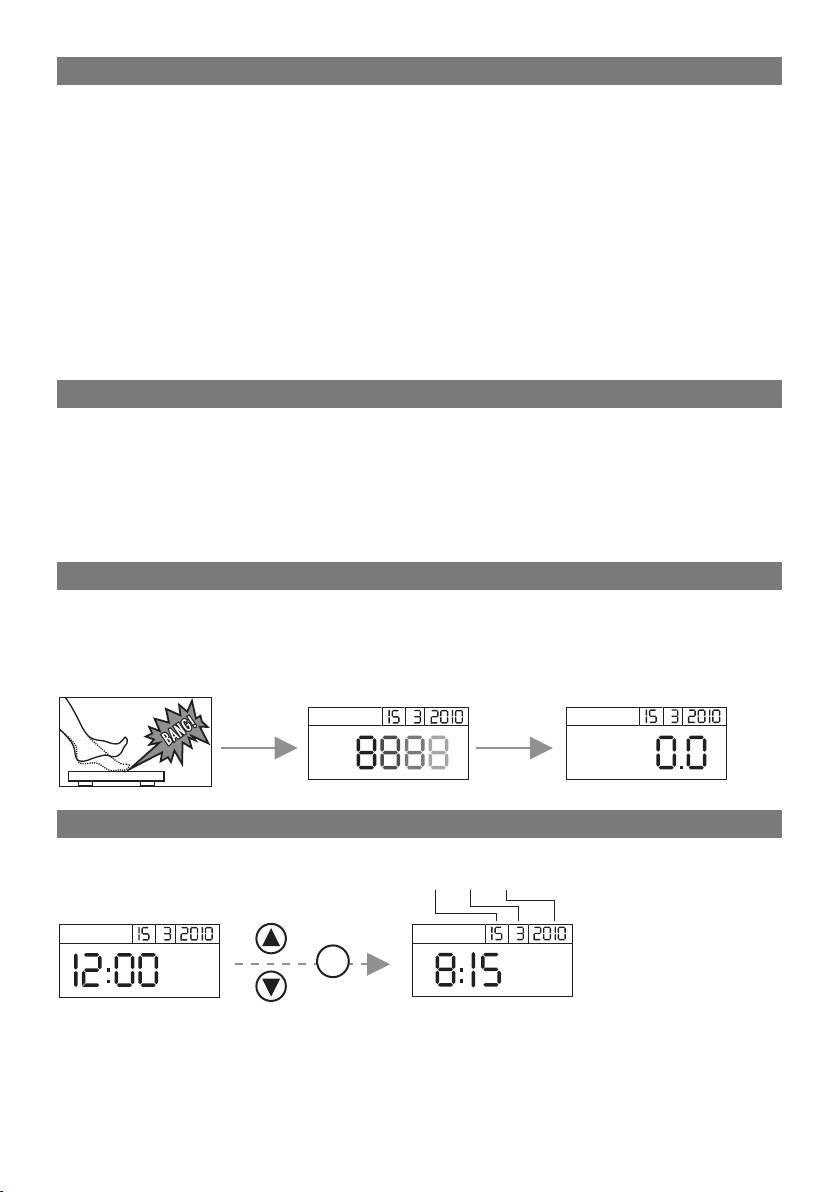
Tap your foot quickly, forcefully and audibly on the scale to activate the vibration sensor.
'8888' and the date appear as a self test until '0.0' is displayed. If necessary, change the location
where the user data is saved.
kg
8 Settings
Set time and date
day month year
SET
The date and time can only be changed when the batteries are taken out and replaced.
To set the current date and time, you must proceed in several stages as follows:
year – month – day – hour – minute.
13
