
Beurer BY 99: 5. How the app works
5. How the app works: Beurer BY 99
Table of contents
- Table of contents Included in delivery
- 1. Getting to know your device Functions of the device Using the app provides you with the following functions: System requirement (for using the app)
- 2. Signs and symbols 3. Intended use 4. Notes
- Note WARNING Safety notes on handling batteries
- 5. How the app works
- 6. Unit description 6.1 “Baby” HD camera 6.2 “Monitor” parent unit
- 6.3 Display description 7. Initial use of parent unit 7.1 Initial use of camera 7.2 Initial use of parent unit with battery
- 7.3 Initial use of parent unit with mains part plug 8. Operating the parent unit 8.1 Infrared night vision 8.2 Set the volume 8.3 Set the brightness 8.4 Intercom function 8.5 Settings menu
- Zoom function Lullabies Alarm Temperature unit Add camera
- Delete camera View camera Alternating camera image Energy-saving mode
- 9. Initial use via smartphone/tablet 9.1 Setting up the camera using an Android™ device 9.2 Setting up the camera on your iPhone 9.3 Camera settings 9.3.1 Allocating a camera name / menu image 9.3.2 Setting the notification sensitivity
- 9.4 General settings 10. Operating the camera via the app 10.1 Switching on the camera 10.2 Adding another camera 10.3 Removing a camera
- 10.4 Account settings / signing out 10.5 Infrared night vision function 10.6 Functions during live transmission in the app 10.6.1 Intercom function 10.6.2 Photo function / Video memory function
- 10.6.3 Lullabies 10.6.4 Temperature display 10.7 Using the camera for other end devices 10.8 Access to the user account via the web portal (PC) 11. Useful information about the baby monitor 12. Maintenance and cleaning
- 13. What if there are problems? Problem Solution
- Problem Solution
- 14. Disposal
•
Batteries must be charged correctly prior to use. The instructions from the manufacturer
and the specifications in these instructions for use regarding correct charging must be ob-
served at all times.
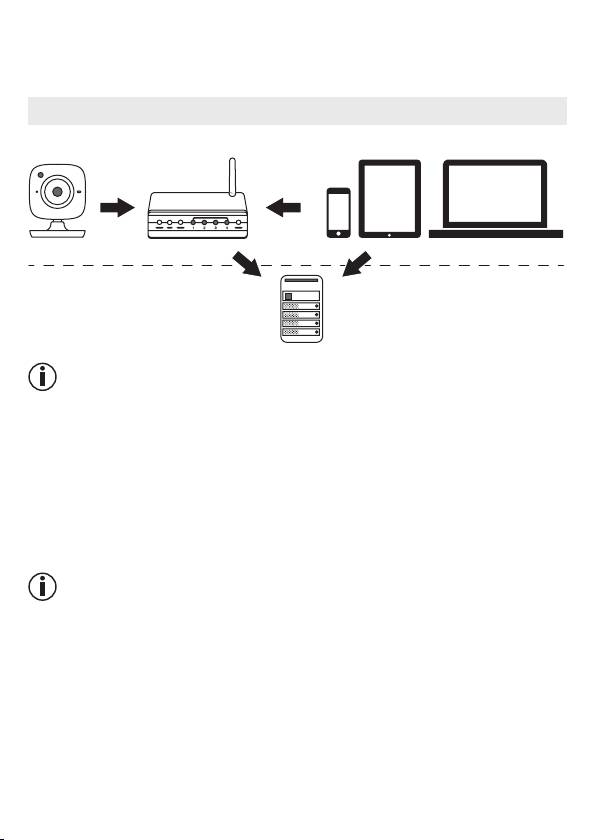
5. How the app works
BY 99
Smartphone, Tablet, PCWLAN-Router
24
Hubble-Server
Local
Internet
Note
If there is an active internet connection, the camera sends all recordings via the Hubble server.
This is of vital importance when setting up the camera. Not all functions are available if there
is no active internet connection (limited functionality)
.
•
You can increase the range of the camera by placing it as high as possible near a door or
a window.
•
Other radio waves may possibly interfere with the transmission of the baby monitor. There-
fore, do not position the baby monitor near devices such as microwaves, etc.
•
The following other factors can interfere with the baby monitor’s transmission or shorten its
range: furniture, walls, houses, trees, environmental factors (such as fog, rain).
Note
On the Hubble homepage (http://beurer.hubbleconnected.com), you can activate the record-
ing function at an additional charge. When the recording function is activated, events trig-
gered by movements are automatically recorded and saved onto the Hubble server so that
they can be viewed later.
