
Dell PowerEdge RAID Controller H700: Replacing the TBBU on a PERC 5/E, PERC 6/E, PERC H700, or PERC H800 Figure 1-2. Removing and Installing the Battery and Battery Cable on the DIMM
Replacing the TBBU on a PERC 5/E, PERC 6/E, PERC H700, or PERC H800 Figure 1-2. Removing and Installing the Battery and Battery Cable on the DIMM: Dell PowerEdge RAID Controller H700
Table of contents
- Deploying the Dell™ PERC Adapter Removing the PERC Adapter Installing the PERC Adapter
- Figure 1-1. Removing and Installing the PERC Adapter Replacing the BBU on a PERC 5/i, PERC 6/i, PERC H700, or PERC H800
- Replacing the TBBU on a PERC 5/E, PERC 6/E, PERC H700, or PERC H800 Figure 1-2. Removing and Installing the Battery and Battery Cable on the DIMM
- Managing Preserved Cache
Replacing the TBBU on a PERC 5/E, PERC 6/E, PERC H700, or PERC H800
NOTE: The Transportable Battery Backup Unit (TBBU) on the storage controller
consists of a DIMM and a BBU.
1
Ensure that there is no preserved cache on the PERC adapter. See "Managing
Preserved Cache" on page 4.
2
Perform a controlled shutdown of the system and attached peripherals.
3
Disconnect the system from the electrical outlet and remove the system cover.
4
Remove the storage controller from the system. Press down on the tabs at each
edge of the DIMM slot and lift the TBBU assembly off the storage controller.
See Figure 1-1.
5
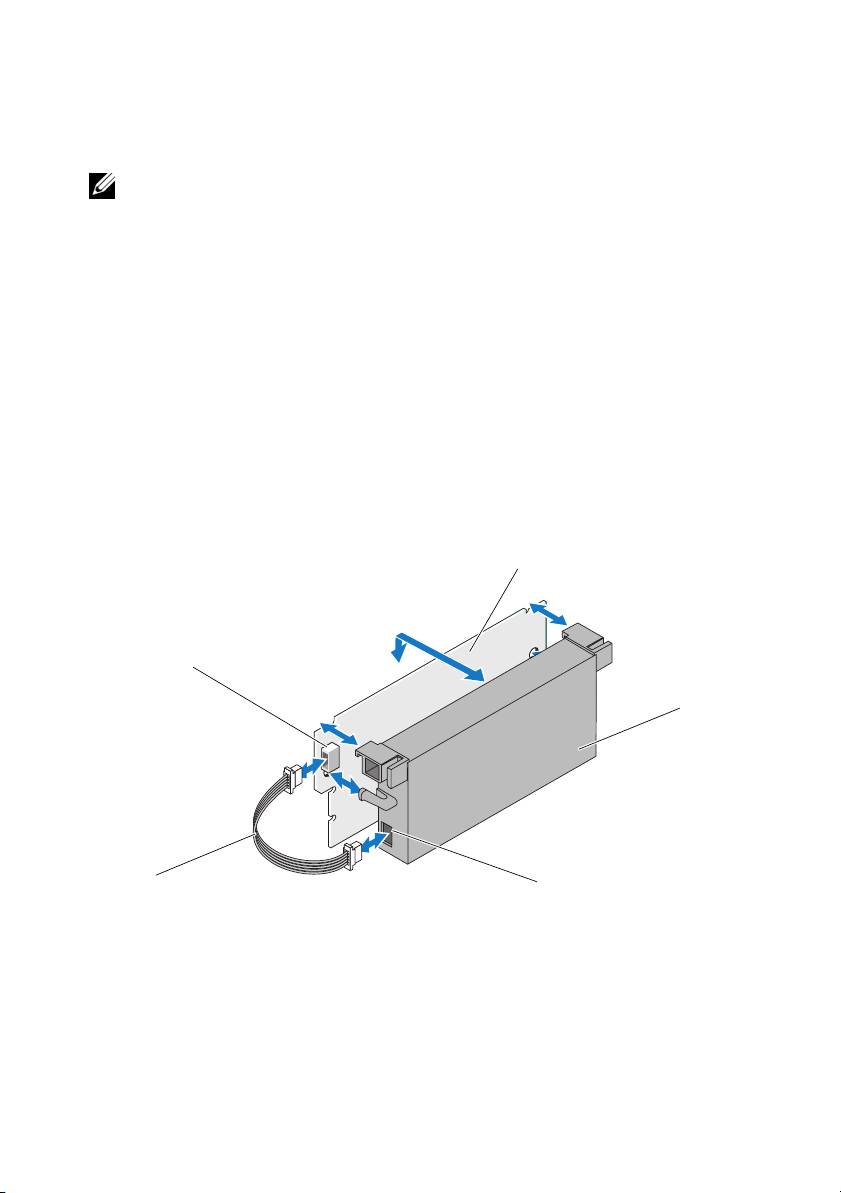
Disconnect the battery cable from both ends and press out on the battery clips
rotating the battery out of the DIMM. See Figure 1-2.
Figure 1-2. Removing and Installing the Battery and Battery Cable on the DIMM
3
2
4
1
5
1 battery cable 2 connector on the DIMM 3 DIMM
4 battery 5 connector on the battery
6
Unpack the new TBBU and follow all antistatic procedures.
7
Insert one end of the battery cable into the connector on the DIMM and the
other end into the connector on the new battery.
