
Dell POWEREDGE 1955: Install the Server Modules
Install the Server Modules: Dell POWEREDGE 1955
Table of contents
- Notes, Notices, and Cautions
- System Features
- Supported Operating Systems
- Other Information You May Need
- Obtaining Technical Assistance Installation and Configuration Unpack the System
- Install the System in a Rack
- Install the Server Modules
- Connect the Keyboard, Mouse, and Monitor Connect the Management System
- Connect the System and Monitor (Optional) to Power Turn on the System and Monitor (Optional)
- Turn on the Server Modules Complete the 0perating System Setup
- Technical Specifications Server Module Processor Memory Drives Connectors Video
- Physical Battery System System Enclosure Power Supply Module
- Fan Module KVM Module DRAC/MC Module
- PowerConnect 5316M Ethernet Switch Module Gb Ethernet Pass-Through Module Fibre Channel Pass-Through Module
- Fibre Channel Switch Module Infiniband Pass-Through Module
- Environmental
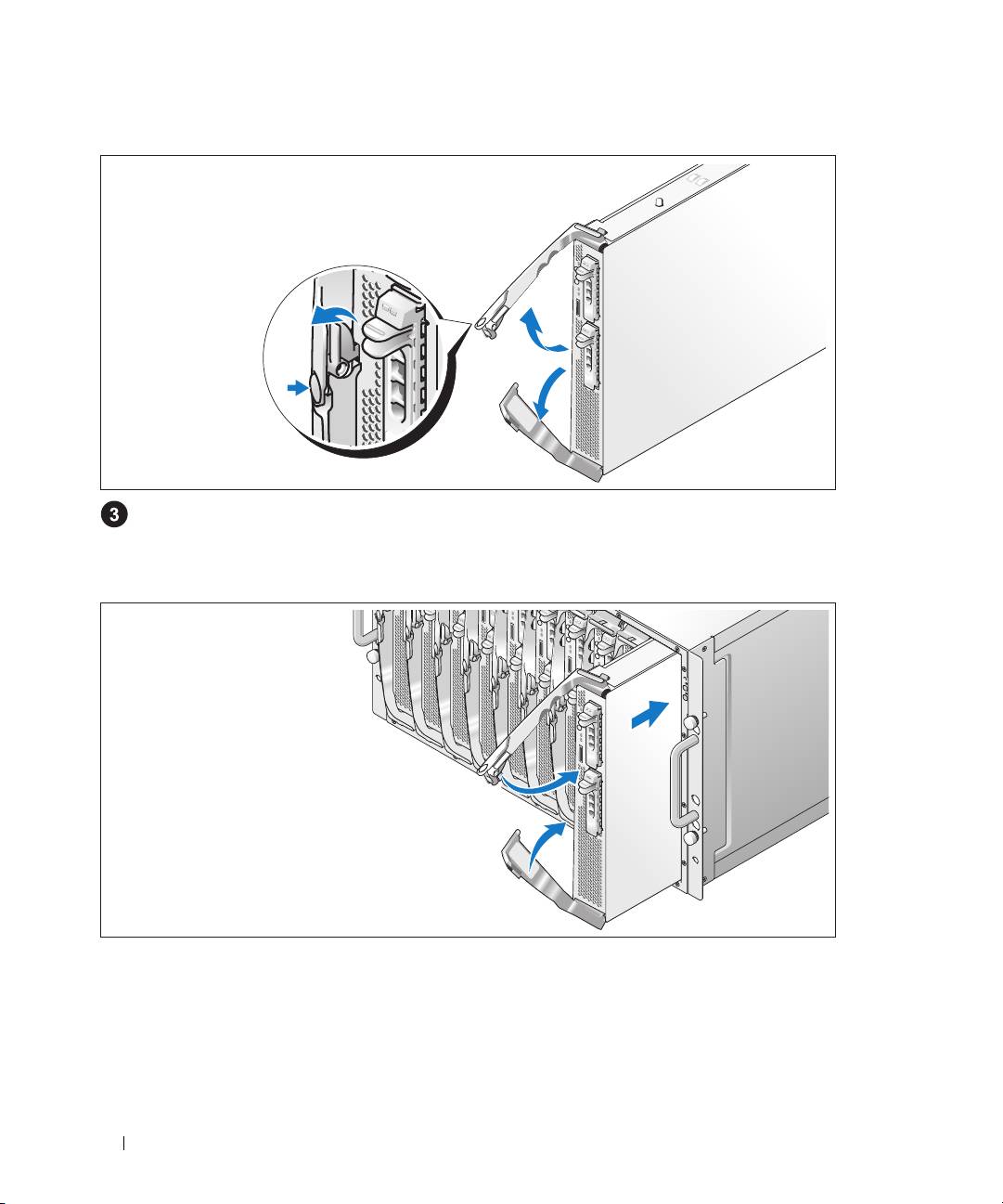
Install the Server Modules
Before installing the modules, orient each module so that the upper handle has the logo on it and
"TOP-SIDE" on the module edge faces upward. Press the release latch on the inside of the upper
handle. Pull out the upper and lower handles.
Beginning from left to right, slide the modules into the chassis. When the open handles contact the
chassis front panel, begin to rotate the handles together (the lower handle will close first) until the
lower handle is flush against the module’s front panel. Continue to rotate the upper handle downward
until it is flush against the lower handle. (When the handles are fully closed, the release latch will
secure both handles to the front panel.)
8 Getting Started With Your System
Top 10 manuals
100.00
NZXT HALE90 1000W99.99
Samsung SM-R38099.97
AEG BSB 18C99.97
Dell 2700W99.97
Smeg KSEC70X99.96
Beurer HDE 4099.96
Pyramida KH 50 v.299.96
MSI CSM-H81M-P3299.96
AEG HR 562799.95
Melissa 640-048