
Beurer FT 78: 5. Initial use 6. Settings 4. Unit description 6.1 Switching the acoustic signals on and o 6.2 Switching temperature unit (Celsius °C -> Fahrenheit °F) 6.3 Memory function
5. Initial use 6. Settings 4. Unit description 6.1 Switching the acoustic signals on and o 6.2 Switching temperature unit (Celsius °C -> Fahrenheit °F) 6.3 Memory function: Beurer FT 78
Table of contents
- Table of contents
- 1. Signs and symbols 2. Intended use 3. Notes
- Notes on handling batteries General notes
- 5. Initial use 6. Settings 4. Unit description 6.1 Switching the acoustic signals on and o 6.2 Switching temperature unit (Celsius °C -> Fahrenheit °F) 6.3 Memory function
- Starting measurement 7. Measuring
- 10. Disposal 8. Replacing the battery 11. What if there are error messages? 9. Cleaning and storage
- Error message Cause Solution 12. Technical data
IMPORTANT
5. Initial use
•
The device is not shockproof. Do not allow it to be dropped and pre-
The batteries are already inserted in all new devic-
vent any high impact stress on the device.
es. Before rst use, remove the protruding plastic
•
Avoid bending the device.
insulating strip from the battery compartment. The
•
Do not take the device apart and do not modify it in any way.
ear thermometer will then switch on automatically.
•
If this device is used according to the instructions for use, it is not
necessary to recalibrate it regularly. If you still have any questions,
please take the complete device to the retailer.
6. Settings
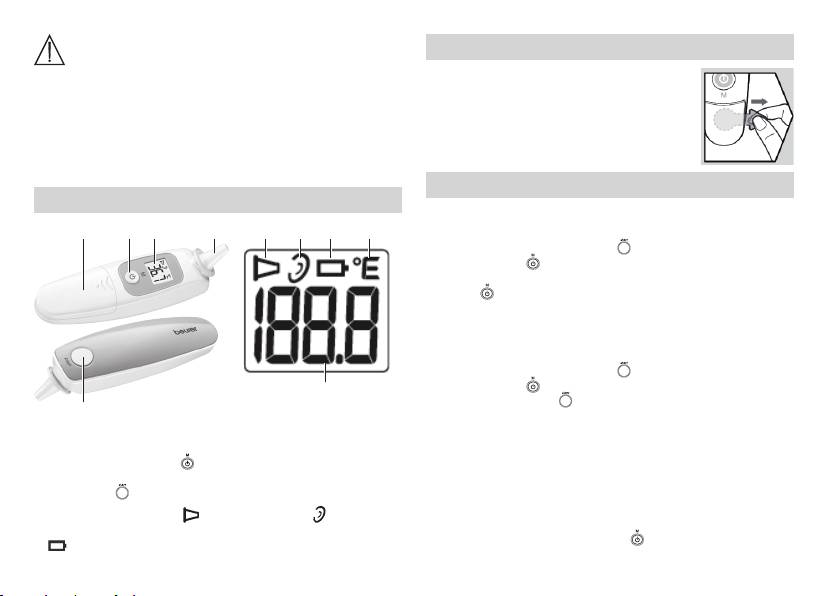
4. Unit description
6.1 Switching the acoustic signals on and o
1234
1 2 3 4
1. Ensure that the device is switched o .
2.
Press and hold the start button ( ) and then press the ON/OFF/
memory button ( ), until “°C” appears on the LCD display.
3. To switch the acoustic signals on or o , press the ON/OFF/memory
button (
) .
4. Repeat these steps to switch the acoustic signals on or o .
6.2 Switching temperature unit (Celsius °C -> Fahrenheit °F)
1. Ensure that the device is switched o .
2.
Press and hold the start button ( ) and then press the ON/OFF/
memory button ( ), until “°C” appears on the LCD display.
5
3. Press the start button (
) to switch from °C to °F.
5
4.
You can switch the LCD display from “°F” to “°C” using the same
1 Protective cap
1 Measurement symbol
process.
2 LCD display
2 Ear symbol
3 ON/OFF/memory button (
)
3 Battery symbol
6.3 Memory function
4 Battery compartment
4 Temperature unit (°C or °F)
There are a total of 9 memory groups for body temperature measure-
5 Start button (
)
5 Temperature display
ment. If the measurement values of the ear thermometer are in the range
between 34 °C and 42.2 °C (93.2 °F – 108.0 °F), the ear thermometer
If the measurement symbol (
) and the ear symbol ( ) are visible on
switches o and the latest measurement data in stored in the memory.
the LCD display, the device is ready to take a measurement.
•
Press the ON/OFF/Memory button ( ) again to display the stored
If (
) is shown on the LCD display, the batteries need to be replaced.
temperature.
14
