
Beurer BM70: 3. Unit description Icons in the display: 4. Prepare measurement Inserting battery
3. Unit description Icons in the display: 4. Prepare measurement Inserting battery: Beurer BM70
Table of contents
- 2. Important information Signs and symbols 1. Getting to know your instrument
- Advice on use
- Storage and Care Repair and disposal Advice on batteries
- 3. Unit description Icons in the display: 4. Prepare measurement Inserting battery
- PC interface System requirements for the Beurer “Health Manager” Setting date and time computer software Mains operation
- . Measuring blood pressure 5.2 Correct posture 5.1 Positioning cuff 5.3 Select memory 5.4 Measuring blood pressure
- WHO classification: 5.5 Evaluating results Cardiac arrhythmia:
- Table for classification of blood pressure values (unit of measurement mmHg) for adults: : Haemodynamic stability 5.6 Resting indicator measurement (using HSD diagnostics) : Lack of haemodynamic stability
- 7. Cleaning and storing the instrument 8. Rectifying faults 6. Saving, retrieving and deleting results
- 9. Specifications
- 10. Adapter
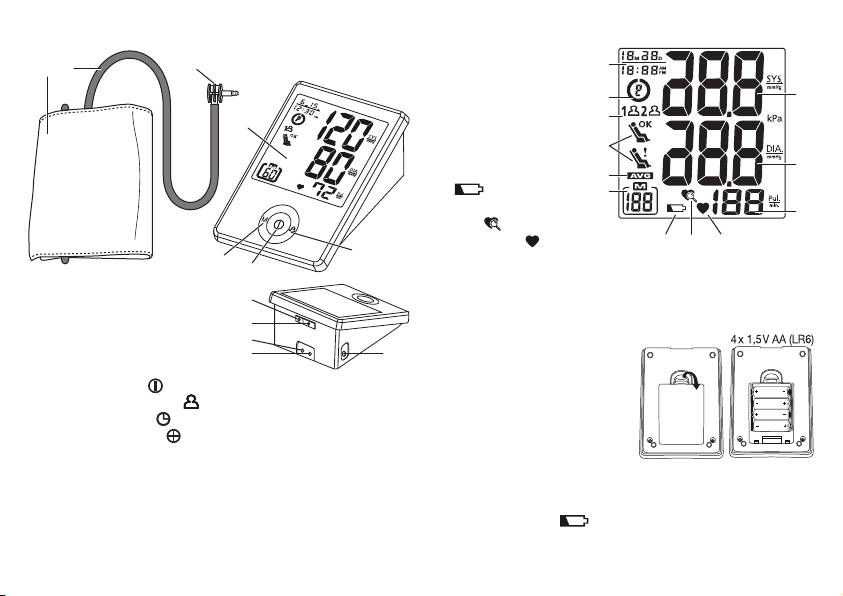
3. Unit description
Icons in the display:
1. Date/Time indicator
2
1
3
1
2. WHO classification
3. Memory zones
2
12
4. Resting indicator
3
5. Average value (AVG)
4
6. Memory sequence
4
number
11
7. Weak battery mark
5
6
8. Cardiac arrhythmia
10
icon
9. Pulse mark
79
8
7
5
10. Pulse rate
6
11. Diastolic pressure
12. Systolic pressure
1. Cuff tube
8
2. Cuff
9
4. Prepare measurement
3. Cuff connector
10
Inserting battery
4. Display
11
12
•
Remove the battery cover from
5. Memory button M
the back of the monitor.
6. ON/OFF button
• Insert four AA 1.5 V alkaline
7. User selection button
batteries. making absolutely
8. Date/time button
sure that you insert them with
9. Adjustment button
the correct polarity as marked.
10. Connector, power supply
Never use rechargeable batter-
11. Data interface
ies.
12. Cuff connector port (left side)
• Replace the battery cover carefully.
If the battery change is continuously illuminated, meas-
urement is no longer possible and you must replace all the bat-
17
