
Beurer BC 20: 6. Applying the blood pressure computer 5. Setting date/time 7. Measuring blood pressure
6. Applying the blood pressure computer 5. Setting date/time 7. Measuring blood pressure: Beurer BC 20
Table of contents
- 2. Important information 1. Familiarization
- Advice on batteries Storage and Care Repair and disposal
- 3. Unit description 4. Inserting/changing batteries
- 6. Applying the blood pressure computer 5. Setting date/time 7. Measuring blood pressure
- 9. Rectifying faults 8. Display of the readings saved
- 10. Cleaning and Care 11. Table for classification of blood pressure values (unit of measurement mmHg) for adults:
- 12. Technical data
Once the batteries have been removed from the device,
6. Applying the blood pressure computer
the date and time must be set again. The saved meas-
•
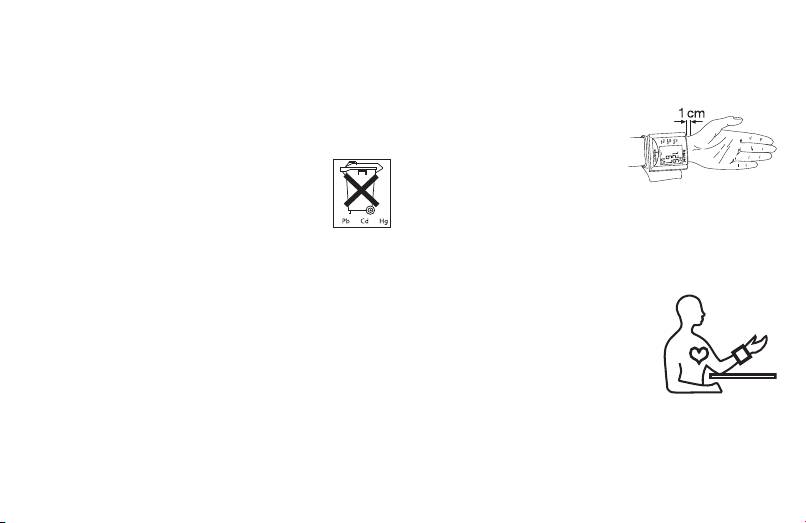
Apply the blood pressure computer to the inside of
urements are lost.
the left wrist.
They are considered to be toxic waste and, as such,
•
Ensure that the wrist is unclothed.
should be disposed of in special containers, toxic waste
•
Close the cuff with the Velcro
collection points or brought to electrical goods dealers.
fastener, so that the top
You are legally obliged to dispose of the batteries.
margin of the computer is
Note: You will find these markings on batteries
about 10 mm below the ball
containing harmful substances: Pb = battery
of the thumb (see illustration).
containing lead, Cd = battery containing cad-
•
The cuff must be placed tightly around the wrist but
mium, Hg = battery containing mercury.
must not constrict.
5. Setting date/time
7. Measuring blood pressure
The date/time setting is necessary, so that you can save
•
Sit in a relaxed position.
your readings correctly with the date and time and call
•
Ensure that your arm is supported
them up again later.
and bend it so that it is at the level
To set the date and time, proceed as follows:
of your heart (see illustration).
•
After inserting the batteries, press the Start /Stop
•
Before measurement allow an
button
. The year display will start to flash. Use
adequate relaxation time of
the memory button M
to set the year and confirm
3 – 5 minutes.
using the Start /Stop button
.
•
Now press the Start /Stop button
to start the meas-
•
Then set the month, day, hour and minutes and con-
urement.
firm each setting with the Start /Stop button
.
•
Following the display check, during which all num-
bers light up, the cuff automatically pumps up to
180 mmHg.
13
• • • • • • • • • • • • •
