
Beurer BC 20: 3. Unit description 4. Inserting/changing batteries
3. Unit description 4. Inserting/changing batteries: Beurer BC 20
Table of contents
- 2. Important information 1. Familiarization
- Advice on batteries Storage and Care Repair and disposal
- 3. Unit description 4. Inserting/changing batteries
- 6. Applying the blood pressure computer 5. Setting date/time 7. Measuring blood pressure
- 9. Rectifying faults 8. Display of the readings saved
- 10. Cleaning and Care 11. Table for classification of blood pressure values (unit of measurement mmHg) for adults:
- 12. Technical data
•
Never attempt to repair the instrument or adjust it your-
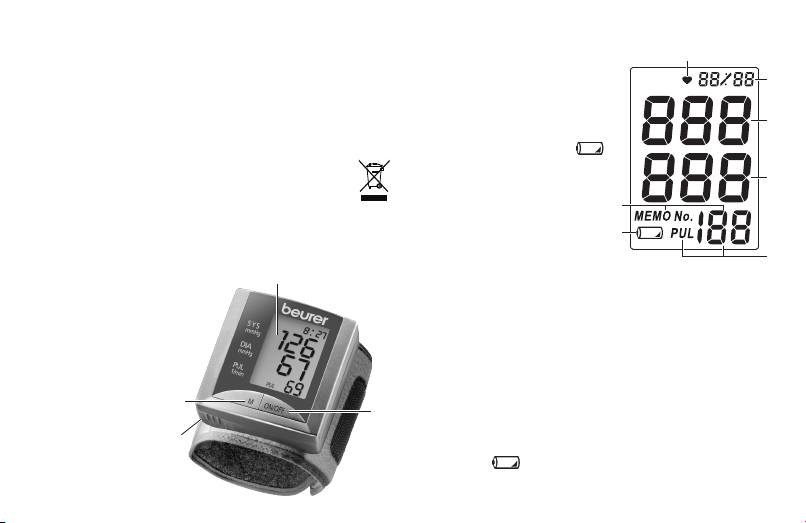
Icons in the display:
self. We can no longer guarantee perfect functioning if
1. Pulse symbol
1
you do.
2. Time and date
2
•
Repairs may only be performed by Beurer Customer
3. Systolic pressure
Service or authorized dealers. However, always check
4. Diastolic pressure
3
the batteries and replace them if necessary prior to
5. Measured pulse
making any complaint.
6. „Change battery“ icon
•
The appliance should be disposed of accord-
7. Memory space number
4
ing to Regulation 2002/96/EC-WEEE (Waste
Electrical and Electronic Equipment). In case of
7
queries, please contact the municipal authorities re-
6
sponsible for waste disposal in your area.
5
3. Unit description
4. Inserting/changing batteries
Display
•
Remove the battery compartment cover
.
Battery compart-
•
Use exclusively brand-name batteries of the type:
ment cover
2 x 1.5 V Micro (Alkaline Type LR03). Making abso-
Memory button M
lutely sure that you insert them with the correct polar-
Start /Stop button
ity as marked. Do not use rechargeable batteries.
•
Then close the battery compartment by fitting the
cover and clicking it in position.
When the batteries are almost exhausted, an empty bat-
tery symbol
appears at bottom left in the display
and the batteries must then be exchanged.
12
