
Dell UPS 2700R: Removing the Battery Tray
Removing the Battery Tray: Dell UPS 2700R
Table of contents
- Notes and Warnings
- System Features
- Finding Information What are You Looking For? Find It Here
- Installation and Startup Unpacking the System
- Lifting the Cabinet
- Identifying the UPS Figure 1. The Dell Online Rack UPS Front Panel Figure 2. UPS Rear Panel (2700W, 120V Shown)
- Rackmount Setup Opening the Battery Cover
- Removing the Battery Tray
- Positioning the Rails
- Attaching the R ails to the Rack
- Installing and Securing the Cabinet
- Installing the Battery Tray
- Installing the UPS Front Cover Connecting the Equipment
- Connecting the Power Cord
- Starting the UPS Completing the Startup
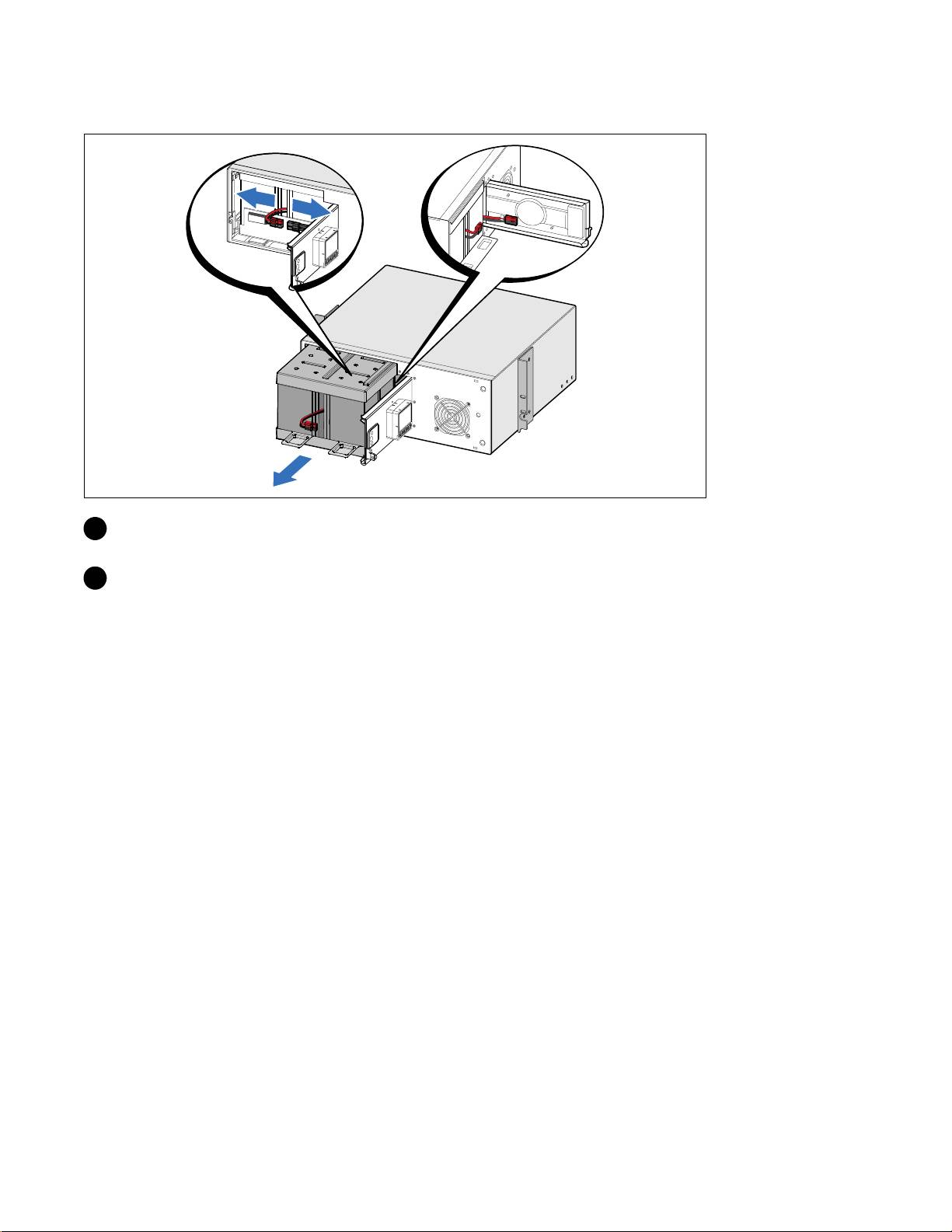
Removing the Battery Tray
2 Disconnect the battery connector and place the right battery connector in the battery door to
move it out of the way.
3 Pull the battery tray out using the plastic tabs and remove the battery tray.
Installation and Startup
|
9
Top 10 manuals
100.00
NZXT HALE90 1000W99.99
Samsung SM-R38099.97
AEG BSB 18C99.97
Dell 2700W99.97
Smeg KSEC70X99.96
Beurer HDE 4099.96
Pyramida KH 50 v.299.96
MSI CSM-H81M-P3299.96
AEG HR 562799.95
Melissa 640-048