
Beurer BM 90: Table for the classification of blood pressure values (measurement unit, mmHg) for adults: 8. Saving, displaying and deleting measurements on the device Saving measurements Displaying measurements Deleting measured values from the device 9. Error message/troubleshooting
Table for the classification of blood pressure values (measurement unit, mmHg) for adults: 8. Saving, displaying and deleting measurements on the device Saving measurements Displaying measurements Deleting measured values from the device 9. Error message/troubleshooting: Beurer BM 90
Table of contents
- 1. Getting to know your instrument 2. Included in delivery
- 3. Important notes Signs and symbols Instructions for application
- Instructions for storage and maintenance Notes on batteries Instructions for repairs and disposal
- 4. Unit description
- Information on the display 5. Preparing the measurement
- Replacing the batteries Setting the date and time
- Operating the blood pressure monitor with a mains part 6. Measuring blood pressure Attach the cuff Adopt the correct posture
- Performing the blood pressure measurement 7. Evaluating results Cardiac arrhythmia:
- Table for the classification of blood pressure values (measurement unit, mmHg) for adults: 8. Saving, displaying and deleting measurements on the device Saving measurements Displaying measurements Deleting measured values from the device 9. Error message/troubleshooting
- 10. Cleaning and storing the unit 11. Technical specifications
- Mains part for wireless box Mains part for blood pressure monitor
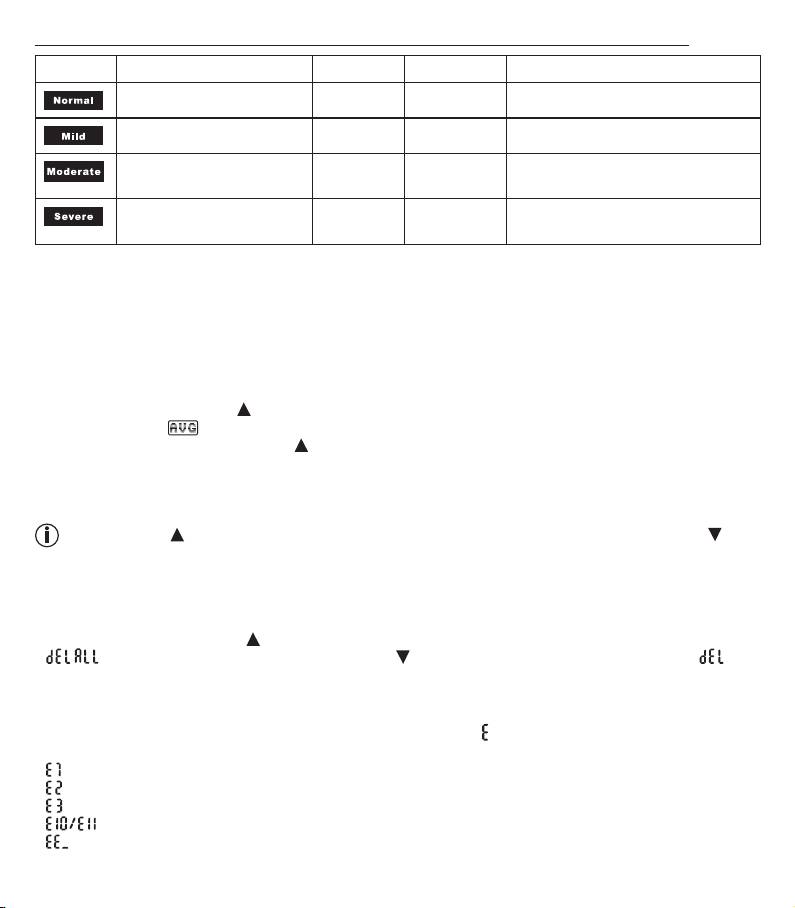
Table for the classification of blood pressure values (measurement unit, mmHg) for adults:
Display Category Systole Diastole Action
Normal range < 140 < 90 Self-monitoring
Grade 1: mild hypertension 140 - 159 90 - 99 regular monitoring by doctor
Grade 2: moderate hyper-
160 - 179 100 - 109 seek medical attention
tension
Grade 3: severe hyperten-
> = 180 > = 110 seek medical attention
sion
8. Saving, displaying and deleting measurements on the device
Saving measurements
•
The results of every successful measurement are automatically stored together with the date and time. If there
are more than 60 measurements, the oldest measurements are lost.
Displaying measurements
•
When switched off, press the MEM button. Firstly, the average value of all values stored will be displayed.
This is denoted by in the display.
•
If you press the memory button, MEM again, further individual measurements are displayed – beginning with
the value measured most recently. The individual values are denoted by the memory space numbers 1 to 60.
The date of each measurement is displayed after approx. 4 seconds and after about a further 4 seconds the
time is also displayed.
By pressing the MEM button, the most recent measurements are displayed; by pressing the SET but-
ton, the oldest are displayed.
•
Turn off the device using the START/STOP button or it will turn off automatically after approx. 1 minute.
Deleting measured values from the device
•
To clear the memory, press the MEM button for approx. 3 seconds when switched off.
•
flashes on the display; confirm using the SET button. When the values have been deleted, is
shown on the display and the device turns off automatically.
9. Error message/troubleshooting
If the blood pressure measurement has not been performed properly, appears on the display.
Error messages may appear if:
• : the cuff is fastened too loosely,
• : the cuff is fastened too tightly,
• : the pump pressure is too high,
• : you move or speak during the measurement,
• : there is a system or unit error.
22
