
Beurer BM 90: Replacing the batteries Setting the date and time
Replacing the batteries Setting the date and time: Beurer BM 90
Table of contents
- 1. Getting to know your instrument 2. Included in delivery
- 3. Important notes Signs and symbols Instructions for application
- Instructions for storage and maintenance Notes on batteries Instructions for repairs and disposal
- 4. Unit description
- Information on the display 5. Preparing the measurement
- Replacing the batteries Setting the date and time
- Operating the blood pressure monitor with a mains part 6. Measuring blood pressure Attach the cuff Adopt the correct posture
- Performing the blood pressure measurement 7. Evaluating results Cardiac arrhythmia:
- Table for the classification of blood pressure values (measurement unit, mmHg) for adults: 8. Saving, displaying and deleting measurements on the device Saving measurements Displaying measurements Deleting measured values from the device 9. Error message/troubleshooting
- 10. Cleaning and storing the unit 11. Technical specifications
- Mains part for wireless box Mains part for blood pressure monitor
•
To prevent possible damage to the device, the wireless box must only be used with the mains part included in
delivery.
Insert the mains part into the connection provided for this purpose on the top of the wireless box. Then insert
the mains plug of the mains part into the mains socket.
•
You can see if the wireless box is ready by the ‚traffic light‘ function: green – ready for use (connection to the
server established).
•
Now select the “blood pressure monitor” option on the website and enter the activation code of your blood
pressure monitor. You will find this on the underside of the blood pressure monitor.
•
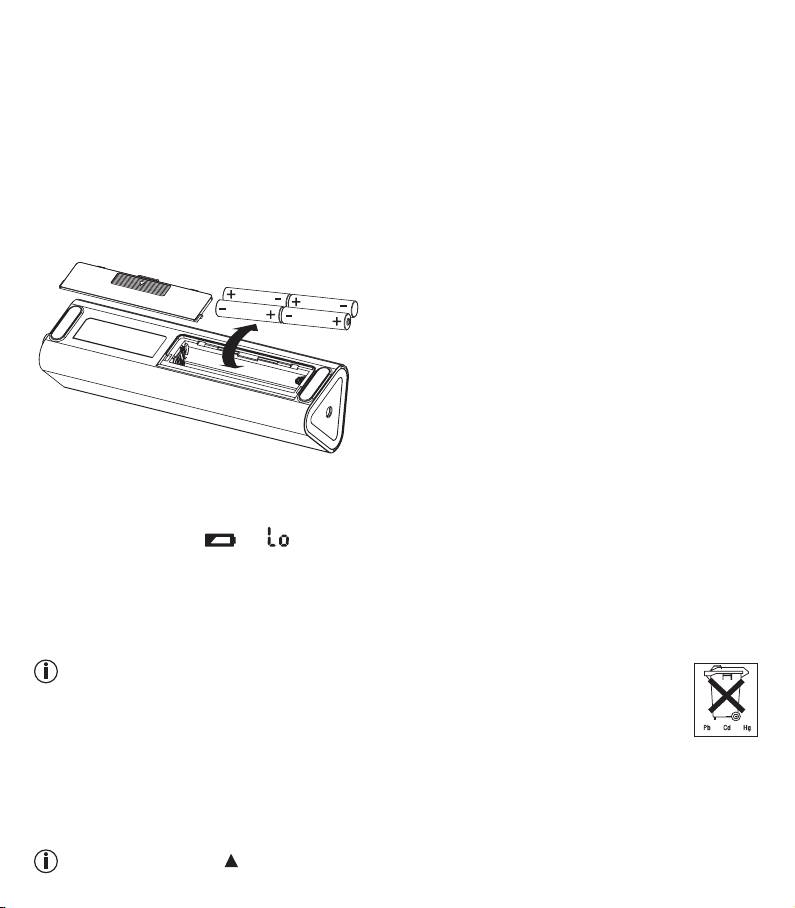
Open the battery compartment lid on the blood pressure monitor.
•
Insert four 1.5V AAA (alkaline type LR 03) batteries. Make sure that the batteries are inserted the correct way
round.
Do not use rechargeable batteries.
•
Subsequently close the battery compartment lid carefully.
•
Carry out a measurement and assign the result to your profile.
Replacing the batteries
If the low battery indicator and are displayed, you can no longer perform any measurements and must
replace the batteries. Once the batteries have been removed from the device, the current date and time are de-
leted. The saved measurements are retained.
Used batteries should not be disposed of in normal household waste. Dispose of them via your electronics retai-
ler or your local recycling point. You are legally obligated to do so.
The codes below are printed on batteries containing harmful substances:
Pb: battery contains lead,
Cd: battery contains cadmium,
Hg: battery contains mercury.
Setting the date and time
•
If there is an existing connection to the server, the date and time will be automatically retrieved by the server.
•
If there is no connection to the server, you will be sent directly to the date/time settings mode.
It is essential to set the date and time. Otherwise, when you reconnect to the server, your measurements will
not be transferred, stored and later retrieved with the correct date and time.
If you press and hold the MEM button, you can set the values more quickly.
19
