
Beurer BC 80: 8. Error messages/troubleshooting 7. Transferring measurements
8. Error messages/troubleshooting 7. Transferring measurements: Beurer BC 80
Table of contents
- 2. Important notes 1. Getting to know your device
- Notes on use
- Instructions for storage and maintenance
- 3. Unit description Instructions for repairs and disposal
- Information on the display: 4. Preparing for the measurement
- 5. Measuring blood pressure
- Adopt the correct posture Performing the blood pressure measurement
- Evaluating results
- 6. Displaying and deleting measurements
- 8. Error messages/troubleshooting 7. Transferring measurements
- 10. Technical specifications
•
Start individual measurement access.
8. Error messages/troubleshooting
•
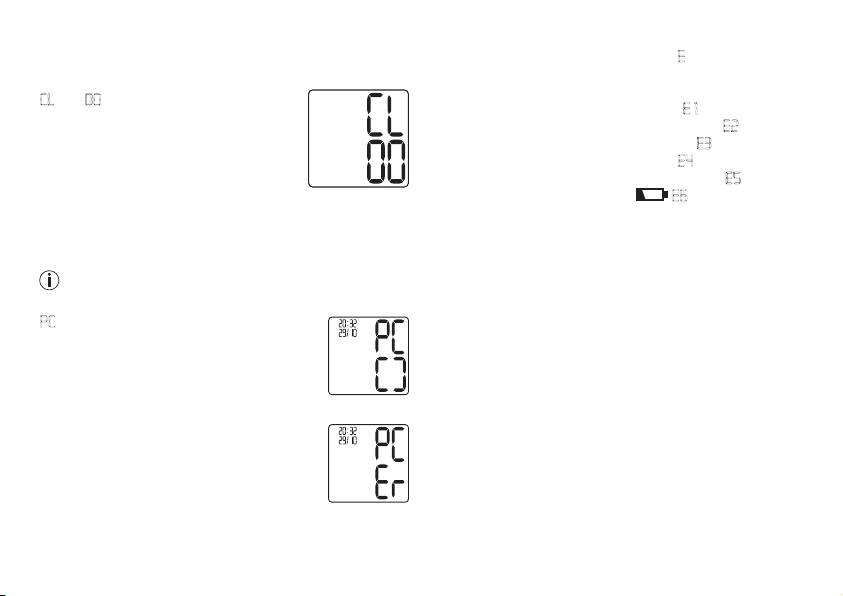
Press and hold the M1 & M2 memory buttons for 5 sec-
In the event of errors, the error message
E
_
appears on the
onds.
display.
Error messages may appear if:
CL
and
00
appear on the display.
•
It was not possible to record the pulse:
E 1
;
All the values in the current user memory
•
You move or speak during the measurement::
E2
;
are deleted.
•
The cuff is fastened too tightly or loosely:
E3
;
The device will then switch off automati-
•
Errors occur during the measurement:
E4
;
cally.
•
The pump pressure is higher than 300 mmHg:
E5
;
•
The batteries are almost empty
E6
.
In such cases, repeat the measurement. Ensure that you
7. Transferring measurements
do not move or speak. If necessary, reinsert or replace the
Connect the blood pressure monitor to your PC using the
batteries.
USB cable.
No data transfer may be launched whilst performing a
9. Cleaning and maintenance
measurement.
•
Clean your blood pressure monitor carefully using a slightly
damp cloth only.
PC
is shown on the display. Begin the data
•
Do not use any cleaning agents or solvents.
transfer in the “HealthManager” PC software.
•
Under no circumstances should you hold the unit under
During the data transfer, an animation is
water, as this can cause liquid to enter and damage the
shown on the display. A successful data
unit.
transfer is displayed as in figure 1. If the data
•
Never place any heavy objects on the device.
transfer is unsuccessful, an error message
f
igure 1
appears as in figure 2. In this case, interrupt
the PC connection and start the data transfer
again.
After 30 seconds of not being in use or if
communication with the PC is interrupted,
f
igure 2
the blood pressure monitor switches itself off
automatically.
23
