
Beurer BC 40: Time Hour format Date
Time Hour format Date: Beurer BC 40
Table of contents
- ENGLISH Dear customer, 1. Getting to know your device
- 2. Important notes
- Do not take a measurement within 30 minutes of eating, drinking, smoking or exercising.
- Instructions for storage and maintenance Instructions for repairs and disposal Notes on batteries
- 3. Unit description 4. Preparing the measurement
- Time Hour format Date
- 5. Measuring blood pressure
- Evaluating results
- Blood pressure value category Systole (in mmHg) Diastole (in mmHg) Action 6. Saving, displaying and deleting measurements
- 7. Error messages/troubleshooting
- 8. Cleaning and maintenance 9. Technical specifications
- Technical information is subject to change without notifica- tion to allow for updates.
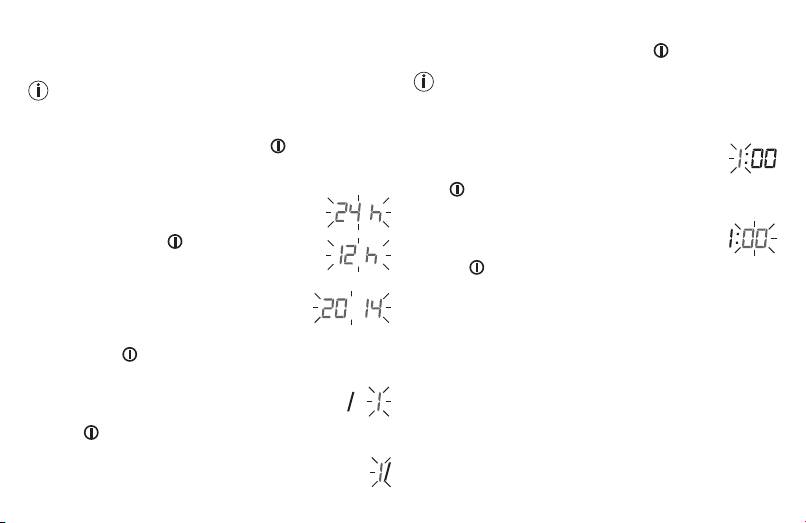
It is essential to set the date and time. Otherwise, you will
•
Select the desired day using the memory button M and
not be able to save your measurements correctly with a
confirm with the START/STOP button .
date and time and access them again later.
If the hour format is set as 12h, the day/month display
If you press and hold the memory button M you can set
is reversed.
the values more quickly.
Time
To access the settings mode, either reinsert the batteries or
The hours flash on the display.
press and hold the START/STOP button
for 5 seconds
•
Select the desired hour using the memory but-
when the device is switched off.
ton M and confirm with the START/STOP but-
Hour format
ton .
•
Select the desired hour format using the
The minutes flash on the display.
memory button M and confirm with the
•
Select the desired minute using the memory
START/STOP button .
button M and confirm with the START/STOP
button .
Date
Once all the data has been set, the device switches off
The year flashes on the display.
automatically.
•
Select the desired year using the memory
button M and confirm with the START/
STOP button .
The month flashes on the display.
•
Select the desired month using the memory
button M and confirm with the START/STOP
button .
The day flashes on the display.
20
