
Beurer BC 40: 3. Unit description 4. Preparing the measurement
3. Unit description 4. Preparing the measurement: Beurer BC 40
Table of contents
- ENGLISH Dear customer, 1. Getting to know your device
- 2. Important notes
- Do not take a measurement within 30 minutes of eating, drinking, smoking or exercising.
- Instructions for storage and maintenance Instructions for repairs and disposal Notes on batteries
- 3. Unit description 4. Preparing the measurement
- Time Hour format Date
- 5. Measuring blood pressure
- Evaluating results
- Blood pressure value category Systole (in mmHg) Diastole (in mmHg) Action 6. Saving, displaying and deleting measurements
- 7. Error messages/troubleshooting
- 8. Cleaning and maintenance 9. Technical specifications
- Technical information is subject to change without notifica- tion to allow for updates.
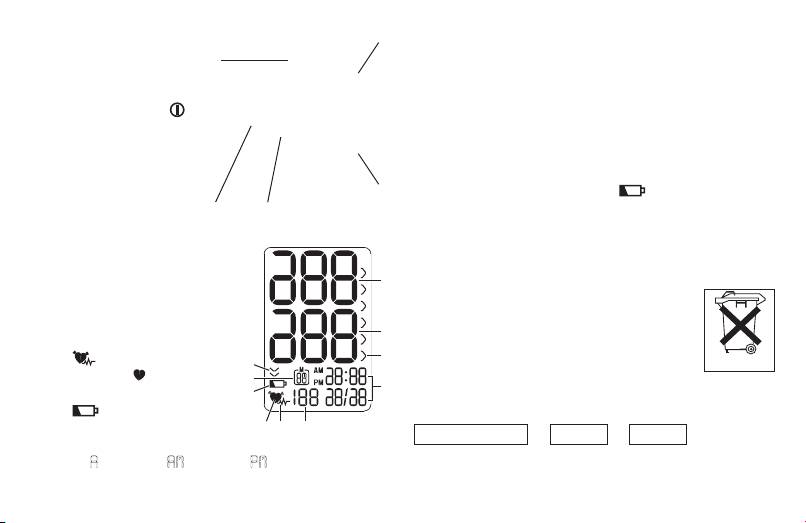
3. Unit description
2
4. Preparing the measurement
1. Display
1
Insert the batteries
2. Battery compartment lid
•
Remove the battery compartment lid on the right side of
3. Wrist cuff
the device.
4. START/STOP button
•
Insert two 1.5 V micro (alkaline type LR03) batteries. Make
5. Memory button M
sure that the batteries are inserted the correct way round.
Do not use rechargeable batteries.
•
Close the battery compartment lid again carefully.
3
If the battery replacement symbol is displayed, you can
no longer perform any measurements and must replace all
5 4
batteries.
Information on the display:
Used batteries should not be disposed of in normal house-
1. Systolic pressure
hold waste. Dispose of them via your electronics retailer or
2. Diastolic pressure
your local recycling point. You are legally obligated to do so.
1
3. WHO classification
Note: The codes below are printed on batteries
4. Time and date
containing harmful substances: Pb: battery
5. Calculated pulse value
2
contains lead, Cd: battery contains cadmium,
6. Cardiac arrhythmia sym-
Hg: battery contains mercury.
bol
3
10
7. Pulse symbol
Setting the hour format, date and time
9
4
8. Battery replacement sym-
8
This menu allows you to set the following functions, one
bol
after another.
9.
Memory space number/
567
Hour format
➔
Date
➔
Time
memory display average
value (
A
), morning (
AM
), evening (
PM
)
10. Release air (arrow)
19
Pb Cd Hg
