
Beurer BC 40: 7. Error messages/troubleshooting
7. Error messages/troubleshooting: Beurer BC 40
Table of contents
- ENGLISH Dear customer, 1. Getting to know your device
- 2. Important notes
- Do not take a measurement within 30 minutes of eating, drinking, smoking or exercising.
- Instructions for storage and maintenance Instructions for repairs and disposal Notes on batteries
- 3. Unit description 4. Preparing the measurement
- Time Hour format Date
- 5. Measuring blood pressure
- Evaluating results
- Blood pressure value category Systole (in mmHg) Diastole (in mmHg) Action 6. Saving, displaying and deleting measurements
- 7. Error messages/troubleshooting
- 8. Cleaning and maintenance 9. Technical specifications
- Technical information is subject to change without notifica- tion to allow for updates.
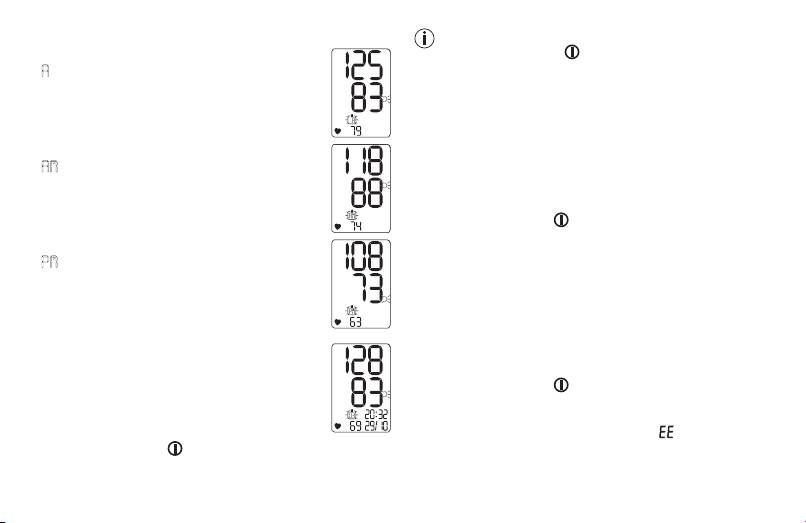
Displaying average values
You can exit the menu at any time by pressing the
•
Press the memory button M.
START/STOP button .
A
flashes on the display.
Deleting measurements
The average value of all saved measurements is
Deleting individual measurements
displayed.
•
Start individual measurement access.
•
Press and hold the memory button M for approx. 5 sec-
•
Press the memory button M.
onds. The relevant measurement is deleted.
AM
flashes on the display.
•
The display starts to flash, then an empty display with
The average value of the morning measure-
empty user memory frame is displayed. Press the mem-
ments for the last 7 days is displayed (morning:
ory button M to delete additional values or press the
5.00 a.m. – 9.00 a.m.).
START/STOP button to switch off the device.
•
Press the memory button M.
Deleting all measurements
PM
flashes on the display.
•
Start access to average value of all saved measurements
The average value of the evening measure-
by pressing the memory button M twice.
ments for the last 7 days is displayed (evening:
•
Press and hold the memory button M for approx. 5 sec-
6.00 p.m. – 8.00 p.m.).
onds. All measurements are deleted.
•
The display starts to flash, then an empty display with
Displaying individual measurements
empty user memory frame is displayed. Press the mem-
•
When the memory button M is pressed again,
ory button M to delete additional values or press the
the last individual measurement is displayed.
START/STOP button to switch off the device.
•
When the memory button M is pressed again,
you can view your individual measurements.
7. Error messages/troubleshooting
•
To switch the device off again, press the
In the event of errors, the error message _ appears on
START/STOP button .
the display.
Error messages may appear if:
24
