
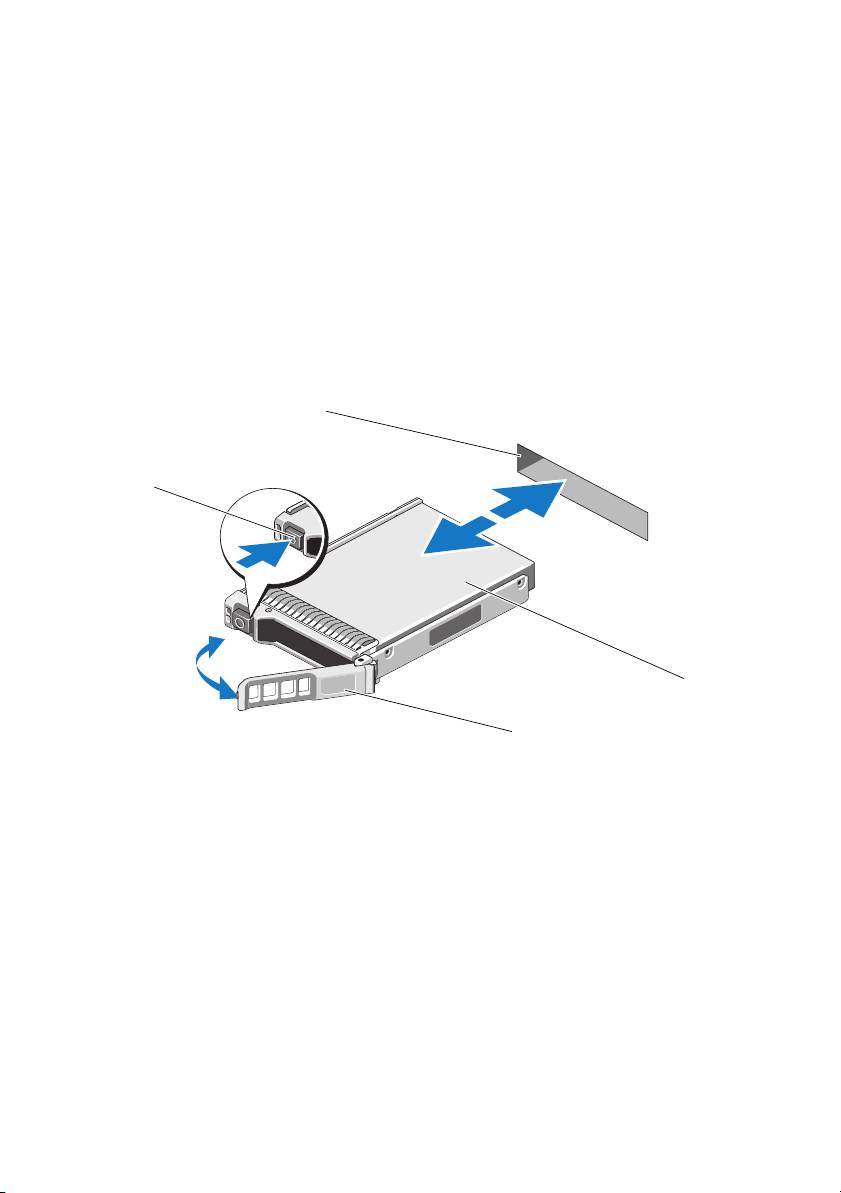
Dell PowerEdge Express Flash PCIe SSD: Figure 1-1. Removing and Installing a PCIe SSD in a Device From or Into the System
Figure 1-1. Removing and Installing a PCIe SSD in a Device From or Into the System: Dell PowerEdge Express Flash PCIe SSD
Table of contents
- Deploying the Dell PowerEdge Express Flash PCIe SSD Setting Up Your PCIe SSD
- Using PCIe SSDs in a Windows or Linux-Based System Servicing Your PCIe SSD Removing a PCIe SSD from the System
- Figure 1-1. Removing and Installing a PCIe SSD in a Device From or Into the System
- Installing a PCIe SSD Device in the System
You can safely remove the device from the operating system under the following
conditions after you use the Prepare to Remove task:
• The PCIe SSD is blinking the prepare for removal LED pattern.
• The PCIe SSD is no longer accessible by the operating system.
2
Press the release button on the front of the device carrier and open the device
carrier release handle, to release the PCIe SSD. See Figure 1-1.
3
Slide out the PCIe SSD.
Figure 1-1. Removing and Installing a PCIe SSD in a Device From or Into the System
1 release button 2 PCIe SSD slot
3 top of the device 4 PCIe SSD carrier handle
2
1
3
4
Top 10 manuals
100.00
NZXT HALE90 1000W99.99
Samsung SM-R38099.97
AEG BSB 18C99.97
Dell 2700W99.97
Smeg KSEC70X99.96
Beurer HDE 4099.96
Pyramida KH 50 v.299.96
MSI CSM-H81M-P3299.96
AEG HR 562799.95
Melissa 640-048