
Dell Latitude E5420 (Early 2011): Undocking Your Computer From the Battery Slice Charging Your Battery Slice
Undocking Your Computer From the Battery Slice Charging Your Battery Slice: Dell Latitude E5420 (Early 2011)
Table of contents
- Notes, Cautions, and Warnings
- Battery Slice Bottom View Setting up Your Battery Slice
- Docking Your Computer to the Battery Slice
- Undocking Your Computer From the Battery Slice Charging Your Battery Slice
- Battery Slice Power-Status LED Codes LED code sequence Status Specifications
book.book Page 5 Wednesday, July 20, 2011 7:09 PM
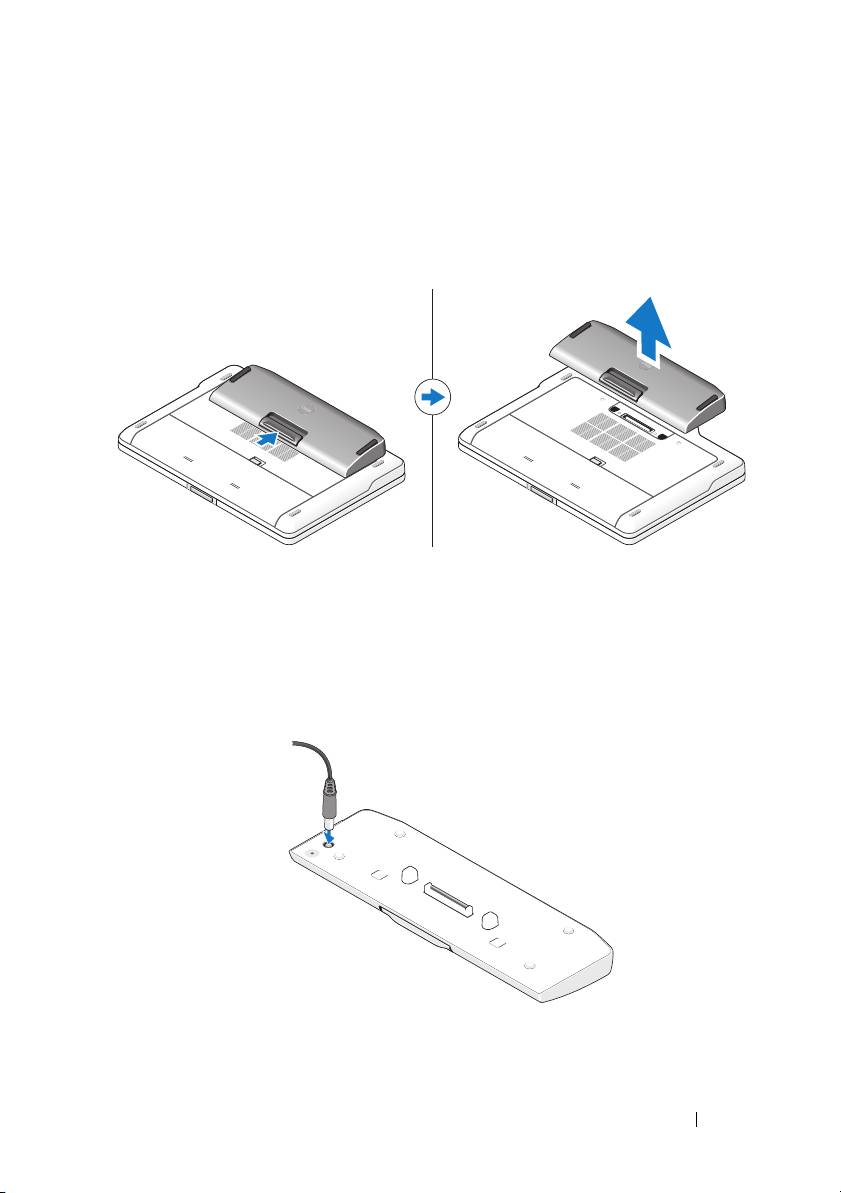
Undocking Your Computer From the Battery Slice
1
Disconnect all the cables connected to the computer.
2
Flip the computer on its back.
3
Press the release lever and lift the battery slice from the computer.
Charging Your Battery Slice
You can recharge your battery slice independent of the computer using the
AC adapter that shipped with your computer. A docked computer will also
charge the battery slice.
Battery Slice 5
Top 10 manuals
100.00
NZXT HALE90 1000W99.99
Samsung SM-R38099.97
AEG BSB 18C99.97
Dell 2700W99.97
Smeg KSEC70X99.96
Beurer HDE 4099.96
Pyramida KH 50 v.299.96
MSI CSM-H81M-P3299.96
AEG HR 562799.95
Melissa 640-048