
Dell Latitude E4200: Docking Your Computer to the Media Base
Docking Your Computer to the Media Base: Dell Latitude E4200
Table of contents
- Notes, Notices, and Cautions
- Media Base Top View
- Side View Back View
- Docking Your Computer to the Media Base
- Undocking Your Computer From the Media Base
- Removing the Media Drive From the Media Base
- Replacing the Media Drive in the Media Base Connecting and Disconnecting External Drives Swapping External Drives While the Computer Is On
- Specifications Finding Information Document/Media/Label Contents
- Document/Media/Label Contents
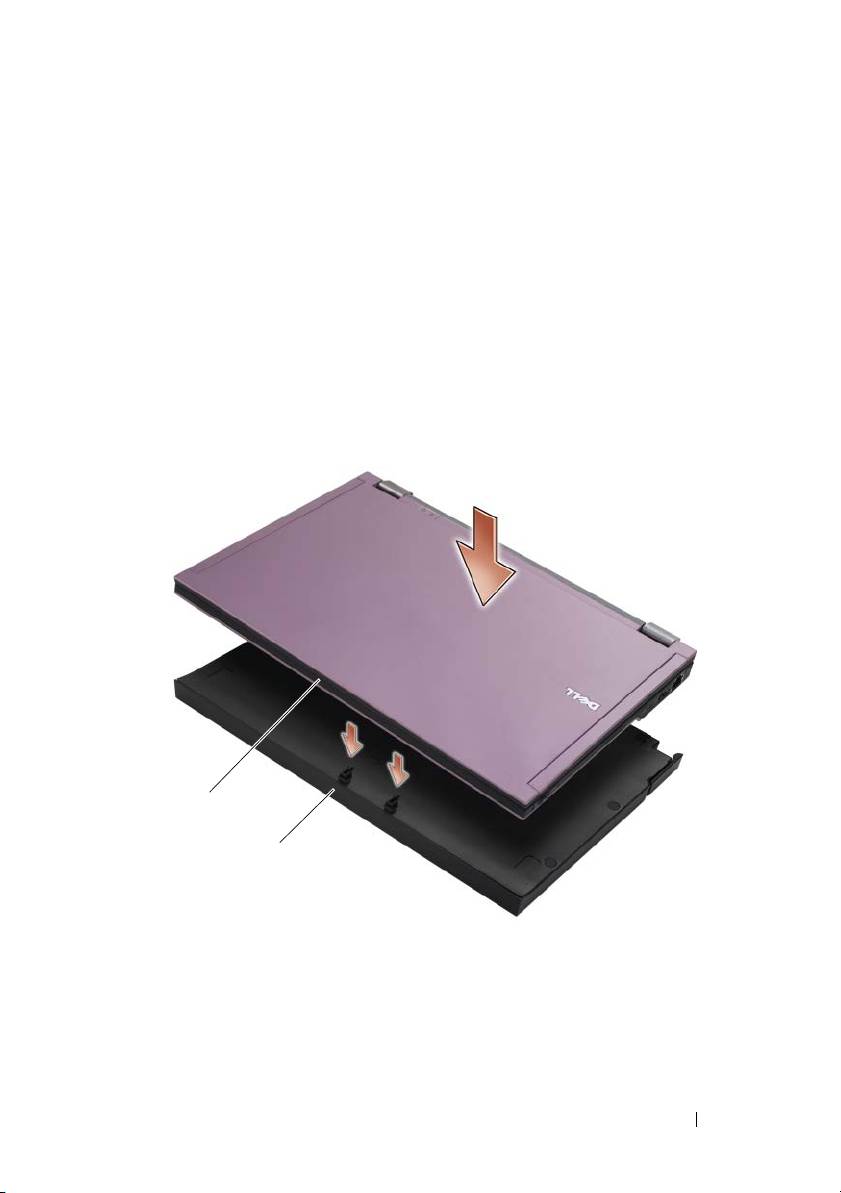
Docking Your Computer to the Media Base
1
Before you initially dock your computer, the operating system must
complete its setup process. To verify that the operating system setup
is complete:
a
Ensure that the computer is not connected to the media base.
b
Turn on the computer.
®
®
c
Verify that the Microsoft
Windows
desktop appears.
d
Shut down the computer through the Windows
Start
menu.
2
Align the front of the computer with the front of the media base and lower
the computer onto the media base.
1
2
1 front of computer 2 media base
Media Base 5
Top 10 manuals
100.00
NZXT HALE90 1000W99.99
Samsung SM-R38099.97
AEG BSB 18C99.97
Dell 2700W99.97
Smeg KSEC70X99.96
Beurer HDE 4099.96
Pyramida KH 50 v.299.96
MSI CSM-H81M-P3299.96
AEG HR 562799.95
Melissa 640-048