
Dell Latitude D631: Left Side View Right Side View
Left Side View Right Side View: Dell Latitude D631
Table of contents
- Notes, Notices, and Cautions Abbreviations and Acronyms
- Contents
- Finding Information What Are You Looking For? Find It Here
- What Are You Looking For? Find It Here
- What Are You Looking For? Find It Here
- Setting Up Your Computer
- About Your Computer Front View
- Left Side View Right Side View
- Back View Bottom View
- Using a Battery Battery Performance
- Checking the Battery Charge Dell™ QuickSet Battery Meter Charge Gauge Check the Battery Charge Check the Battery Health
- Low-Battery Warning Charging the Battery Removing the Battery
- Storing a Battery Troubleshooting Lockups and Software Problems The computer does not start up The computer stops responding
- A program stops responding or crashes repeatedly A program is designed for an earlier Microsoft Windows operating system A solid blue screen appears Other software problems BACK UP YOUR FILES IMMEDIATELY.
- Dell Diagnostics When to Use the Dell Diagnostics Starting the Dell Diagnostics From Your Hard Drive
- Starting the Dell Diagnostics From the Drivers and Utilities Media
- Dell Diagnostics Main Menu Option Function Tab Function
- Index
- 22 Index
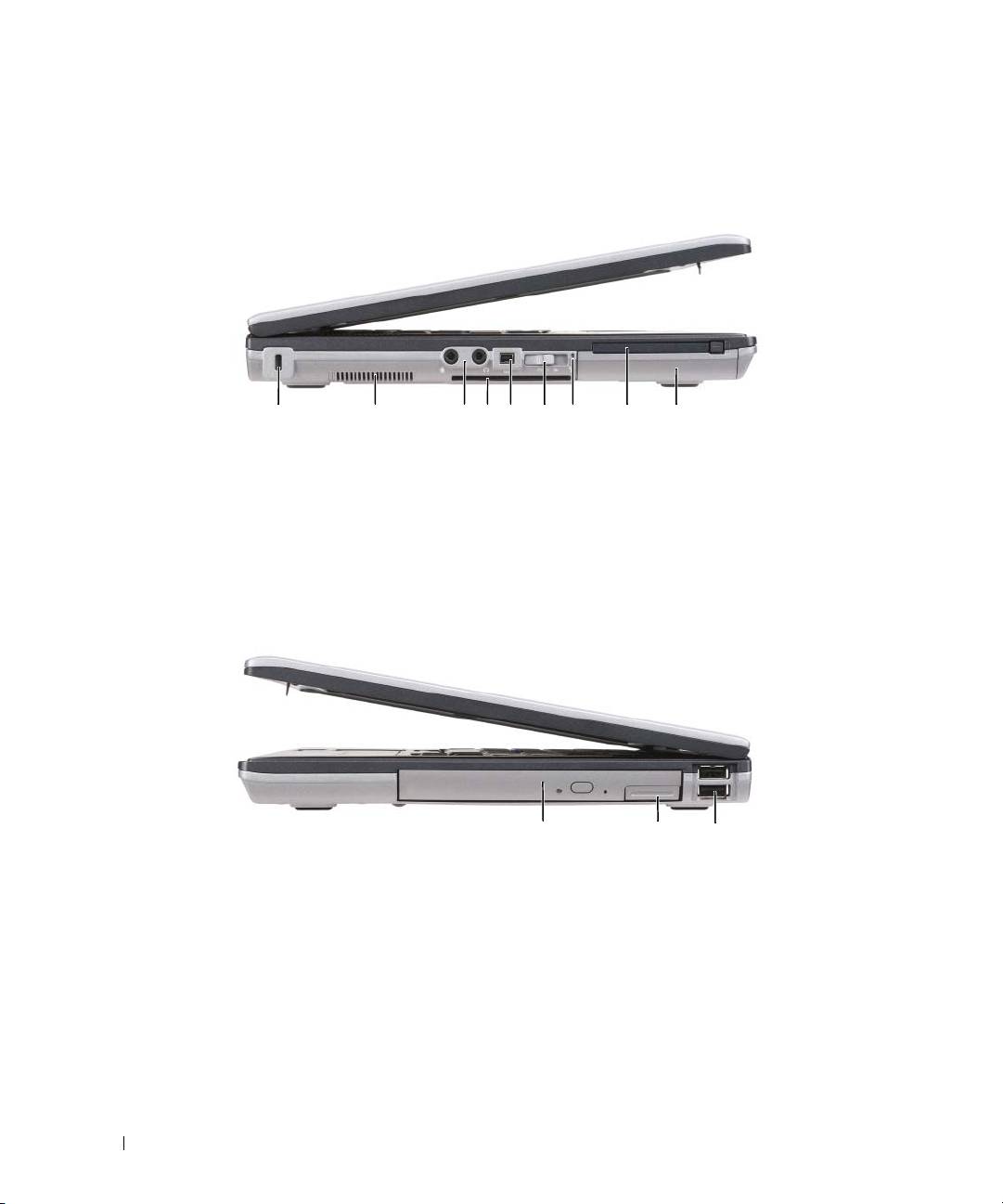
Left Side View
1 2 3 65 7 84 9
1 security cable slot 2 air vent 3 audio connectors (2)
4 smart card slot (with blank) 5 1394 connector 6 wireless switch
7 Wi-Fi Catcher™ light 8 PC Card slot 9 hard drive
Right Side View
1
2
3
1 optical drive in media bay 2 media-bay device latch release 3 USB connectors (2)
10 Quick Reference Guide
Top 10 manuals
100.00
NZXT HALE90 1000W99.99
Samsung SM-R38099.97
AEG BSB 18C99.97
Dell 2700W99.97
Smeg KSEC70X99.96
Beurer HDE 4099.96
Pyramida KH 50 v.299.96
MSI CSM-H81M-P3299.96
AEG HR 562799.95
Melissa 640-048