
Beurer BC 50: Adopt the correct posture Performing the blood pressure measurement
Adopt the correct posture Performing the blood pressure measurement: Beurer BC 50
Table of contents
- ENGLISH 2. Important notes 1. Getting to know your device
- Notes on use
- Instructions for storage and maintenance Notes on batteries
- 3. Unit description Instructions for repairs and disposal
- Information on the display: 4. Preparing for the measurement
- 5. Measuring blood pressure Attaching the cuff
- Adopt the correct posture Performing the blood pressure measurement
- Evaluating results
- 6. Displaying and deleting measurements
- 8. Error messages/troubleshooting 7. Transferring measurements 9. Cleaning and maintenance
- 10. Technical specifications
•
Close the cuff with the hook-and-loop fastener such that the
•
Press the START/STOP button to
upper edge of the device is positioned approx. 1 cm under-
start the blood pressure monitor. All
neath the heel of the hand.
displays will illuminate briefly.
•
The cuff must be fitted tightly around the wrist, but must not
OK
!
The blood pressure monitor will begin the
constrict.
measurement automatically after 3 sec-
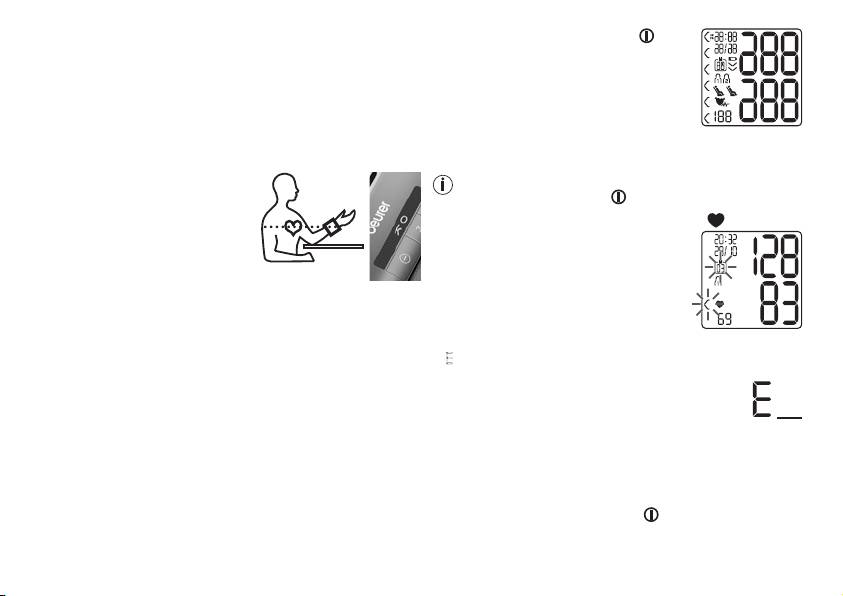
Adopt the correct posture
onds.
The measurement is taken during the in-
•
Before every measurement, relax for about five minutes. Oth-
flation phase.
erwise deviations can occur.
•
You can take the measurement
You can cancel the measurement at any time by pressing
while sitting or lying. To take
the START/STOP button
.
your blood pressure, make sure
As soon as a pulse is found, the pulse symbol is displayed.
you are sitting comfortably with
•
The systolic pressure, diastolic pressure
your arms and back leaning on
and pulse rate measurements are
something. Do not cross your
displayed.
legs. Place your feet flat on the
ground. Make sure to rest your arm and move it. Always
make sure that the cuff is at heart level. Otherwise
significant deviations can occur. Relax your arm and the
palm of your hand. An O.K. symbol bar is integrated into
•
E
_ appears if the measurement could not be performed prop-
the device to additionally assist you. It signals the correct
erly. Observe the chapter on error messages/
position of the blood pressure monitor. You are in the right
troubleshooting in these instructions for use and
position if you can see O.K. on the display.
repeat the measurement.
•
To avoid falsifying the measurement, it is important to remain
•
Now select the desired user memory by pressing
still during the measurement and not to speak.
the M1 or M2 memory buttons. If you do not select a user
Performing the blood pressure measurement
memory, the measurement is stored in the most recently used
user memory. The relevant symbol M1 or M2 appears in the
As described above, attach the cuff and adopt the posture in
display.
which you want to perform the measurement.
•
Press the START/STOP button to switch off the blood
pressure monitor. The measurement is then stored in the
selected user memory.
20
