
Beurer BC 50: 6. Displaying and deleting measurements
6. Displaying and deleting measurements: Beurer BC 50
Table of contents
- ENGLISH 2. Important notes 1. Getting to know your device
- Notes on use
- Instructions for storage and maintenance Notes on batteries
- 3. Unit description Instructions for repairs and disposal
- Information on the display: 4. Preparing for the measurement
- 5. Measuring blood pressure Attaching the cuff
- Adopt the correct posture Performing the blood pressure measurement
- Evaluating results
- 6. Displaying and deleting measurements
- 8. Error messages/troubleshooting 7. Transferring measurements 9. Cleaning and maintenance
- 10. Technical specifications
6. Displaying and deleting measurements
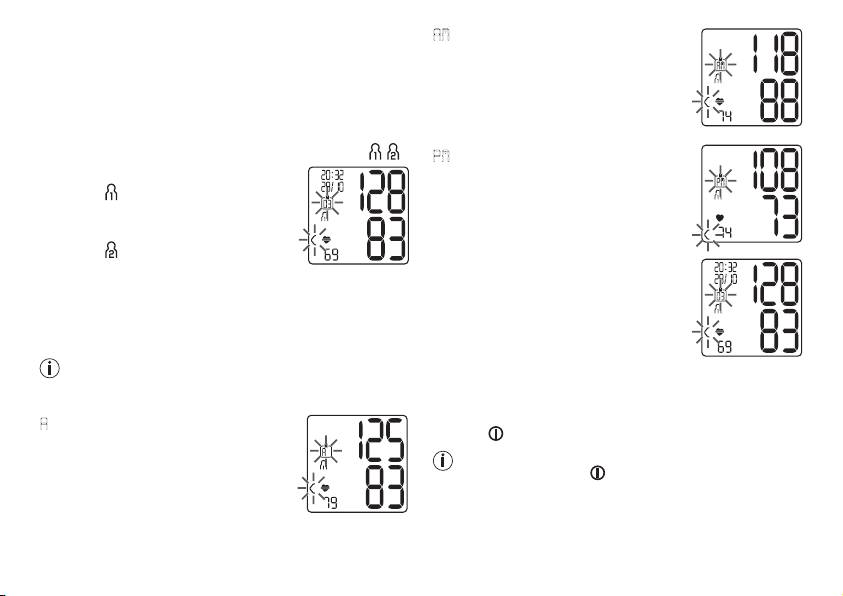
AM
flashes on the display.
User memory
The average value of the morning meas-
The results of every successful measurement are stored
urements for the last 7 days is displayed
together with the date and time. If there are more than 60
(morning: 5.00 a.m. – 9.00 a.m.).
measurements, the oldest measurements are lost.
•
Press the relevant memory button
(M1 or M2).
•
To access memory recall mode, press the M1 or M2
memory button to select your desired user memory ( ).
PM
flashes on the display.
– To view the measurements for user
The average value of the evening meas-
memory
press the M1 memory
urements for the last 7 days is displayed
button.
(evening: 6.00 p.m. – 8.00 p.m.).
– To view the measurements for user
memory
, press the M2 memory
Individual measured values
button.
•
When the relevant memory button
Your last measurement will appear on
(M1 or M2) is pressed again, the last
the display.
individual measurement is displayed
Average values
(in this example, measurement 03).
•
Press the relevant memory button (M1 or M2).
•
When the relevant memory button
Press the M1 button if you have selected user memory
(M1 or M2) is pressed again, you can view your individual
1. Press the M2 memory button if you have selected user
measurements.
memory 2.
•
To switch the device off again, press the START/STOP
A
flashes on the display.
button .
The average value of all saved meas-
You can exit the menu at any time by pressing the
ured values in this user memory is
START/STOP button .
displayed.
Deleting measured values
•
Press the relevant memory button
(M1 or M2).
•
To clear the memory of the relevant user memory, you
must first select a user memory.
22
