
Dell Precision T5400: Back View (Tower Orientation)
Back View (Tower Orientation): Dell Precision T5400
Table of contents
- Notes, Notices, and Cautions
- Contents
- Finding Information What Are You Looking For? Find It Here
- What Are You Looking For? Find It Here
- What Are You Looking For? Find It Here
- What Are You Looking For? Find It Here
- What Are You Looking For? Find It Here
- Setting Up Your Computer Changing Between Tower and Desktop Orientations Switching From Tower to Desktop Orientation Switching From Desktop to Tower Orientation
- Installing Your Computer in an Enclosure
- • If your enclosure has doors, ensure that they allow at least thirty percent airflow through the enclosure (front and back).
- Transferring Information to a New Computer Microsoft Windows XP
- Files and Settings Transfer Wizard (With the Operating System Disc)
- TRANSFER DATA TO THE DESTINATION COMPUTER Files and Settings Transfer Wizard (Without the Operating System Disc) CREATE A WIZARD DISK COPY DATA FROM THE SOURCE COMPUTER
- TRANSFER DATA TO THE DESTINATION COMPUTER Microsoft Windows Vista Power Protection Devices
- Surge Protectors Line Conditioners Uninterruptible Power Supplies
- About Your Computer Front View (Tower Orientation) 5 IEEE 1394 connector (optional)
- 12 diagnostic lights (4) Use these lights to help you troubleshoot a computer
- Back View (Tower Orientation)
- Back Panel Connectors (Tower Orientation) 5 link integrity light Green — A good connection exists between a 10-Mbps
- 10 USB 2.0 connectors (5)
- Front View (Desktop Orientation) 6 hard-drive activity light
- 12 diagnostic lights (4)
- Back View (Desktop Orientation)
- Cleaning Your Computer Computer, Keyboard, and Monitor Mouse (Non-Optical)
- Floppy Drive CDs and DVDs Troubleshooting Tools Power Lights
- • Eliminate interference. Some possible causes of interference are:
- Diagnostic Lights Diagnostic Light Codes During POST Light Pattern Problem Description Suggested Resolution
- Light Pattern Problem Description Suggested Resolution
- Light Pattern Problem Description Suggested Resolution
- Light Pattern Problem Description Suggested Resolution
- Beep Codes Code Cause Code Description Suggested Remedy
- Code Description Suggested Remedy System Messages
- Hardware Troubleshooter
- Dell Diagnostics Starting the Dell Diagnostics From Your Hard Drive
- Starting the Dell Diagnostics From the Drivers and Utilities Disc Dell Diagnostics Main Menu Option Function
- Option Function Tab Function
- Troubleshooting Battery Problems Drive Problems
- Optical Drive Problems Problems Writing to an Optical Drive
- Hard Drive Problems E-Mail, Modem, and Internet Problems
- RUN THE MODEM DIAGNOSTIC TOOL — VERIFY THAT THE MODEM IS COMMUNICATING WITH WINDOWS — ENSURE THAT YOU ARE CONNECTED TO THE INTERNET — Ensure that you have
- Error Messages
- IEEE 1394 Device Problems Keyboard Problems
- Lockups and Software Problems The computer does not start up The computer stops responding A program stops responding A program crashes repeatedly
- A program is designed for an earlier Windows operating system A solid blue screen appears Other software problems
- BACK UP YOUR FILES IMMEDIATELY Memory Problems Mouse Problems
- Network Problems
- Power Problems
- Printer Problems
- Sound and Speaker Problems No sound from speakers
- No sound from headphones Video and Monitor Problems The screen is blank
- CHECK THE MONITOR POWER LIGHT — The screen is difficult to read CHECK THE MONITOR CABLE CONNECTION — CHECK THE MONITOR POWER LIGHT —
- 3D image quality is poor Only part of the screen is readable
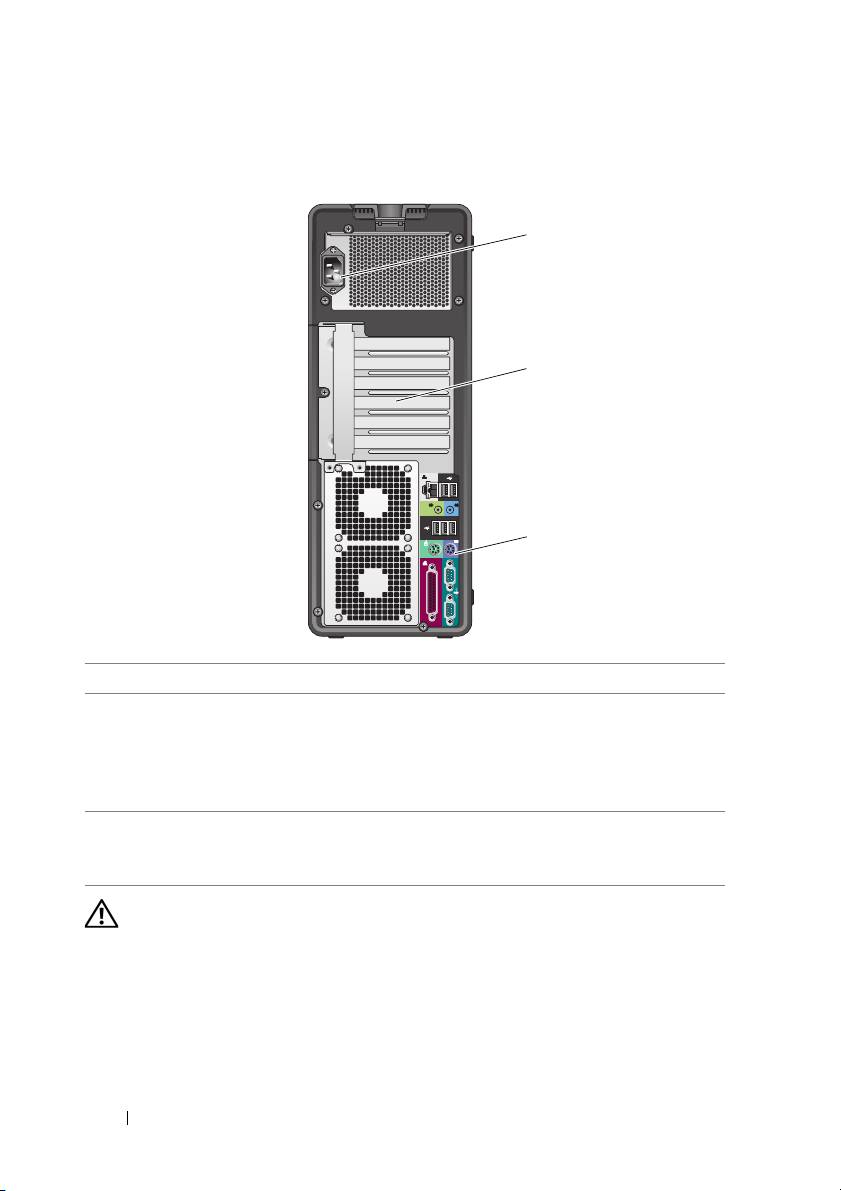
Back View (Tower Orientation)
1
2
3
1 power connector Insert the power cable.
2 card slots Access connectors for any installed PCI and PCI Express cards.
The center four connector slots support full-length cards,
and the connector slots on either the top or bottom (one x8
PCI Express slot (wired as x4) and one PCI-X card) support
half-length cards.
3 back panel
Plug USB, audio, and other devices into the appropriate
connectors
connector. For more information, see "Back View (Desktop
Orientation)" on page 25.
CAUTION: Ensure that none of the system air vents are blocked. Blocking them
would cause serious thermal problems.
20 Quick Reference Guide
Top 10 manuals
100.00
NZXT HALE90 1000W99.99
Samsung SM-R38099.97
AEG BSB 18C99.97
Dell 2700W99.97
Smeg KSEC70X99.96
Beurer HDE 4099.96
Pyramida KH 50 v.299.96
MSI CSM-H81M-P3299.96
AEG HR 562799.95
Melissa 640-048