
Dell E1911 Monitor: 4 | Adjust the monitor | Connect the power cable and press the power button
4 | Adjust the monitor | Connect the power cable and press the power button: Dell E1911 Monitor
Table of contents
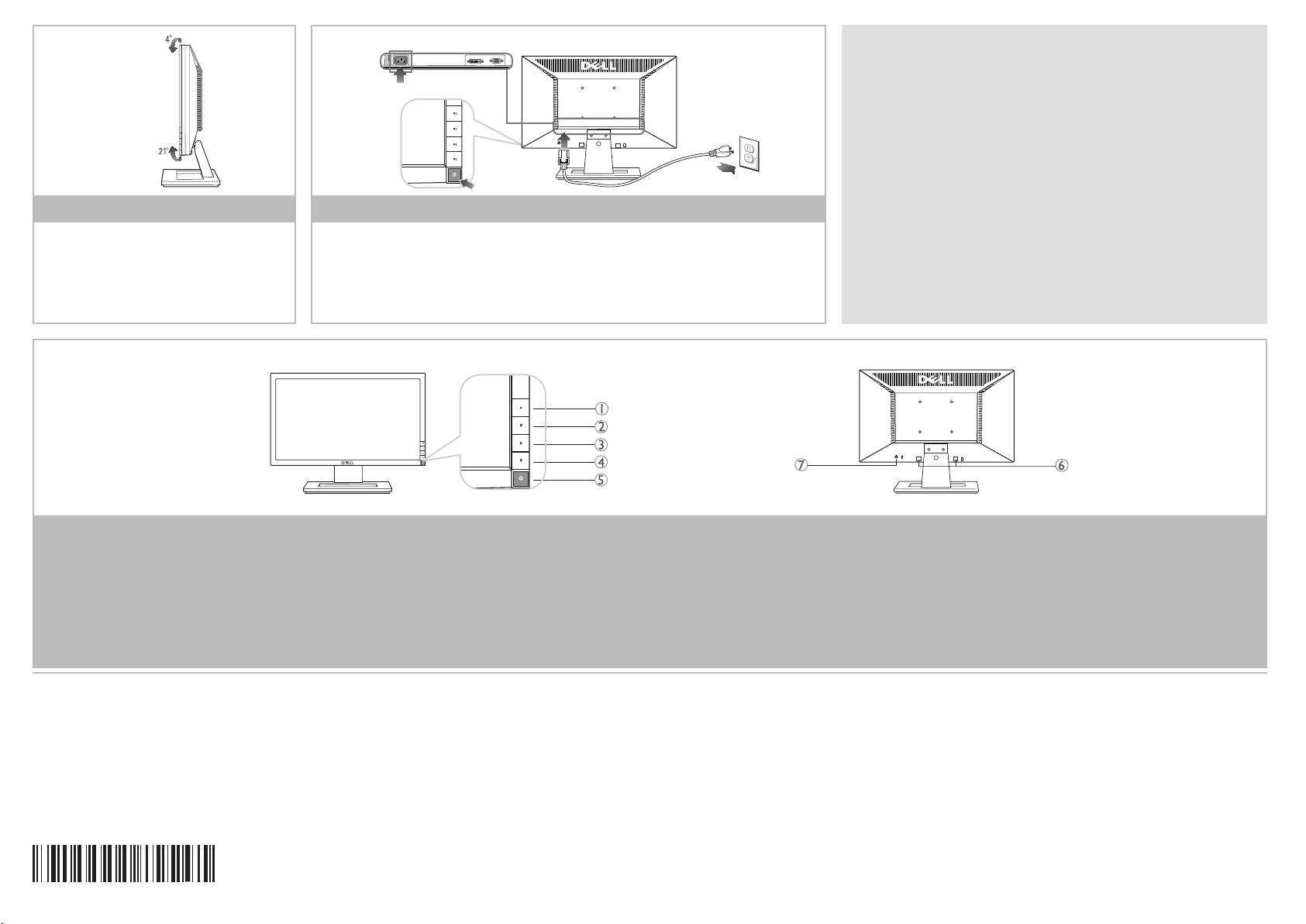
- Setting Up Your Monitor 1 | Verify the contents of the box 2 | Slide the monitor stand onto the base until it clicks into place 3 | Connect the monitor using ONLY ONE of following cables: the blue VGA cable or the white DVI cable
- 4 | Adjust the monitor | Connect the power cable and press the power button
NOTE: For more information see the in the
User's Guide
Drivers and Documentation
media that ships with your monitor.
REMARQUE: Pour plus d'informations consultez le sur le support
Guide Utilisateur
Pilotes et documentation
liv
ré avec votre moniteur.
NOTA: para más información, consulte el en el medio de
Manual del usuario
Documentación y controladores
que incluye su monitor.
NOTA: Per altre informazioni, fare riferimento alla , del supporto
Guida all’uso
Drivers
and User Documentation
(Driver e Documentazione) fornito in dotazione al monitor.
4 | Adjust the monitor
5
| Connect the power cable and press the power button
HINWEIS: Weitere Informationen, finden Sie im Medium
im Benutzerhandbuch
" ", das mit Ihrem Monitor mitgeliefert wird.
Treiber und Dokumentation
Régler le moniteur
Branchez le câble d'alimentation et appuyez sur le bouton d'alimentation
Ajuste el monitor
Conecte el cable de alimentación y presione el botón de encendido
ПРИМЕЧАНИЕ. Для получения дополнительной информации см.
Руководство
Regolazione del monitor
Collegare il cavo d'alimentazione e premere il tasto d’accensione
пользователя на
диске " ", поставляемом с монитором.
Драйверы и документация
Monitor anpassen
Schließen Sie das Netz
kabel an, und drücken Sie den Netzschalter.
OBSERVAÇÃO.: Para mais informações, veja na mídia
Guia do Usuário
Drivers e
Отрегулируйте монитор
Подключите шнур питания и нажмите кнопку питания
que é enviada junto ao seu monitor.
Documentação
Ajuste o monitor
Conecte o cabo de energia e pressione o botão de energia
1.
Shor
tcut Key 1:
1.
Touche raccourci 1
1.
Tecla de acceso directo 1
1.
Tasto scorciatoia 1
1.
Direkttaste 1
1.
Функциональная клавиша 1
1.
Tecla de atalho 1
Preset Modes
Modes de préréglage
Modos predefinidos
Modalità predefinite
Voreingestellte Modi
Предустановленные режимы
Modos pré-definidos
2.
Shortcut Key 2:
2.
Touche raccourci 2
2.
Tecla de acceso directo 2
2.
Tasto scorciatoia 2
2.
Direkttaste 2
2.
Функциональная клавиша 2
2.
Tecla de atalho 2
Brightness/Contrast
Luminosité/Contraste
Brillo y Contraste
Luminosità/Contrasto
Helligkeit / Kontrast
Яркость
/Контрастность
Brilho e Contraste
3.
OSD Menu
3.
Menu OSD
3.
OSD menu
3.
Menu OSD
3.
OSD-Menü
3.
Экранное меню
3.
Menu OSD
4.
Exit
4.
Quitter
4.
Salir
4.
Esci
4.
Verlassen
4.
Выход
4.
Saída
5.
Power Button
5.
Bou
ton d'alimentation (avec
5.
Bo
tón de encendido (con indicador
5.
Tasto di accensione (con
5.
Ein/Aus-Tas
te
5.
Кнопка включения питания (со
5.
Bo
tão liga/desliga (com luz
(with power light indicator)
témoin lumineux d'alimentation)
de luz de encendido/apagado)
indicatore luminoso accensione)
(mit Stromanzeige)
световым индикатором питания)
indicadora de funcionamento)
6.
Dell Soundbar Mounting
6.
Supports de montage Dell
6.
Ab
razaderas de montaje para
6.
Staffe di montaggio Dell
6.
Dell Soundbar
6.
Монтажные кронштейны для модуля
6.
Suportes de montagem do
Brackets
Soundbar
Dell Soundbar
Soundbar
Schraubbefestigungen
акустических систем Dell Soundbar
Dell Soundbar
7.
Security lock slot
7.
Fente de verrouillage de sécurité
7.
Ranura de bloqueo de seguridad
7.
Fessura per blocco di sicurezza
7.
Sicherheitsschloss-Schlitz
7.
Pазъем для защитного замка
7.
Ranhura de Bloqueio de Segurança
The contents herein are subject to change
La información de este documento se encuentra
Les informations contenues dans ce document
Le informazioni di questo documento sono
Änderung der Inform
ationen in diesem
Информация, содержащаяся в настоящем документе,
As informações neste documento estão
without notice.
sujeta a cambios sin aviso previo.
sont sujettes à modifications sans préavis.
soggette a cambiamenti senza preavviso.
Dokument jederzeit vorbehalten.
подлежит изменению без предварительного
sujeitas a alteração sem aviso.
© 2010 Dell Inc. All rights reserved.
© 2010 Dell Inc. tous droits rése
rvés.
© 2010 Dell Inc. tous droits rése
rvés.
©2010 Dell Inc.
Tutti i diritti sono riservati.
© 2010 Dell Inc. Alle
Rechte vorbehalten.
уведомления.
©2010 Dell Inc.
Todo os direitos reservados.
Printed in China. Printed on recycled paper.
.
Impreso en China. Impreso en papel reciclado.
Imprimé en Chine. Imprimé sur papier recyclé
.
Stamp
ato in Cina. Stampato su carta riciclata.
Printed in China. Gedruckt auf
Recycling-
©2010 Dell Inc. Вс
е права защищены. Отпечатано
Impresso na China. Impresso em papel
Reproduction of these materials in any
La
reproducción de dichos materiales sin permiso
La
reproduction de ces contenus de quelque
Qualsiasi tipo di rip
roduzione di questi
Papie
r.
в Китае. Настоящий документ отпечатан на бумаге из
reciclado.
manner wh
atsoever without the prior written
por escrito de Dell Inc. queda terminantemente
façon sans la permission écrite de Dell Inc. est
materiali, senza l’autorizzazione scritta della
Die
Reproduzierung dieser Materialien unter
вторичного сырья.
A
reprodução destes materiais em qualquer
permission
of Dell Inc. is strictly prohibited.
prohibida.
strictement interdite.
Dell Inc. è severamente proibita.
irgendeiner Form ohre die schriftliche
Воспроизведение данных материалов в любом виде без
maneira sem a permissão escrita da Dell Inc.
Dell is a trademark
of Dell Inc.; Dell Inc.
y el logotipo de son marcas comerciales
DELLDell
et le logo sont des marques
DELLDell
ed il logo sono marchi di fabbrica
Dell
DELL
Erlaubnis von Dell Inc. ist strengstens verboten.
письменного согласия компании Dell Inc. запрещено.
é estritamente proibida.
de Dell Inc.
déposées de Dell Inc.
registrati della Dell Inc.
und das Logo sind Warenzeichen
DELLDell
и логотип являются товарными знаками компании
Dell Dell
e o logotipo são marcas
DELLDell
disclaims any p
roprietary interest in trademarks
Dell descarga todo interés de propiedad sobre las
Dell renonce à tout intérêt de propriété dans
Dell nega ogni interesse di proprietà in marchi
von Dell Inc.
Dell Inc. Компания Dell не претендует на право
comerciais da Dell Inc.
and trade names other than its own
.
marcas y nombres de otras empresas.
les marques et noms des autres.
e nomi diversi dal proprio.
Dell hat keine Eigentumsrechte über Marken
собственности других товарных знаков.
A Dell nega qualquer interesse de
und Namen anderer Inhaber.
propriedade em marcas e nomes de terceiros.
August 2010 Août 2010 Agosto 2010 August 2010 Agosto 2010Agosto 2010
Август 2010
50650E19GB01R(A)XX
www.dell.com | support.dell.com
P/N: VC534 Rev. A00
