
Dell 1642018871: Figure 3. 5600W, 230V Rear Panel
Figure 3. 5600W, 230V Rear Panel: Dell 1642018871
Table of contents
- Notes and Warnings
- System Features
- Finding Information
- Installation and Startup Unpacking the System
- Lifting the Cabinet
- Identifying the UPS Figure 1. The Dell Online Rack UPS Front Panel Figure 2. 5600W, 208V Rear Panel
- Figure 3. 5600W, 230V Rear Panel
- Rackmount Setup Removing the Battery Retaining Bracket
- Removing the Battery Trays
- Installing the Rails
- Installing the Cabinet
- Securing the Cabinet Installing the Battery Trays
- Replacing the Battery Retaining Bracket and Connecting the Internal Battery Connectors
- Installing the UPS Front Cover Connecting the Equipment
- Hardwiring the UPS Input Figure 4. Circuit Breaker Diagram
- Removing the Terminal Block Cover
- Installing the Input and Ground Wires Table 1. UPS Wiring Specifications
- Starting the UPS
- Completing the Startup
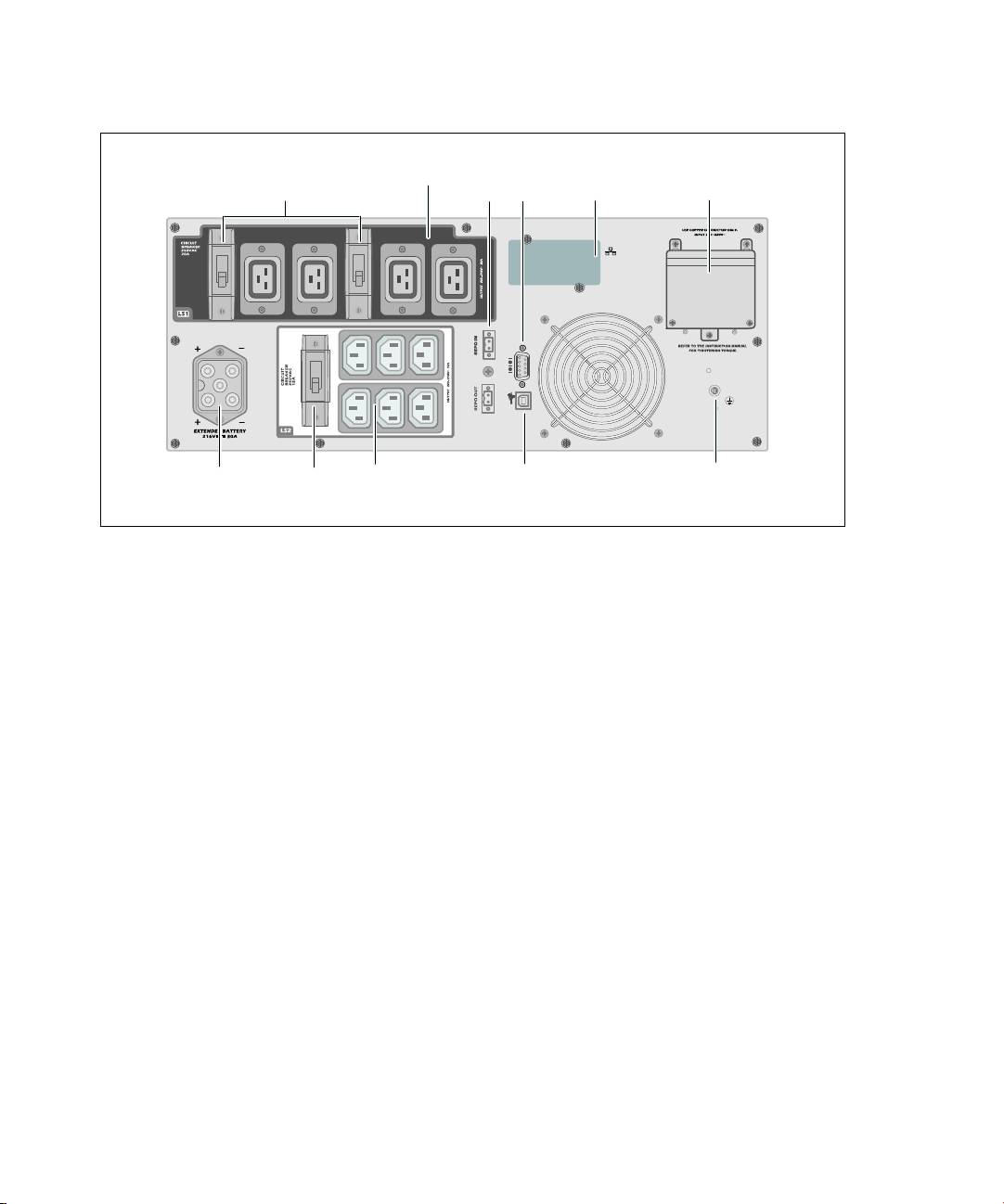
Four IEC 320-C19 Receptacles
UPS
(Load Segment 1)
REPO
RS-232
Communication
Input Terminal
Two Output Circuit Breakers
Ports
Port
Bay
Block
EBM
Output Circuit
Six IEC 320-C13
USB Port
Ground
Connector
Breaker
Receptacles
Screw
(Load Segment 2)
Figure 3. 5600W, 230V Rear Panel
8
|
Installation and Startup
Top 10 manuals
100.00
NZXT HALE90 1000W99.99
Samsung SM-R38099.97
AEG BSB 18C99.97
Dell 2700W99.97
Smeg KSEC70X99.96
Beurer HDE 4099.96
Pyramida KH 50 v.299.96
MSI CSM-H81M-P3299.96
AEG HR 562799.95
Melissa 640-048