
Beurer KS 800: 3. Unit description 4. Weighing / Timer
3. Unit description 4. Weighing / Timer: Beurer KS 800
Table of contents
- 1. Getting started 2. Initial use with the app
- 3. Unit description 4. Weighing / Timer
- 5. Error messages 6. Important instructions
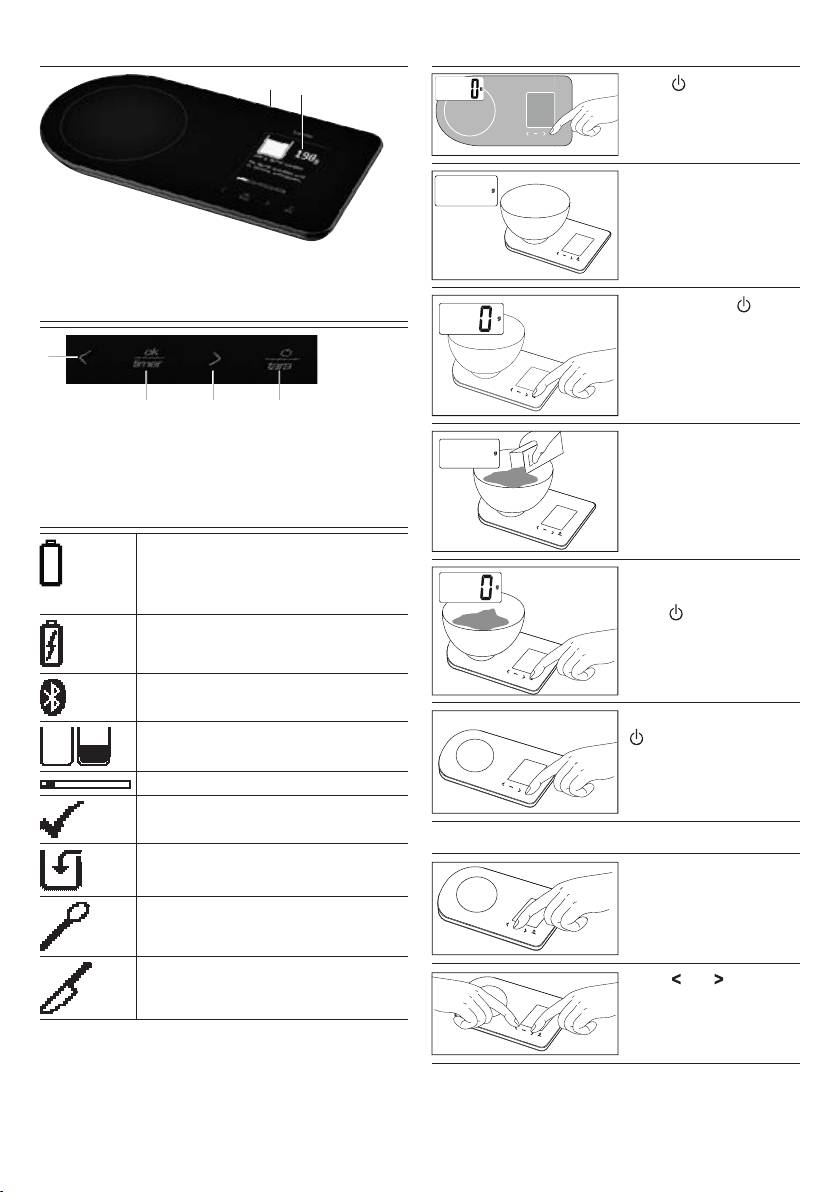
3. Unit description
4. Weighing / Timer
1
2
Press to switch on the
scale. Wait until
0 is dis-
played.
ok
taratimer
Position the container.
37
timer
ok
tara
1 Battery charging socket for charging the battery
with the USB cable provided
2 Display
Press the “tara / ” but-
ton.
1
timer
ok
tara
2 3 4
1 Recipe: Previous step
3 Recipe: Next step
Place the material to be
Timer: Setting the time
Timer: Setting the time
500
weighed on the scale.
2 Recipe: Confirming the
4 ON/OFF
recipe step
Tare function
Timer: Switching on
timer
ok
tara
The KS 800 kitchen scale features an inte-
grated lithium-ion battery. If the low bat-
To weigh additional
tery symbol appears, the battery must be
ingredients, press the
charged using the USB cable provided.
“tara /
” button again.
Battery charging.
tara
timer
ok
tara
Recipe is being transferred via Blue-
tooth.
Press and hold the
Fill level display for weighing during
-button for 3 seconds.
the recipe.
Progress bar/recipe
timer
ok
tara
Recipe step completed, next step fol-
lows
Setting the timer
Ingredients step, e.g. sugar
Press the “timer” button.
Action step, e.g. letting the dough rise
tara
timer
ok
tara
Preparation step, e.g. peeling the
Press and to set the
apples
desired time.
tara
timer
ok
tara
5
