
Dell OptiPlex FX160 (Late 2008): Thermal Restrictions Removing Chassis From Monitor Bracket Removing Counter Balance From Monitor
Thermal Restrictions Removing Chassis From Monitor Bracket Removing Counter Balance From Monitor: Dell OptiPlex FX160 (Late 2008)
Table of contents
- About Warning Mounting Counter Balance to the Monitor Mounting the Bracket to the Monitor Mounting the Chassis to the Plate Mounting the Chassis to the Monitor
- Thermal Restrictions Removing Chassis From Monitor Bracket Removing Counter Balance From Monitor
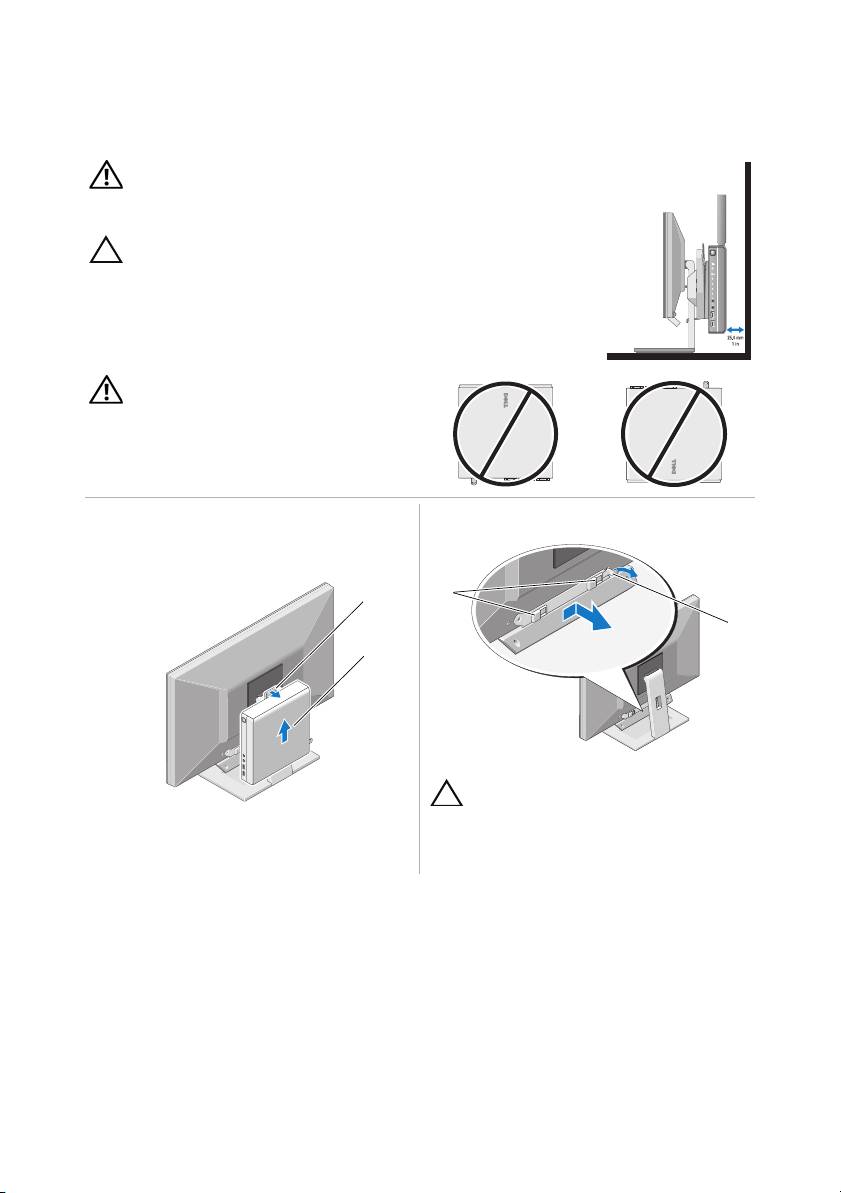
WARNING: Before mounting the chassis to the monitor, ensure that
none of the vents (OptiPlex™ FX160/160 has ventilation on four of the six
primary surfaces) are blocked on the system.
CAUTION: Before installing your computer in an enclosure,
read the safety instructions that shipped with your computer.
Thermal Restrictions
There must be at least 1 inch (25.4mm) clearance at the back of the chassis
for optimal system cooling.
WARNING: Chassis front face should not
be placed in the up or down position.
Removing Chassis From Monitor Bracket Removing Counter Balance From Monitor
1
1
2
2
CAUTION: Before removing the counter
balance, ensure the chassis is removed
from the monitor bracket.
1 release tab 2 chassis 1 mounting slots 2 release tab
____________________
Information in this document is subject to change without notice.
© 2009 Dell Inc. All rights reserved. Printed in China. Printed on Recycled Paper.
Reproduction of these materials in any manner whatsoever without the written permission of Dell Inc.
is strictly forbidden.
Trademarks used in this text: Dell, the DELL logo, and OptiPlex are trademarks of Dell Inc.
Other trademarks and trade names may be used in this document to refer to either the entities claiming the
marks and names or their products. Dell Inc. disclaims any proprietary interest in trademarks and trade
names other than its own.
