
Beurer MG 170: 7. Care and storage CLEANING Storage 8. In the event of problems
7. Care and storage CLEANING Storage 8. In the event of problems: Beurer MG 170
Table of contents
- Items included in the package: Explanation of symbols 1. Getting to know your appliance 2. Proper use
- 3. Safety information
- Repairs Fire hazard Handling Disposal 4. Start-up
- 5. Appliance description Massage mat (front) Hand switch 6. Operation
- 7. Care and storage CLEANING Storage 8. In the event of problems
Note
•
Do not use the massage device just before going to bed. The massage can also have a stimulating
effect and may cause difficulties in getting off to sleep.
WARNING
The massage must be pleasant and relaxing at all times. Stop the massage or change your position
or the contact pressure if you find it is painful or unpleasant.
7. Care and storage
CLEANING
WARNING
•
Disconnect the device before cleaning it.
•
Only clean the appliance in the manner specified. Fluid must never be allowed to enter into the
device or accessories.
•
Do not use the device again until it is completely dry.
First unplug the device and allow it to cool off. Then you can clean it with a cloth which is no more than lightly
moistened. You can also use a mild detergent.
Storage
•
Keep the massage device in a cool and dry place where it is out of the reach of children. We recommend
storing the device in its original packaging.
•
Avoid any contact with sharp or pointed objects which could damage the device or cover.
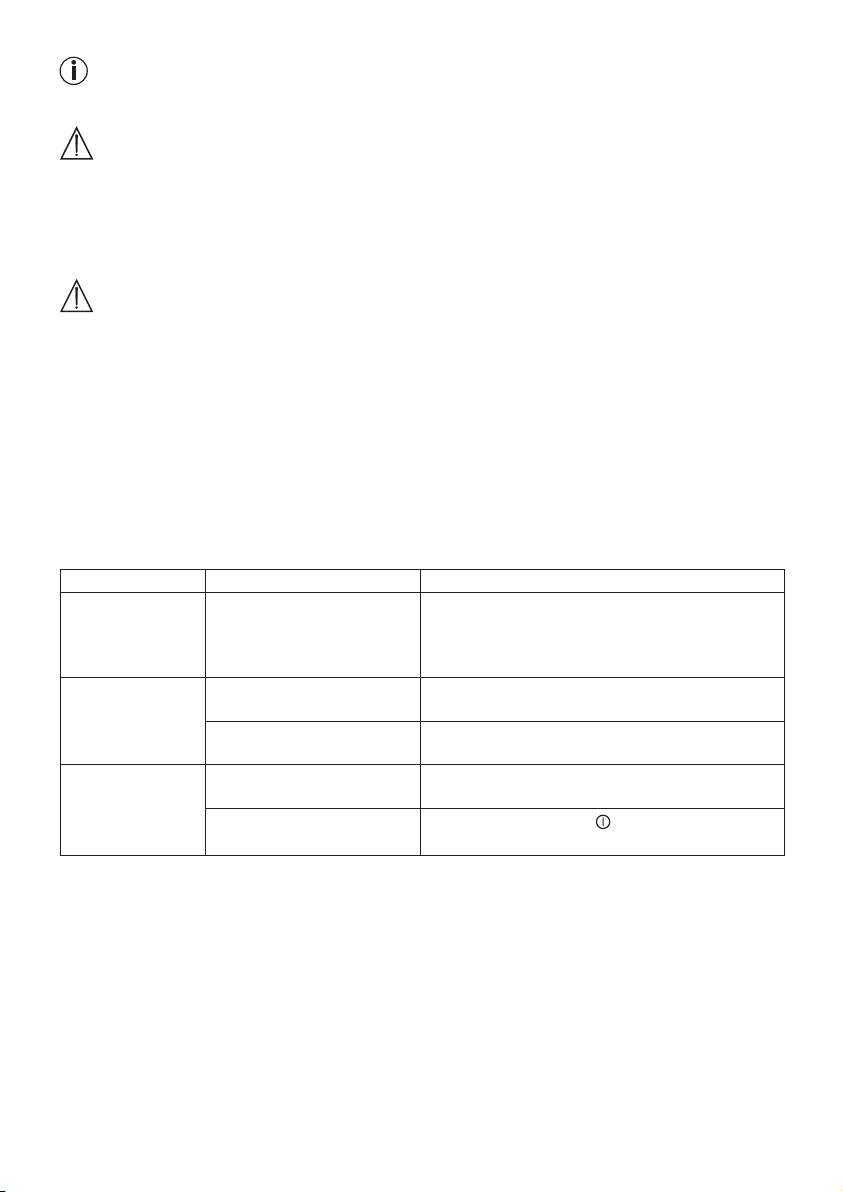
8. In the event of problems
Problem Cause Remedy
The device is
The seat cover is not fully
Ensure that the entire mat is resting at
very loud during
in The mat is not in full con-
massage.
tact with the surface it was
placed on.
Massage stopped. The preset maximum period
Let the device cool down for at least 15 min.
of operation has elapsed.
before using again. Switch the device on again.
The connection to the mains
Check the plug connection and the contact of the
has been interrupted.
mains plug with the mains supply.
No massage. Appliance not connected to
Make all connections and switch on the device.
the mains power supply.
Device not switched on.
Turn the device on using
and activate the mas-
sage using buttons 1 – 4.
12
