
Beurer BC 19: ENGLISH
ENGLISH: Beurer BC 19
ENGLISH
Dear Customer,
The device also has an acoustic voice output.
Thank you for choosing one of our products. Our name
Keep these instructions carefully for further use and also
stands for high-quality, thoroughly tested products for
let other users have access to them.
the applications in the areas of heat, weight, blood pres-
2. Important information
sure, body temperature, pulse, gentle therapy, massage
and air.
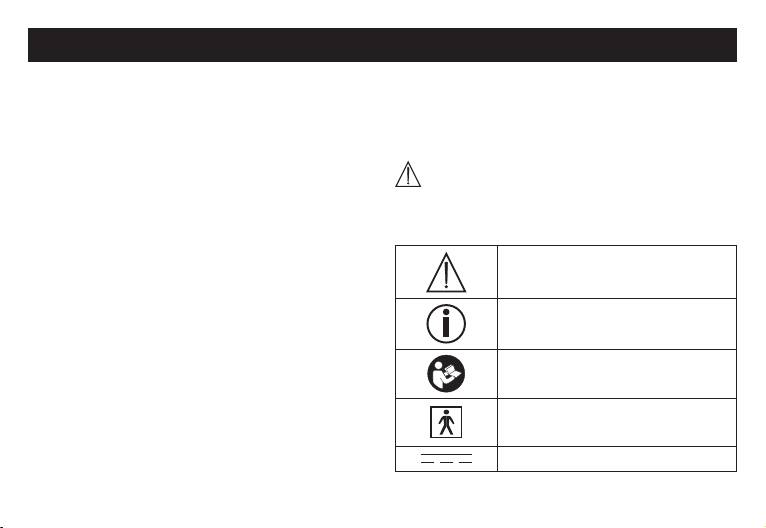
Signs and symbols
Please read these instructions for use carefully and keep
The following symbols are used in these instructions
them for later use, be sure to make them accessible to
for use, on the packaging and on the type plate for the
other users and observe the information they contain.
device and accessories:
Best regards,
Caution
Your Beurer Team
1. Getting to know your instrument
Note
The wrist blood pressure monitor is used for non-inva-
Note on important information
sive measurement and monitoring of adults’ arterial
blood pressure.
Follow instructions for use
You can use it to measure your blood pressure quickly
and easily, storing the results and displaying the pro-
gression of readings together with the average.
Type BF applied part
A warning is issued for anyone suffering from cardiac
arrhythmia.
The values determined are classified and graphically
Direct current
evaluated according to WHO guidelines.
14
•
Before every measurement, relax for about five minu-
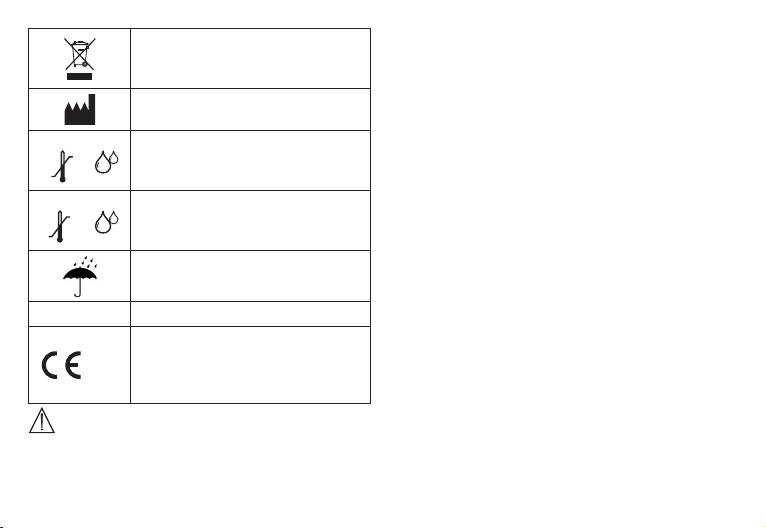
Disposal in accordance with EC Direc-
tes.
tive – WEEE (Waste Electrical and
•
If you want to perform several measurements on the
Electronic Equipment).
same person, wait five minutes between each measu-
Manufacturer
rement.
•
Do not take a measurement within 30 minutes after
Storage
eating, drinking, smoking or exercising.
Permissible storage temperature and
55°C
•
Repeat the measurement if you are unsure of the mea-
humidity
-20°C
sured value.
RH ≤85%
•
The measurements taken by you are for your informa-
Operating
Permissible operating temperature
tion only – they are not a substitute for a medical exa-
40°C
and humidity
mination! Discuss the measurements with your doctor,
10°C
RH ≤85%
and never base any medical decisions on them (e.g.
Keep dry
medicines and their administration)!
•
Do not use the blood pressure monitor on newborns
or patients with preeclampsia. We recommend con-
SN Serial number
sulting a doctor before using the blood pressure moni-
tor during pregnancy.
The CE labelling certifies that the
•
In the case of restricted circulation on the arm as a
product complies with the essential
result of chronic or acute vascular diseases (inclu-
0483
requirements of Directive 93/42/EEC
ding vascular constriction), the accuracy of the wrist
on medical products.
measurement is limited. In this case you should avoid
using an upper arm blood pressure monitor.
Advice on use
•
Cardiovascular diseases may lead to incorrect measu-
•
In order to ensure comparable values, always measure
rements or have a detrimental effect on measurement
your blood pressure at the same time of day.
accuracy. The same also applies to very low blood
15

pressure, diabetes, circulatory disorders and arrhyth-
• The device is only intended for the purpose described in
mias as well as chills or shaking.
these instructions for use. The manufacturer is not liable
•
The blood pressure monitor must not be used in con-
for damage resulting from improper or careless use.
nection with a high-frequency surgical unit.
Storage and Care
•
Only use the unit on people who have the specified
wrist measurement for the device.
•
The blood pressure monitor is made up of precision
•
Please note that when inflating, the functions of the
electronic components. Accuracy of readings and the
limb in question may be impaired.
instrument’s service life depend on careful handling.
•
During the blood pressure measurement, blood circu-
– You should protect the device from impact, moisture,
lation must not be stopped for an unnecessarily long
dirt, major temperature fluctuations and direct expo-
time. If the device malfunctions, remove the cuff from
sure to the sun’s rays.
the arm.
– Never drop the device.
•
Do not allow sustained pressure in the cuff or frequent
– Do not use near strong electromagnetic fields, i.e.
measurements. The resulting restriction of the blood
keep it away from any radio systems and mobile
flow may cause injury.
phones.
•
Ensure that the cuff is not placed on an arm in which
– Only ever use the cuffs provided with the monitor
the arteries or veins are undergoing medical treatment,
or original replacement cuffs. Otherwise erroneous
e.g. intravascular access or therapy, or an arteriove-
results will be recorded.
nous (AV) shunt.
•
Do not press any buttons until the cuff is in position.
•
Do not use the cuff on people who have undergone a
•
If the instrument is not used for any length of time, we
mastectomy.
recommend removing the batteries.
•
Do not place the cuff over wounds as this may cause
further injury.
Advice on batteries
•
The blood pressure monitor can only be operated with
•
Batteries can be fatal if swallowed. You should there-
batteries.
fore store the batteries and products where they are
•
To conserve the batteries, the monitor switches off
automatically if no buttons are pressed for one minute.
16
inaccessible to small children. If a battery has been
the batteries and replace them if necessary prior to
swallowed, call a doctor immediately.
making any complaint.
•
Batteries should not be charged or reactivated with
•
The appliance should be disposed of according to
any other means, nor should they be taken apart,
Regulation-WEEE (Waste Electrical and Elec-
thrown in the fire or short-circuited.
tronic Equipment). In case of queries, please
•
Remove the batteries from the instrument if they are
contact the municipal authorities responsible for
worn out or if you are not going to use the instrument
waste disposal in your area.
for any length of time. This prevents any damage as a
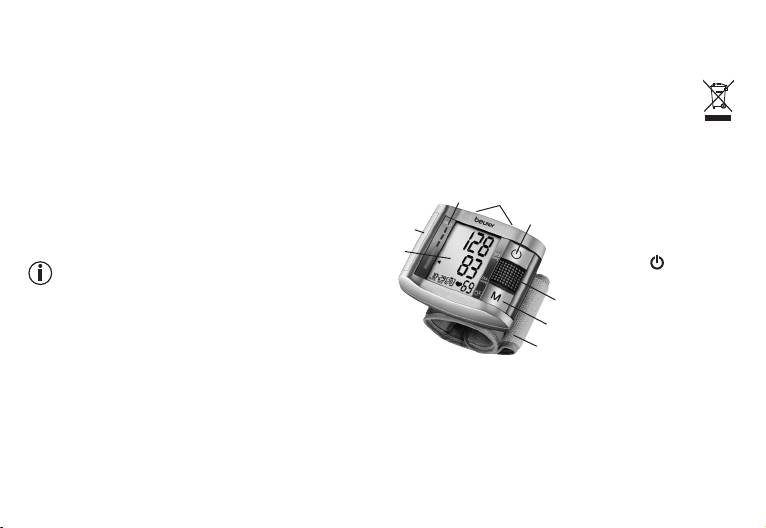
3. Unit description
result of leakage. Always replace all the batteries at the
same time.
8
1
. Battery cover
7
•
Never use different types of battery, battery brands or
2
. Display
4
batteries with different capacities. You should prefer-
1
3
.
Loudspeaker
ably use alkaline batteries.
4
. START/STOP
2
button
Repair and disposal
5
. Memory button M
•
Batteries do not belong in domestic refuse. Used bat-
3
6
. Wrist cuff
teries should be disposed of at the collection points
7
. Volume button
5
provided.
louder +/quieter -
6
•
Never open the instrument. If these instructions are
8. WHO - LED
not heeded, the warranty will be null and void.
•
Never attempt to repair the instrument or adjust it
yourself. We can no longer guarantee perfect function-
ing if you do.
•
Repairs may only be performed by Beurer Customer
Service or authorized dealers. However, always check
17
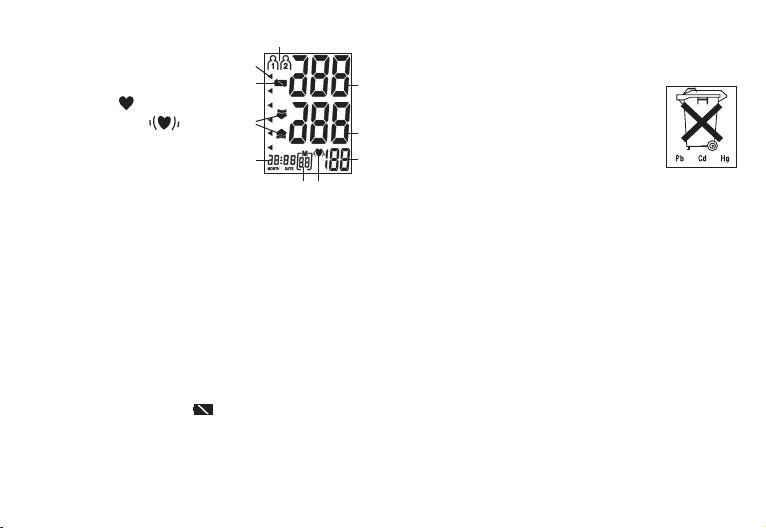
Icons in the display:
Once batteries have been removed from the device, the
10
1. Systolic pressure
time must be reset. Any measurement results that have
9
2. Diastolic pressure
been stored are however retained.
8
1
3. Pulse rate
Note: You will find these markings on batte
4. Pulse icon
/ Cardiac
ries containing harmful substances: Pb =
arrhythmia icon
7
battery containing lead, Cd = battery con-
2
5. Number of memory space
taining cadmium, Hg = battery containing
6. Time and date
mercury.
6
3
7. Inflate/deflate arrow
Setting date and time
45
8. ‘Change battery’ icon
It is vital to set the date and time. This is the only way
9. WHO classification
that measurements can be saved and recalled with the
10. Memory Zones
correct date and time.
4. Prepare measurement
The time is shown in 24 hour format. The device also has
five languages. The device is set to German on delivery.
Inserting battery
Proceed as follows to set the date, time and language:
•
Remove the battery cover (left side of the unit).
•
Press the memory key M for over 5 seconds.
•
Insert two 1.5 V micro batteries (alkaline, type LR 03).
•
The year starts flashing. Use the +/- key to set the year
Make absolutely sure that you insert the batteries with
and confirm with the memory key M.
the correct polarity as marked. Do not use recharge-
•
Set the year, month, day, hour and minute and confirm
able batteries.
in each case with the memory key M.
•
Replace the battery cover carefully.
•
After setting the date and time you can set the lan-
If the ‘change battery’ icon
is displayed, measure-
guage.
ment is no longer possible and you must replace all
•
Use the + and - volume keys to select the following
the batteries.
languages: L1 = German, L2 = English, L3 = French,
L4 = Spanish, L5 = Russian, L0 = no language. Con-
firm your selection with the memory key M.
18
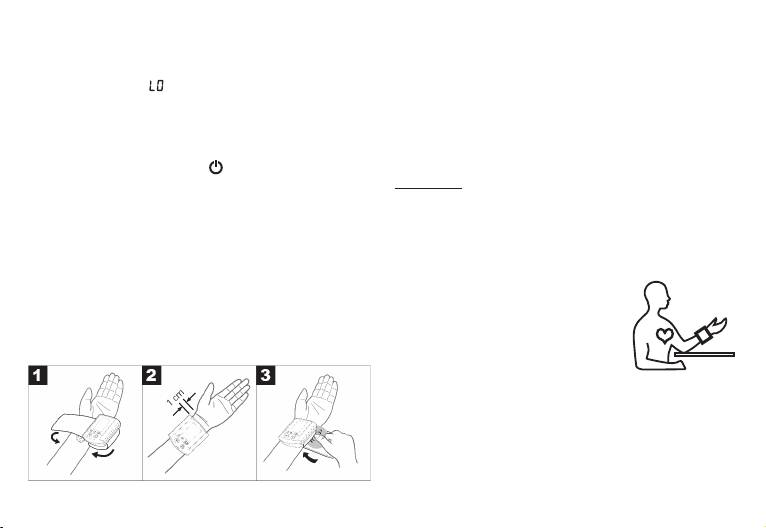
•
You can then set the volume of the selected language:
•
Bare your left wrist, making sure that the circulation in
Vol 3 = high, Vol 2 = medium, Vol 1 = low. Confirm
the arm is not restricted by any clothes etc. that are
your selection with the memory key M.
too tight. Position the cuff on the inside of your wrist.
Note: Language off means that voice output is
•
Fasten the cuff with the Velcro fastening so that the
not selected and the measurement value will not be
upper edge of the monitor is positioned approx. 1 cm
announced.
below the ball of your thumb.
•
The cuff has to be fitted tightly around the wristbut
Select memory
should not constrict it.
Switch on the device with the
button. When the
device is switched off only the clock in the display is
Important: The instrument should only be operated with
shown. After the announcement you can select the
the original cuff.
desired memory space by pressing the + or - volume
Correct posture
button.
•
Rest for approx. 5 minutes before each measurement.
Two memories with 60 memory spaces each are avail-
Otherwise there may be divergences.
able to save the measurement results of two different
•
You can perform the measurement
people separately or to save morning and evening meas-
while sitting or lying. To carry out a
urement values separately.
blood pressure measurement, make
5. Measuring blood pressure
sure you are sitting comfortably with
your arms and back leaning on
Positioning cuff
something. Do not cross your legs.
Place your feet flat on the ground.
Make sure to rest your arm and move it. Always make
sure that the cuff is at heart level. Otherwise significant
deviations can occur. Relax your arm and the palm of
your hand.
•
In order not to distort the result, it is important to keep
still during the measurement and not talk.
19
• • • • • • • • • • • • •

Measuring blood pressure
instructions on error messages/troubleshooting and
•
Put on the cuff as described previously and assume
repeat the measurement.
the position in which you want to carry out the meas-
•
The test result is saved automatically.
urement.
Evaluating results
•
Start the measurement process by pressing START/
Cardiac arrhythmia:
STOP button . After checking the display with all
This instrument can identify possible cardiac arrhythmia
digits lighting up, the monitor will automatically inflate.
disorders during measurement and if necessary indi-
Following the self-test, during which all display ele-
cates the measurement with the flashing icon
.
ments briefly appear, the measurement begins. Dur-
This may be an indicator for arrhythmia. Arrhythmia
ing inflation the device already determines measured
is a condition where the heart rhythm is abnormal as
values used to estimate the required inflation pressure.
a result of defects in the bioelectrical system control-
If this pressure is insufficient, the device automatically
ling the heart beat. The symptoms (omitted or prema-
inflates by another 40 mmHg (Real Fuzzy Logic).
ture heart beats, slow or excessively fast heart rate) may
•
Then the pressure in the cuff is slowly released and
be caused, among other things, by heart disease, age,
the pulse is measured.
physical predisposition, excessive use of stimulants,
•
When the measurement has been completed, the
stress or lack of sleep. Arrhythmia can only be ascer-
remain ing air pressure is released very quickly. The
tained through examination by your doctor.
pulse, the systolic and the diastolic blood pressure are
Repeat the measurement if the flashing icon is
displayed.
displayed after the measurement. Please note that you
•
You can adjust the volume during the announcement
should rest for 5 minutes between measurements and
by pressing + and -.
not talk or move during the measurement. If the icon
•
You can interrupt measurement at any time by press-
appears often, please contact your doctor. Any
ing the START/STOP button .
self-diagnosis and treatment based on the test results
•
_ appears if it has not been possible to perform the
may be dangerous. It is vital to follow your doctor’s
measurement properly. Observe the section in these
instructions.
20

WHO classification:
Have it che-
In accordance with the guidelines/definitions of the
High-normal
cked regu-
130 -139 85 - 89
World Heath Organization and the latest findings, the
(Green)
larly by doc-
measurements can be classified and assessed accor-
tor
ding to the following table.
Check it
However, these standard values serve only as a general
Normal (Green) 120 -129 80 - 84
yourself
guideline, as the individual blood pressure varies in diffe-
Check it
rent people and different age groups etc.
Optimal (Green) <120 <80
yourself
It is important to consult your doctor regularly for advice.
Your doctor will tell you your individual values for normal
Source: WHO, 1999
blood pressure as well as the value above which your
blood pressure is classified as dangerous.
The bar graph in the display and the scale on the unit
indicate the range of the blood pressure which has been
Range of blood
Systolic
Diastolic
Measure
recorded. An accoustic evaluation of your measurement
pressure values
(in mmHg)
(in mmHg)
also follows.
Grade 3:
If the values for systolic and diastolic pressure are in
Seek medical
Severe hyperten-
≥180 ≥110
two different WHO ranges (e.g. systolic in the high-nor-
advice
sion (Red)
mal range and diastolic pressure in the normal range)
Grade 2:
the graphic WHO classification on the unit indicates the
Seek medical
Moderate hyper-
160 -179 100 -109
higher range (high-normal in the example described).
advice
tension (Orange)
6. Saving, retrieving and deleting results
Have it che-
Grade 1:
•
The results of each successful measurement are
cked regu-
Mild hypertension
140 -159 90 - 99
stored together with date and time. With more than
larly by doc-
(Yellow)
60 items of measured data, the earliest items of data
tor
measured are lost.
21

•
In order to retrieve measurement results again, press
•
there is a system or device error (
ErA
,
, Er7
or
the memory key M. Initially, the average value of the
Er8
appears on the display)
last three blood pressure readings is displayed (Dis-
•
the batteries are almost empty .
play ). Press the memory key M again to display the
In the above cases, you must repeat the measurement.
latest measurements with date, time and graphic WHO
Make sure that the cuff tube is properly inserted and that
classification and to hear the values announced. You
you do not move or talk.
can adjust the volume during the announcement by
Re-insert the batteries if necessary, or else replace
pressing the volume key + and -.
them.
•
You can clear the memory by pressing and holding +
and - simultaneously for 5 seconds after pressing the
Technical alarm – description
memory key M and selecting the user.
Should the recorded blood pressure (systolic or diasto-
•
If you wish to change the user memory, see “Select
lic) lie outside the limits specified in the section “Techni-
memory”.
cal specifications”, the technical alarm will appear on the
display indicating either “
” or “
Lo
”. In such cases, you
7. Error messages/troubleshooting
should seek medical assistance and check the accuracy
In case of faults, the _ message appears in the display.
of your procedure.
Error messages may appear if:
The limit values for the technical alarm are factory set
•
systolic or diastolic pressure could not be measured
and cannot be adjusted or deactivated. These alarm limit
( or appears on the display)
values are accorded second priority under the standard
•
systolic or diastolic pressure was outside the measure-
IEC 60601-1-8.
ment range ( or
Lo
appears on the display)
The technical alarm is a non-locking alarm and must not
•
the cuff is fastened too tightly or loosely (
Er3
or
Er4
be reset. The signal shown on the display will disappear
appears on the display)
automatically after about 8 seconds.
•
the pump pressure is higher than 300 mmHg (
Er5
appears on the display)
•
pumping up takes longer than 160 seconds (
Er6
appears on the display)
22

8. Cleaning and storing the instrument
Dimensions L 85 mm x W 70 mm x H 31 mm
•
Clean your blood pressure monitor carefully using a
Weight Approx. 140 g (without batteries)
slightly damp cloth only.
Cuff size 14.0 to 19.5 mm
•
Do not use any detergents or solvents.
•
Never hold the instrument under water as otherwise
Permissible operating
+10 °C to +40 °C, ≤ 85 % relative
liquid can penetrate and damage the instrument.
conditions
air humidity (non-condensing)
•
Never place any heavy objects on the instrument.
Permissible storage
-20 °C to +55 °C, ≤85 % relative
conditions
air humidity, 800-1050 hPa ambi-
9. Technical details
ent pressure
Model no. BC 19
Power supply
2 x 1,5 V
AAA batteries
Measurement
Oscillometric, non-invasive blood
Battery life For approx. 250 measurements,
method
pressure measurement on the
depending on the blood pressure
wrist
level and/or pump pressure
Measurement range Cuff pressure 0 – 300 mmHg,
Accessories Instruction for use, 2 x 1.5 V AAA
systolic 60 – 260 mmHg,
batteries, storage box
diastolic 40 – 199 mmHg,
Classification Internal supply, continuous oper-
Pulse 40 –180 beats/minute
ation, type BF applied part, IPX0,
Display accuracy Systolic ± 3 mmHg,
no AP or APG
diastolic ± 3 mmHg,
pulse ± 5 % of the value shown
Technical information is subject to change without notifi-
Measurement inac-
Max. permissible standard devia-
cation to allow for updates.
curacy
tion according to clinical testing:
•
This unit is in line with European Standard EN 60601-
systolic 8 mmHg /diastolic
1-2 and is subject to particular precautions with regard
8 mmHg
to electromagnetic compatibility (EMC). Please note
Memory 2 x 60 memory spaces
that portable and mobile HF communication sys-
23

tems may interfere with this unit. More details can be
requested from the stated Customer Service address
or found at the end of the instructions for use.
•
This device is in line with the EU Medical Devices
Directive 93/42/EC, the “Medizinproduktegesetz”
(German Medical Devices Act) and the standards
EN1060-1 (non-invasive sphygmomanometers, Part 1:
General requirements), EN1060-3 (non-invasive
sphygmomanometers, Part 3: Supplementary require-
ments for electro-mechanical blood pressure measur-
ing systems) and IEC80601-2-30 (Medical electrical
equipment – Part 2 – 30: Particular requirements for the
safety and essential performance of automated non-
invasive blood pressure monitors).
•
The accuracy of this blood pressure monitor has been
carefully checked and developed with regard to a long
useful life. If using the device for commercial medical
purposes, it must be regularly tested for accuracy by
appropriate means. Precise instructions for checking
accuracy may be requested from the service address.
24


