
Beurer FT 55: 7. Trouble shooting Error message Problem Solution
7. Trouble shooting Error message Problem Solution: Beurer FT 55
Table of contents
- 1. Important notes
- 2. What you should know about using this thermometer Beurer-Tip:
- Beurer-Tip: 3. Description of device Front side Rear side
- 4. Functions 5. Operation 5.1 Setting time and date
- 5.2 Batteries 6. During use 6.1 Measuring in the ear
- 6.2 Saving the temperatures measured 6.3 Surface temperatures 6.4 Ambient temperature 6.5 Changing the temperature unit
- 7. Trouble shooting Error message Problem Solution
- 8. Cleaning, storage, disposal 9. Technical data
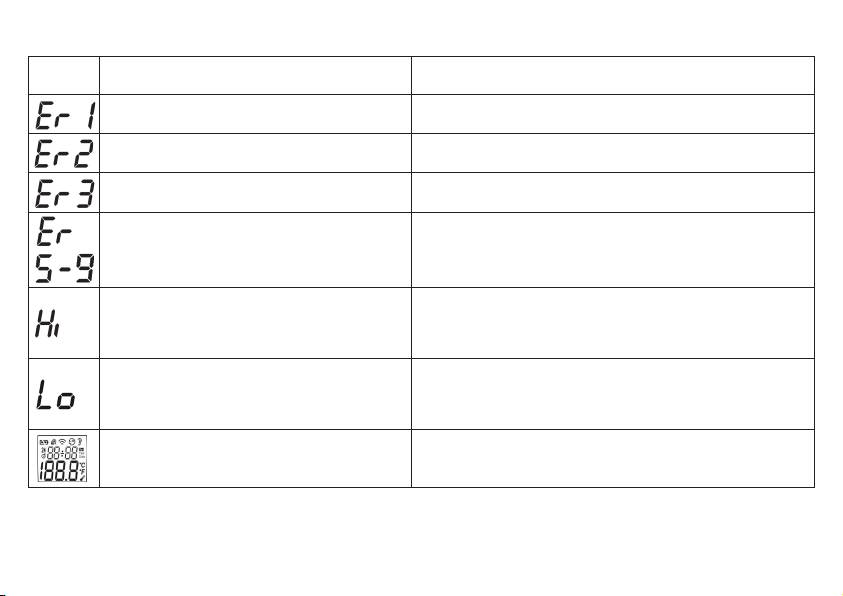
7. Trouble shooting
Error
message Problem Solution
Autotest in progress, device not yeat ready for. Wait until the ear symbol stops flashing.
Large fluctuation in ambient temperature. Store the device for at least 30 minutes in the room where the
measurement will be taken.
Ambient temperature below 10 °C or above 40 °C
The ambient temperature must be between 10 °C and 40 °C (50 °F,
(<50 °F, >104 °F).
104 °F).
Device no longer functioning correctly. Take out battery for approx. 1 minute and insert again. If the error
message is repeated, consult your dealer or customer service.
(1) Ear thermometer mode: the temperature measured
Operate the thermometer only between the specified tempera ture
is higher than 42.2 °C (108 °F).
ranges. If necessary, clean the sensor tip. In the event of a repeated
(2) SCAN mode: the temper ature measured is higher
error message, contact your dealer or customer service.
than 80 °C (176 °F).
(1) Ear thermometer mode: the temperature measured
Operate the thermometer only between the specified temperature
is lower than 34,0 °C (93.2 °F).
ranges. If necessary, clean the sensor tip. In the event of a repeated
(2) SCAN mode: the temperature measured is lower
error message, contact your dealer or customer service.
than -22 °C (-7.6 °F).
Autotest not successful. Insert new battery.
18
