
Vitek VT-4060 SR: SPEAKERS Composite Video SVideo ARRANGEMENT OF SPEAKERS Component Video (YUV) VGA SCART CONNECTING SPEAKERS
SPEAKERS Composite Video SVideo ARRANGEMENT OF SPEAKERS Component Video (YUV) VGA SCART CONNECTING SPEAKERS: Vitek VT-4060 SR
Table of contents
- DVD 5.1 HOME THEATRE SYSTEM IMPORTANT NOTICES:
- ABOUT YOUR DVD PLAYER BEST LOCATION TO OBTAIN A CLEAR PICTURE PLAYABLE DISCS DIGITAL AUDIO OUTPUT ANALOG AUDIO OUTPUT LASERHEAD OVERCURRENT PROTECTION SYSTEM DISCS USE OF DISC Handling Cleaning
- Storing Handing and Caring for Discs Step: FRONT PANEL REAR PANEL Remote control OPERATING THE REMOTE CONTROL Battery installation: Using the Remote Control
- BATTERIES Connection Stereo Audio Coaxial Digital Audio Speaker Output
- SPEAKERS Composite Video SVideo ARRANGEMENT OF SPEAKERS Component Video (YUV) VGA SCART CONNECTING SPEAKERS
- ANGLE MARK: OSD LANG: CLOSED CAPTIONS: SCREEN SAVER: LAST MEMORY: CONNECTING ANTENNA AUDIO SETUP PAGE ANALOG AUDIO SETUP: DOWNMIX: LT/RT: MENU OPERATION: STEREO: 3D SURROUND: OFF: GENERAL SETUP PAGE FRONT, CENTER, REAR and SUBWOOFER SPEAKER: (No this DIALOG:
- DIGITAL AUDIO SETUP PAGE 3D PROCESSING: DIGITAL OUTPUT: SPDIF OFF: HDCD SETUP: ALL: KARAOKE PCM ONLY: LPCM OUT: DOLBY DIGITAL SETUP VIDEO SETUP PAGE DUAL MONO: DYNAMIC: COMPONENT V IDEO: CHANNEL DELAY PAGE: EQUALIZER: COLOR SETTING SETUP:
- PREFERENCES PLAYING THE RADIO AUDIO, SUBTITLE and DISC MENU LANGUAGE PAGE: PARENTAL: BASIC DVD OPERATION PASSWORD PAGE:
- PREV/NEXT playback MENU: MENU/PBC FUNCTIONS LOCATING A TITLE
- JPEG FILES
- Troubleshooting Symptom Cause Solution Specification DVD receiver
ENGLISH
Note:
• Real connection depends on the TV/monitor input terminal.
• Don't use the all connections at the same time, otherwise the picture
will be affected.
Only the physical connection conforms to the video setting can
it produce the normal picture (please refer to the Video Setup in
System Setup).
SPEAKERS
The configuration and arrangement of a surround sound system
speakers is critical. For maximum listening enjoyment, refer to the
arrangement of speakers section in this manual prior to connecting
speakers.
Surround Sound Speakers
Front or main right and left speakers; center speaker
These three speakers provide extensive sound imaging and augment the
dynamic effect of the audio. A movie principal dialogue comes through
these speakers.
Rear or surround sound speakers
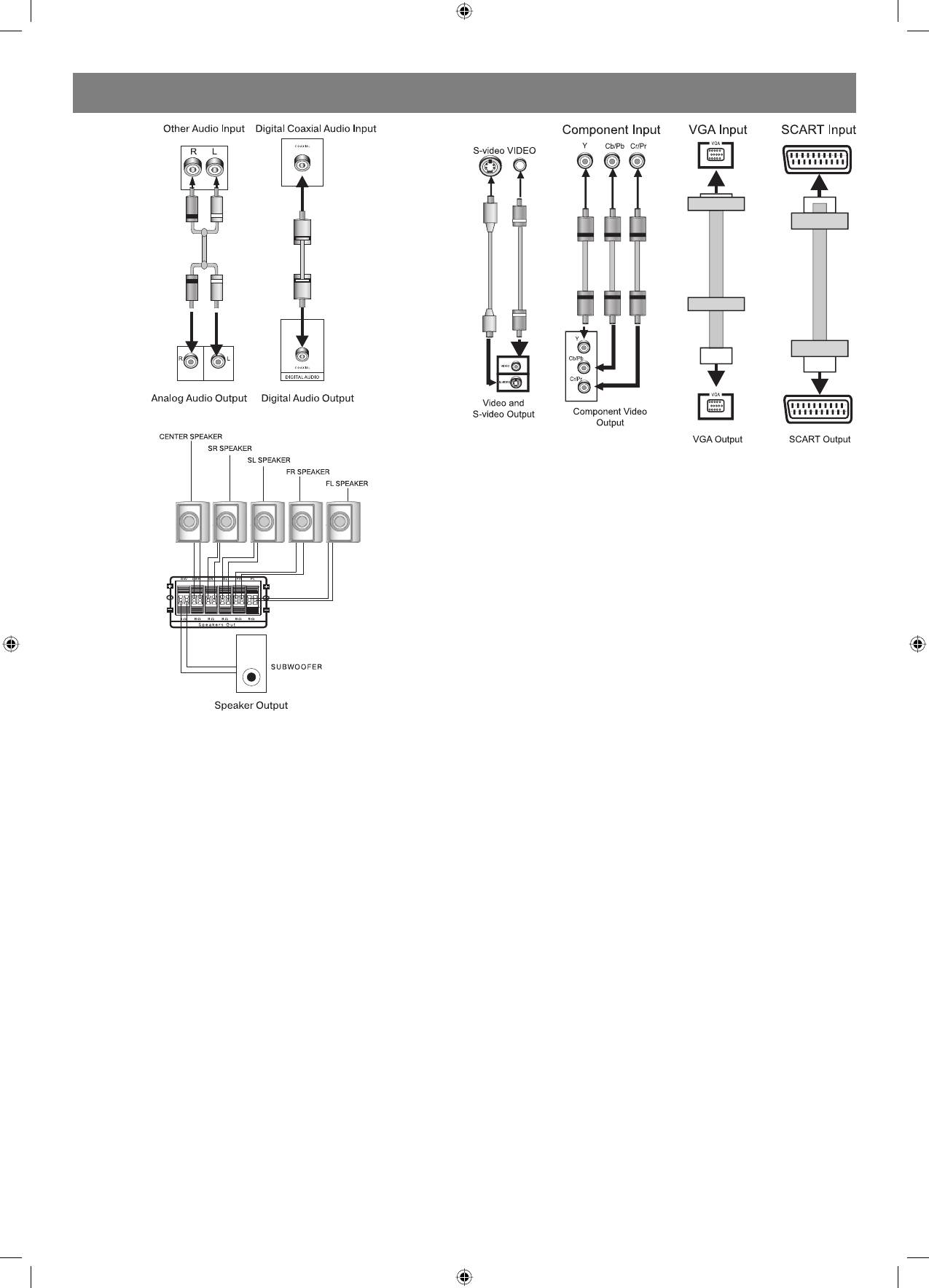
Connection
These two speakers provide 3D dynamic sound effects, and create an
The following available video output for this unit.
enveloping atmosphere, as they add background sounds.
Composite Video
SubWoofer speaker
Use the AVc able (yellow terminal) to connect composite video output
Provides rich and powerful bass, adding a powerful dimension of
terminal of this unit to the TV/monitor video input terminal.
realism.
Note: Audio recorded for the center speaker and subwoofer will be
SVideo
assigned to the front and 3D rear speakers to obtain the optimum 3D
Use the Svideo cable to connect the svideo output terminal of this unit
surround sound effect.
to the TV/monitor Svideo input terminal.
ARRANGEMENT OF SPEAKERS
Component Video (YUV)
The ideal surround sound speaker configuration may vary according
Use core AV cable to connect the component output terminals of this
to room size and wall material. The figure below illustrates a typical
unit to 3 the corresponding TV/monitor input terminals.
arrangement.
VGA
Hints:
Use a VGA cable to connect the VGA output terminal to the TV/monitor
1. Front or main speakers and central speaker should be placed at the
VGA input terminal.
same level and in away that sound is oriented toward the listener
ears.
SCART
2. 3D surround sound or rear speakers should be placed 3’ higher than
Use a 21_pin SCART cable to connect the SCART output terminal to the
the height of listener ears.
TV/monitor SCART input terminal.
3. Subwoofer speaker may be placed anywhere within the room, as its
location produces little effect on a listener’s sensation to sound.
4. To obtain the optimum bass effect, a subwoofer is recommended in
home theater systems.
CONNECTING SPEAKERS
This welldesigned DVD receiver provides optimum sound quality when
the speakers used are within the range of their rated impedance.
Important
1. The minimum impedance of the five speaker terminals is 4ohm; for
the subwoofer, it is 8 ohm.
2. If you want to use only one speaker or listen to monophonic music,
do not parallel connect individual speakers to the left and right
channel terminals. See the figure on the below.
6
4060.indd 64060.indd 6 23.10.2006 9:25:1223.10.2006 9:25:12


