
Vitek VT-4060 SR: ABOUT YOUR DVD PLAYER BEST LOCATION TO OBTAIN A CLEAR PICTURE PLAYABLE DISCS DIGITAL AUDIO OUTPUT ANALOG AUDIO OUTPUT LASERHEAD OVERCURRENT PROTECTION SYSTEM DISCS USE OF DISC Handling Cleaning
ABOUT YOUR DVD PLAYER BEST LOCATION TO OBTAIN A CLEAR PICTURE PLAYABLE DISCS DIGITAL AUDIO OUTPUT ANALOG AUDIO OUTPUT LASERHEAD OVERCURRENT PROTECTION SYSTEM DISCS USE OF DISC Handling Cleaning: Vitek VT-4060 SR
Table of contents
- DVD 5.1 HOME THEATRE SYSTEM IMPORTANT NOTICES:
- ABOUT YOUR DVD PLAYER BEST LOCATION TO OBTAIN A CLEAR PICTURE PLAYABLE DISCS DIGITAL AUDIO OUTPUT ANALOG AUDIO OUTPUT LASERHEAD OVERCURRENT PROTECTION SYSTEM DISCS USE OF DISC Handling Cleaning
- Storing Handing and Caring for Discs Step: FRONT PANEL REAR PANEL Remote control OPERATING THE REMOTE CONTROL Battery installation: Using the Remote Control
- BATTERIES Connection Stereo Audio Coaxial Digital Audio Speaker Output
- SPEAKERS Composite Video SVideo ARRANGEMENT OF SPEAKERS Component Video (YUV) VGA SCART CONNECTING SPEAKERS
- ANGLE MARK: OSD LANG: CLOSED CAPTIONS: SCREEN SAVER: LAST MEMORY: CONNECTING ANTENNA AUDIO SETUP PAGE ANALOG AUDIO SETUP: DOWNMIX: LT/RT: MENU OPERATION: STEREO: 3D SURROUND: OFF: GENERAL SETUP PAGE FRONT, CENTER, REAR and SUBWOOFER SPEAKER: (No this DIALOG:
- DIGITAL AUDIO SETUP PAGE 3D PROCESSING: DIGITAL OUTPUT: SPDIF OFF: HDCD SETUP: ALL: KARAOKE PCM ONLY: LPCM OUT: DOLBY DIGITAL SETUP VIDEO SETUP PAGE DUAL MONO: DYNAMIC: COMPONENT V IDEO: CHANNEL DELAY PAGE: EQUALIZER: COLOR SETTING SETUP:
- PREFERENCES PLAYING THE RADIO AUDIO, SUBTITLE and DISC MENU LANGUAGE PAGE: PARENTAL: BASIC DVD OPERATION PASSWORD PAGE:
- PREV/NEXT playback MENU: MENU/PBC FUNCTIONS LOCATING A TITLE
- JPEG FILES
- Troubleshooting Symptom Cause Solution Specification DVD receiver
ENGLISH
ABOUT YOUR DVD PLAYER
The following will help you get the most enjoyment from your DVD receiver system.
BEST LOCATION
The unit should be placed on a firm, flat surface, away from VCRs, stereos, radios, or large speakers, as the magnetic flux from these devices may
cause distortion in the sound and a poor picture. If placed in a cabinet, be sure there is at least 1 m
2
of free space completely around the unit for
proper ventilation.
TO OBTAIN A CLEAR PICTURE
A DVD receiver is a precision device. If the optical pickup lens and disc drive parts become dirty or worn down, picture quality will become poor. To
obtain a clear picture, regular inspection and maintenance are recommended every 1,000 hours of use, depending on the operating environment.
Contact dealer for details.
PLAYABLE DISCS
This DVD receiver system will play the following types of discs: DVD, MP3,CD, CDRand CDRW with supererror correction ability. It is also capable
of displaying picture CD and digital photo album. It supports eight languages, up to 32 subtitles, and multiangle viewing. It features easy setup and
operation with onscreen menus. It has full function CPU upgrade able capability.
DIGITAL AUDIO OUTPUT
The unit coaxial output capability enables you to connect an external sixchannel AV amplifier and processor with builtin Dolby Digital code and
MPEG modulating capacity with just one cord. This enables you to conveniently enjoy different DVD, CD, and Mp3 discs.
ANALOG AUDIO OUTPUT
Speaker system plugandplay convenience through the builtin sixchannel power amplifier eliminates the use of an external power amplifier.
LASERHEAD OVERCURRENT PROTECTION SYSTEM
To extend the service life of the laser head, the unit includes a unique laserhead over current protection system, ensuring a constant laser current.
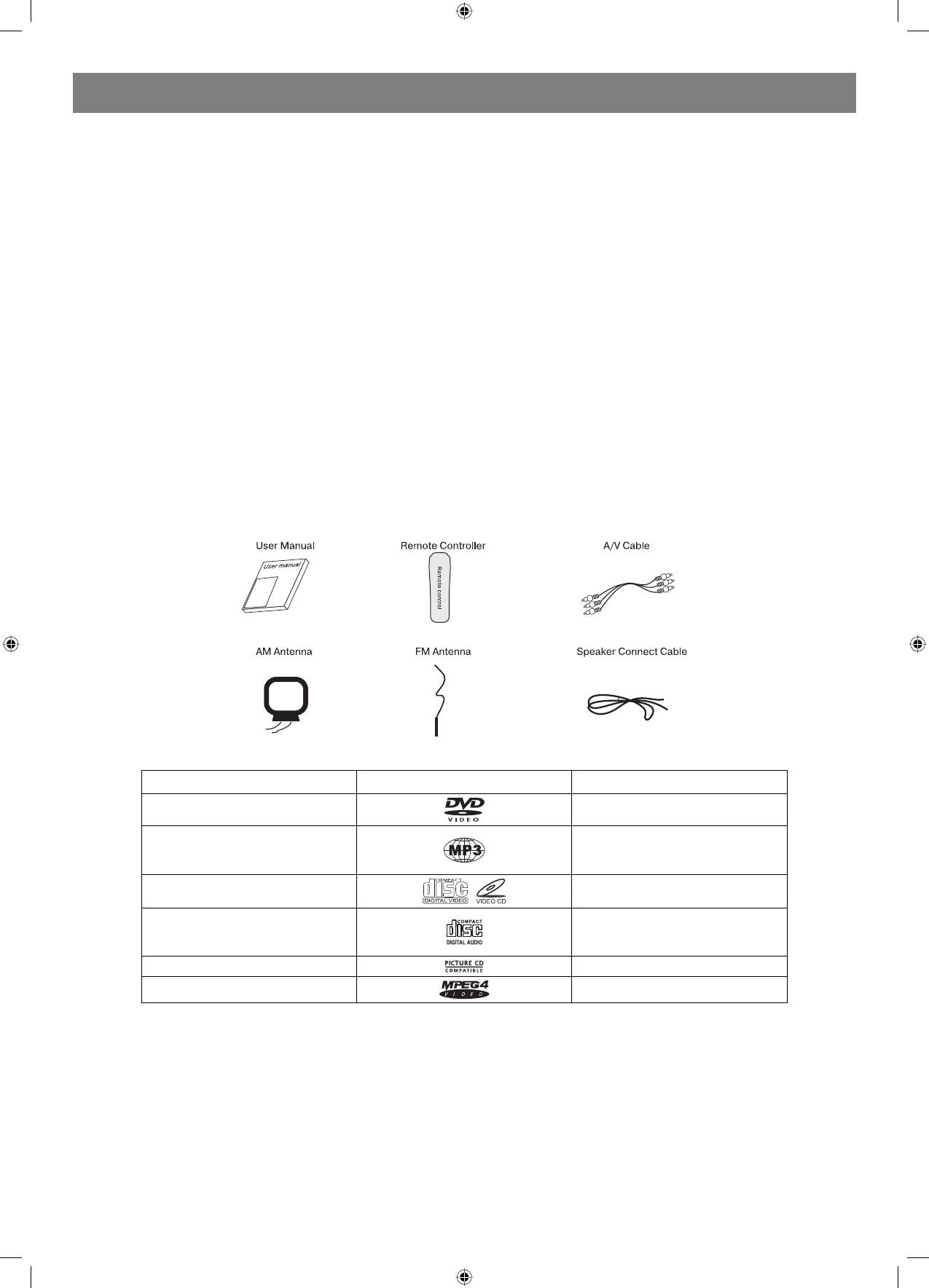
Accessories
This unit can play the following types of discs
Disc types Symbol Contents
DVD
Audio + Video
Audio
MP3
VideoCD (VCD)
Audio + Video
Audio
CDDA
Picture CD JPEG Photo CD
MPEG4
Audio + Video
DISCS
USE OF DISC
This page contains valuable information regarding the handling, cleaning, and storage of discs played in this unit.
Handling
Do not touch the playback side of the disc.
Do not attach paper or tape to discs, do not stick or write anything on the surface. Protect against fingerprints.
Always hold a disc by the center and edge portions.
Cleaning
Fingerprint and dirt on the disc may cause picture and/or sound deterioration. Wipe the disc from the center outward with a soft cloth. Always keep
the disc clean.
If you cannot wipe the dirt off, lightly use a slightly moistened soft cloth and finish with a dry cloth.
Do not use any type of solvent such as: Paint thinner, benzene, commercially available cleaners or antistatic spray for vinyl LPs.
3
4060.indd 34060.indd 3 23.10.2006 9:25:1123.10.2006 9:25:11


