
Vitek VT-1666: instruction
Class: Household, kitchen appliances, electronics and equipment
Type: Microwave oven
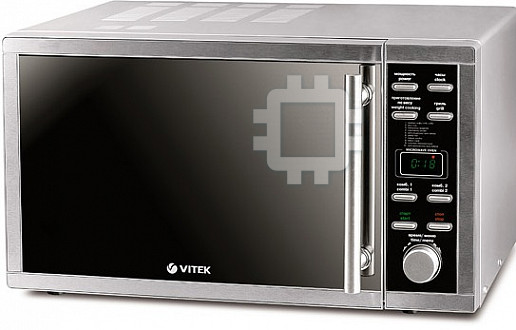
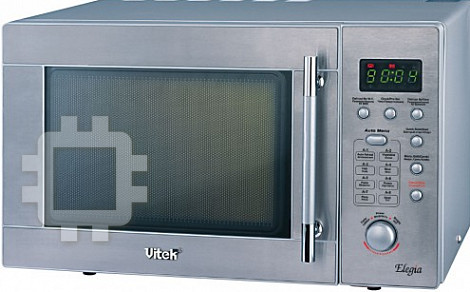


Manual for Vitek VT-1666
Table of contents
- SAFETY MEASURES SPECIAL USER INSTRUCTIONS
- CHOOSING COOKWARE COOKING PRODUCTS IN MICROWAVE OVENS Testing cookware before using it in a microwave oven Materials and cookware intended for usage in the microwave oven
- Materials and cookware not intended for usage in the microwave oven DESCRIPTION Control panel (5) Display (12)
- SETTING TIPS ON GROUNDING OF THE MICROWAVE OVEN Microwave oven assembly
- Protective covering Setting current time Setting the glass tray OPERATION Cooking in a microwave oven Sound signal
- Power level selection: Combination cooking Grill mode
- Auto cooking mode Auto cooking menu Auto defrost of products
- Tips on defrost of products Timer mode Lock-out function Express cooking Special functions Stop operating
- CLEAN AND CARE Problems and their solutions Normal operation Troubleshooting
- GUARANTEE Delivery set Specifications
VT-1666
MANUAL INSTRUCTION
3
13
27
40
53
65
76
89
102
www.vitek-aus.com
1666.indd 11666.indd 1 24.06.2008 12:46:2724.06.2008 12:46:27
2
3
4
5
мощность
часы
power
clock
приготовление
по весу
гриль
weight cooking
grill
1. молоко, кофе/ milk,coffe
2. рис/ rice
3. макароны/ spaghetti
4. картофель/ potato
5. автоподогрев/ autoreheat
6. рыба/ fish
7. птица/ poultry
8. мясо/ meat
9. шашлык/ skewered meat
10. авторазморозка/ autodefrost
комб. 1
комб. 2
combi 1
combi 2
старт
стоп
start
stop
время/меню
time/menu
8
7
6
1
1
мощность
часы
power
clock
10
16
9
приготовление
по весу
гриль
weight cooking
grill
11
17
1. молоко, кофе/ milk,coffe
2. рис/ rice
3. макароны/ spaghetti
4. картофель/ potato
5. автоподогрев/ autoreheat
6. рыба/ fish
7. птица/ poultry
8. мясо/ meat
9. шашлык/ skewered meat
10. авторазморозка/ autodefrost
21
22
24
26 27
12
23
25
комб. 1
комб. 2
combi 1
combi 2
13
18
старт
стоп
28
start
stop
14
19
20
29
время/меню
time/menu
15
303132333435
2
1666.indd 21666.indd 2 24.06.2008 12:46:2924.06.2008 12:46:29
ENGLISH
MICROWAVE OVEN
corresponds to the voltage specified on
the unit.
SAFETY MEASURES
3. Use the unit only for the intended pur-
• Do not operate the unit when the door is
poses, specified in this manual.
open, it can cause negative microwave
4. The unit is intended for cooking and
radiation.
heating of dishes.
• Do not change electrical networks of
5. Do not switch on the unit without prod-
protective interlocks of the oven door.
ucts inside.
• Do not place any object between the
6. Do not use the unit if its power cable,
body and the door of the unit, remove dirt
the plug is damaged, in the case of mal-
and detergents from the inner side of the
function or if the unit was dropped.
door.
7. Before suing cookware in a microwave
• Adjustments and repair of the microwave
oven, make sure that the cookware are
oven should be performed only by the
selected properly;
authorized service personnel.
8. When heating food in flammable mate-
• ATTENTION! If the door or the door
rials cookware, such as plastic or pa-
packings are damaged you should not
per, watch the oven, in order to avoid
operate the unit until a qualified special-
burning;
ist removes the defect;
9. Before putting paper or plastic bags
• ATTENTION! In order to avoid danger of
in the unit, remove wire curling from
high leakage of microwave radiation all
them.
repairs, connected with removal of the
10. Cookware can heat up strongly from the
covers, should be performed only by the
cooked products, thus it is necessary to
specialists;
use potholders.
• ATTENTION! Do not heat liquids or oth-
11. While heating liquids, strong boiling can
er products in firmly closed packaging or
appear, that is why you should be care-
containers, as they can explode;
ful while using the containers.
• ATTENTION! Children can use the unit
12. Before feeding children in order to avoid
without their parents' supervision only if
burns, shake feeding bottles and check
they have been given all the necessary
the temperature of the content.
instructions and they realize the danger
13. Never cook or heat shell eggs in the mi-
of improper usage of the unit and can op-
crowave oven, as they can explode.
erate the unit, following the precautions;
14. Before cooking, pierce pithy products
such as potatoes, vegetable marrows
SPECIAL USER INSTRUCTIONS
and apples.
While using electrical appliances basic
15. When smoke appears switch off the unit
safety precautions should always be fol-
and keep the door closed in order to
lowed.
avoid output of flame;
ATTENTION! In order to avoid burns, elec-
16. Do not use the operating chamber of
tric shocks, fire, impact of the microwave
the unit for storage; do not leave paper
radiation leakage and not to do harm to
or products in it.
people's health:
ATTENTION! Do not heat liquids or
1. Before using the unit, please read all
products in firmly closed packaging or
the instructions carefully.
containers, as they can explode.
2. Before switching on the unit, make sure
17. Do not fry products in the oven.
that the voltage in your home socket
18. Do not obstruct ventilation openings in
3
3
1666.indd 31666.indd 3 24.06.2008 12:46:2924.06.2008 12:46:29
ENGLISH
the body of the unit.
easy-cooking products such as chicken
19. Do not store or use the unit outdoors.
and hamburgers once. If slices of meat
20. Do not use the unit near water, near a
are large turn them at least twice during
kitchen sink, in a basement or near a
cooking.
swimming pool.
• Stir the products while cooking, moving
21. Do not immerse the power cord or the
them downwards and from the center to
plug into water.
the edges.
22. Make sure that the power cord and the
plug do not touch heated surfaces.
CHOOSING COOKWARE
23. Make sure that the power cord does not
• The best material for cookware should
hang over the edges of the table.
be “transparent” for microwaves, it lets
24. While cleaning the door and the inner
their energy go through cookware and
surface of the microwave oven use a
heat food.
sponge or a soft cloth dampened in soft
• Microwaves could not go through metal;
non-abrasive substances.
that is why never use metal cookware or
plates with metal finishing.
COOKING PRODUCTS IN MICROWAVE
• Do not use cookware made of reused pa-
OVENS
per as it can contain metal and thus it can
• When cooking bacon, do not put it on a
lead to burning of the packaging.
glass tray, local overheating of the glass
• Round or oval plates better suit for usage
tray can lead to the appearance of cracks
in microwave ovens.
in it.
• Use only cookware intended for cooking
Testing cookware before using it in a
in microwave ovens; put it on the glass
microwave oven
tray.
• Put the tested cookware (for instance, a
• For even cooking of products, put thicker
plate) in the unit, place a glass with water
slices near the edges of the cookware.
on it.
• Follow cooking time. Set the minimum
• Switch on the unit at a maximal power
cooking time, and if necessary increase
and set cooking time not more than 30
it. Do not exceed cooking time it can lead
seconds.
to burning of the products.
• Carefully touch the tested cookware, if it
• Cover products with a glass lid. The lid
is hot, but the water in the glass is cold,
will prevent juice or fat from splashing
do not use this cookware for cooking in
and will help other products be cooked
the microwave oven.
evenly.
• Do not exceed testing time. Maximal time
• To increase cooking process turn over
is 30 seconds.
Materials and cookware intended for usage in the microwave oven
Foil can be used only in the Grill mode. The distance between
the foil and the oven walls should be not less than 2,5 cm. Small
pieces of foil can be used to cover thin slices of meat or poultry,
to avoid overroasting.
Aluminum foil
In the microwave mode, if the foil is too close to the oven
walls, sparkling, and burning-out of spill shield on the door
or breakdown of the oven can happen. In this case you will
forfeit a right for free warranty service and repair.
4
4
1666.indd 41666.indd 4 24.06.2008 12:46:2924.06.2008 12:46:29
ENGLISH
Materials and cookware not intended for usage in the microwave oven
Can cause sparkling.
Aluminum trays
Use cookware intended for usage in a microwave oven.
Cartoon cup with a metal
Can cause sparkling.
handle
Use cookware intended for usage in a microwave oven.
Metal cookware or
cookware with a metal
Metal shields microwave energy. Metal ring can cause sparkling.
ring
Can cause sparkling and burning of packaging during cooking/
Metal twists
heating of products.
Paper bags
Can cause burning in the microwave oven.
Soap can melt and cause pollution of the microwave oven
Soap
chamber.
Wood
Wooden cookware can get dry, crack and flame out.
DESCRIPTION
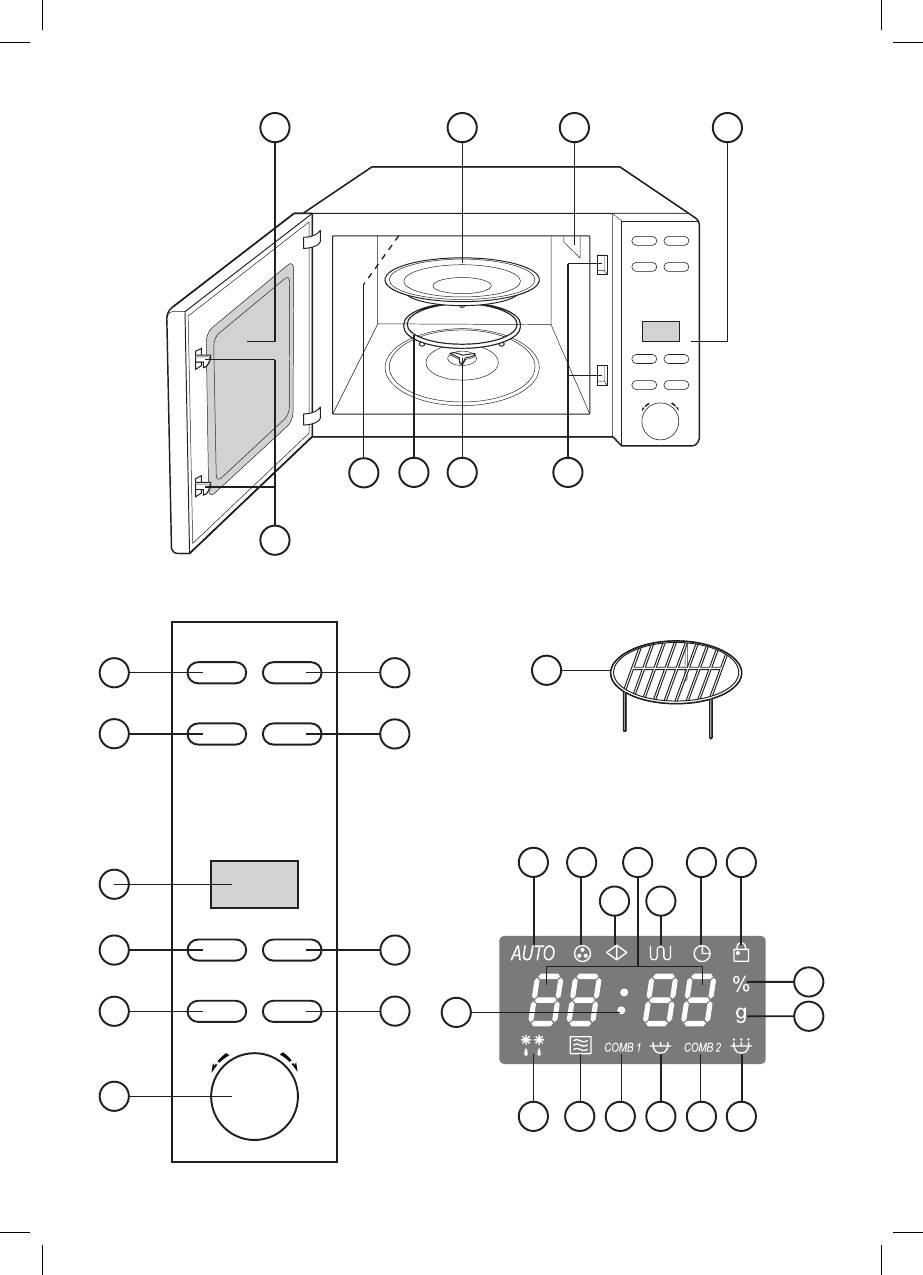
14. The “start” button
1. Lockout system for power off while
Press this button to start the cooking proc-
opening the door during the operation of
ess or the defrost process according to the
the unit
preset program.
2. Viewing window
For express cooking press this button for
3. Glass tray
the desired number of times to set the
4. Microwaves output
heating or cooking time, the unit will start
5. Control panel
cooking at maximal (100%) power.
6. Glass tray support
7. Roller ring
15. The “time/menu” knob
8. Grille heating element
Turn the knob clockwise to select an auto
9. Grill rack (only for Grill mode)
cooking program, to set the current time,
the cooking time or the product weight.
Control panel (5)
Turn the knob anti clockwise to set the prod-
10. The “power” button
uct weight at the “auto-defrost” mode.
This button is used to set the power level.
Power level selection is performed in the
16. The “сlock” button
following order: 100%, 80%, 60%, 40%,
Press this button to select 12-hour or 24-
20%, 0%. To check the preset power level
hour format, to set the current time
while cooking, press the “power” button,
the power level will be displayed during 5
17. The “grill” button
seconds.
Press this button to select the grille mode.
11 . The “weight cooking” button
18. The “сombi 2” button
This button is used to enter weight of prod-
Press this button to select the second com-
ucts at the auto cooking mode
bination cooking mode.
12. Display
19. The “stop” button
On display the current time, the cooking
Press this button to cancel the preset pow-
time, the power level and operating modes
er level, cooking mode or the defrost time.
indications are reflected.
Press and hold this button during 3 seconds
to switch on the lockout mode.
13. The “сombi 1” button
Press this button to select the first combi-
Display (12)
nation cooking mode.
20. Flashing dots
5
1666.indd 51666.indd 5 24.06.2008 12:46:2924.06.2008 12:46:29
ENGLISH
21. Auto cooking mode indication
- The power cable of the extension cord
22. Timer indication
should not hang over the edges of the
23. Standby mode indication
table, where children can pull it and it
24. Digital information/current time indica-
should not be in a passing way.
tion
25. Grille mode indication
SETTING
26. Current time indication
• Before switching on the unit, make sure
27. Lockout mode indication
that the voltage in your home socket cor-
28. Power level indication
responds to the voltage specified on the
29. Product weight indication
unit.
30. 60%, 40% and 20% power operation in-
• Make sure that all packing materials are
dication
removed from the oven chamber.
31. Combination mode 2 indication
• Do not remove a light-gray mica base in-
32. 100% and 80% power operation indica-
side the chamber in the place of micro-
tion
waves output (4), as it serves to protect
33. Combination mode 1 indication
the magnetron.
34. Microwave mode indication
ATTENTION! Make sure that the unit
35. Defrost mode indication
does not have damages such as: bent or
broken door, broken or loose hinges and
TIPS ON GROUNDING OF THE
latches, dimples inside the oven or on
MICROWAVE OVEN
the door. With the existence of any of the
The unit should be securely grounded. In
damages, usage of the unit is prohibited.
case of any short circuit grounding reduces
• Set the unit on the flat stable surface that
risk of getting electric shock, because cur-
will bear its weight and max. weight of the
rent will pass via a ground wire. A power
products, which will be cooked in it. Place
cord with a grounding wire and the plug
the unit out of the reach of children.
with a grounding contact are used in the
• Do not place the unit in places with high
unit. The plug should be connected to the
moisture and temperature, and near in-
outlet that should always have a grounding
flammable objects.
contact.
• Proper ventilation is needed for normal
WARNING: usage of the plug with a
operation of the unit. Set the oven leaving
grounding contact connected with the out-
at least 7-8 cm of space behind and on
let without grounding can lead to the risk of
the sides of the oven and 30 cm of space
electric shock. Consult a qualified electri-
above the oven.
cian, if you do not understand the instruc-
Do not block ventilation openings on the
tions on grounding or if you are not sure
microwave oven case. Do not remove
that the unit is securely grounded.
supporting legs from the bottom of the
To prevent tangling of the power cable the
oven.
unit is equipped with a short power cable.
• Do not use the unit without the glass tray
If you need an extension cord use only a 3-
and the roller ring.
wired extension cord with a grounding con-
• Make sure that the power cable does not
tact on the plug and the socket.
have any damages and does not pass
- Marking of the cord wire section of the
below the unit or through any hot or sharp
microwave oven and on the cable of the
objects.
extension cord should match.
- There should be a grounding wire in the
Microwave oven assembly
extension cord.
Remove the package and the accessories
6
1666.indd 61666.indd 6 24.06.2008 12:46:2924.06.2008 12:46:29

ENGLISH
from the operating chamber. Check the
turning the handle you will hear sound sig-
oven whether there is deformation or not.
nals.
Pay special attention to the door state. If
After the cooking is finished you will hear 4
there is some problem do not set and do
sound signals and in every two minutes you
not switch on the oven.
will hear repeated sound signals reminding
you to open the door of the microwave oven
Protective covering
and take out the product.
Case: If there is protective covering, re-
move it from the surface.
Setting current time
Do not remove light grey mica plate in-
Insert the power plug into the socket, you
side the operating chamber; it serves
will hear a sound signal, “1:01” will appear
to protect the magnetron.
on the display. Press the “clock” button
once or twice, to select 12-hour or 24-hour
Setting the glass tray
format.
1. Set the rotating socket (6) in the open-
Example: to set current time 8 hours 30
ing situated on the bottom of the operat-
minutes.
ing chamber.
1. Press the “сlock” button once.
2. Set the roller ring (7) on the bottom of
2. Turn the “time/menu” knob clockwise,
the chamber.
and set hours - 8.
3. Carefully set glass tray (3) on the roller
3. Press the “сlock” button to confirm.
ring (7), by matching ledges and grooves
4. Turn the “time/menu” knob clockwise
of the support (6).
and set minutes - 30, 8:30 will be dis-
Never set the glass tray with its bottom
played.
upside down.
5. Press the “сlock” button to confirm.
• Do not prevent rotation of the glass tray
The preset time will be displayed, the (26)
while operating the oven.
indication will appear on the display, and
• During cooking always use glass tray
the dots (20) will be flashing.
and tray support.
• Products and cookware should be al-
Note: if time setting is not finished, then
ways set only on the glass tray.
in about 30 seconds a sound signal will
• The glass tray can rotate clockwise/anti
be heard and display information will
clockwise. It is normal.
reset to default settings.
• If cracks or chops appear, stop using
During cooking of products to display
the unit immediately or replace the glass
the current time press the “Clock” but-
tray.
ton the current time will be displayed dur-
ing 5 seconds.
OPERATION
• Before switching on the unit, make sure
Cooking in a microwave oven
that the voltage in your home socket
To switch the microwave cooking mode,
corresponds to the voltage specified on
press the “Power” button for several times
the unit.
to set the required power level and then by
• Put the products inside the working
turning the “Menu/Time” knob clockwise
chamber and close the door.
set the required cooking time.
Max. Cooking time is 60 minutes.
Sound signal
Pressing buttons on the control panel or
7
1666.indd 71666.indd 7 24.06.2008 12:46:2924.06.2008 12:46:29
ENGLISH
Power level selection:
3. Press the “start” button to start cooking
the (25) indications will be lighting, and
Number of pressing of the
Power
“Power” button
level
the indication (23) will go out.
1 time 100%
During the grille mode operation the re-
2 times 80%
maining cooking time is displayed and the
3 times 60%
indication (25) is displayed.
4 times 40%
Combination cooking
5 times 20%
Combination cooking combines micro-
6 times (timer setting) 0
wave and grill modes for achieving the best
Note: while setting 100% and 80% power
results.
level the indication (32) will light up, while
The “combi. 1” mode (30%-microwave
setting 60%, 40% and 20% power level the
cooking + 70% grille) – cooking of fish, po-
indication (30) will light up.
tatoes.
For instance, you need to cook products
The “combi. 2” mode (55%-microwave
for 10 minute, at 60% power level.
cooking + 45% grille) – cooking of omelets,
1. Press the “Power” button for 3 times,
baked potatoes and poultry.
60% power level will appear on the dis-
Maximal cooking time is 60 minutes.
play, the (34) and (30) indications will
For example: you need to switch on combi-
light up.
nation cooking mode Combi 1 for 25 min-
2. Turn the “Time/Menu” knob clockwise
utes.
and set the time “10:00”, the (34) and
1. Press the “сombi 1” button, the indica-
(30) indications will be lighting, and the
tion (33) will light up.
indication (23) will be flashing.
2. Turn the “Time/Menu” knob clockwise
3. Press the “start” button to start cook-
and set the time “25:00”, the (33) indi-
ing the (34) and (30) indications will be
cations will be lighting, and the indica-
lighting, and the indication (23) will go
tion (23) will be flashing.
out.
3. Press the “start” button to start cooking
During operation the remaining cook-
the (33) indication will be lighting, and
ing time is displayed and the indications
the indication (23) will go out.
(34) and (30) are displayed.
During the combination cooking mode op-
eration the remaining cooking time is dis-
Grill mode
played and the indication (33) is displayed.
Grill is used for cooking of fried crisp scraps
For example: you need to switch on combi-
of meat, fish, poultry, and potato. In this
nation cooking mode Combi 2 for 12 min-
mode heat from the quartz heating element
utes.
spreads over the whole process chamber.
1. Press the “сombi 2” button, the indica-
Maximum cooking time is 60 minutes.
tion (31) will light up.
For example: you need to switch on grill
2. Turn the “Time/Menu” knob clockwise
cooking mode Grill for 12 minutes.
and set the time “12:00”, the (31) indi-
1. Press the “Grill” button, the (25) indica-
cation will be lighting, and the indication
tion will light up on the display.
(23) will be flashing.
2. Turn the “Time/Menu” knob clockwise
3. Press the “start” button to start cooking
and set the time “12:00”, the (25) indi-
the (31) indication will be lighting, and
cation will be lighting, and the indication
the indication (23) will go out.
(23) will be flashing.
During the combination cooking mode op-
8
1666.indd 81666.indd 8 24.06.2008 12:46:2924.06.2008 12:46:29
ENGLISH
eration the remaining cooking time is dis-
only select the type of a product and set its
played and the indication (31) is displayed.
weight.
You may need to turn over the product at
Auto cooking mode
the middle of its cooking to cook the prod-
In the Auto cooking mode you do not need
uct evenly.
to set power and cooking time, you should
Auto cooking menu
Program
Products Quantity/Weight (g)
number
Milk/Coffee
1
12 3
(cup, 200 ml)
2 Rice 150 300 450 600
3 Spaghetti 100 200 300
Potatoes (230 g
4
12 3
each)
5 Auto heating 200 300 400 500 600 700 800
6 Fish 200 300 400 500 600
7 Poultry 800 1000 1200 1400
8 Meat 200 300 400 500 600
9 Shashlik 100 200 300 400 500
For example you need to cook 400 g of
placement of the product on the glass tray.
fish.
In any case, if you consider the result un-
1. Open the door of the oven, put the prod-
satisfied, please, increase or decrease the
ucts into the chamber and close the
product weight.
door.
2. Turn the “time/menu” knob clock-
Auto defrost of products
wise and select the corresponding auto
The unit supports the auto defrost function.
mode, the indication (21) and the pro-
Defrost time and power levels are set auto-
gram number will light up.
matically, you should set only the product
3. Pres the “weight сooking” button to set
weight.
the product weight, the indication (21)
For example you want to defrost 600 g of
will be lighting and the indication (23) will
shrimps:
be flashing.
1. Put the shrimps in the working chamber.
4. Press the “start” button to start cooking
2. Turn the “time/menu” knob clockwise
the (21) indication will be lighting, and
and set “600g”, the indication (21) and
the indication (23) will go out.
(35) will be lighting and the indication
During the combination cooking mode
(23) will be flashing.
operation the remaining cooking time is
3. Press the “start” button to start defrost
displayed and the indication (21) is dis-
the (21) and (35) indications will be light-
played.
ing, and the indication (23) will go out.
Attention: The result of the cooking in the
During the defrost mode the remaining de-
auto cooking mode depends on the size
frost time is displayed and the indication
and shape of the product, as well as on the
(35) is displayed.
9
1666.indd 91666.indd 9 24.06.2008 12:46:2924.06.2008 12:46:29
ENGLISH
Tips on defrost of products
Timer mode
- Before defrost of products remove or
It is used to give a sound signal after the
open the packaging.
preset time is over.
- If you do not know the exact weight of the
For example: to set Timer for 2 minutes.
products, select the less one while set-
1. Press the Power button to set 0% pow-
ting.
er, the (22) indication will light up.
- The products will continue to defrost be-
2. Turn the Time/Menu knob clockwise
ing inside the unit after the time is up.
and set time “2:00”. The indication (22)
- Remove the defrosted slices from the
will be lighting and the indication (23)
unit as quick as possible.
will be flashing.
- Turn over big slices, for example chicken
3. Press the “start” button to start count-
legs, in the middle of the defrost process
down, the indication (22) will be lighting,
or in pauses.
and the indication (23) will go out.
- At the beginning of defrosting a chicken,
4. After the time is up you will hear 4 sound
place it with the breast down, and turn
signals. During the timer mode the re-
over in the middle of the defrost process
maining cooking time is displayed and
or in pauses. Cover gentle parts such as
the indication (22) is displayed.
tips of wings with small slices of foil.
- Remove the defrosted slices from the
Lock-out function
unit as quick as possible.
To prevent usage of the oven by children
- Settling time after defrosting is very im-
you can set Lock mode.
portant especially while defrosting big
1. Press and hold the Stop button for 3
and firm slices, which cannot be turned
seconds - sound signal will be heard and
over. Settling will help for to fully defrost
the indication (27) will light up.
products.
2. To cancel lock press and hold the Stop
button for 3 seconds - sound signal will be
Express cooking
heard and the indication (27) will go out.
This function helps to switch on the unit
quickly for heating and cooking of products
Special functions
at full power.
Auto reminding
Press the “start” button to select the oper-
- After a cooking or a defrost program is
ation time of the unit and the unit will switch
finished, you will hear four sound signals,
on at full power.
three sound signals will be heard in every
For example: to set cooking for 2 minutes
two minutes until you open the door of
1. Press the “start” button 4 times, the in-
the unit and press the “stop” button.
dications (32) and (34) will be lighting,
- If time setting or operating modes set-
and the indication (23) will be flashing,
ting is not finished completely then in 30
after switching on of the unit the indica-
seconds you will hear a sound signal and
tion (23) will go out.
display indications will reset.
During the defrost mode the remaining
cooking time is displayed and the indica-
Stop operating
tions (32) and (34) are displayed.
To stop cooking process you only need
Note:
to open the door or press the “stop” but-
- Maximal cooking time at the quick start
ton, to resume the mode press the “Start”
mode is 12 minutes.
button. To switch off the mode, press the
- Time setting step – 30 sec.
“Stop” button.
10
1666.indd 101666.indd 10 24.06.2008 12:46:2924.06.2008 12:46:29
ENGLISH
CLEAN AND CARE
• Use a damp cloth to clean external sur-
• Before cleaning switch off the unit and
faces.
unplug it.
• Keep the door clean. Provide that no
• Protect the control panel from water.
crumbs accumulate between the door
Wipe the panel with a soft, slightly damp
and the panel as it prevents the door
cloth.
from closing.
• Keep the chamber clean. If there are
• Clean ventilation openings on the body
remaining of the products on the walls
of the oven from dust and dirt.
of the unit remove them using a damp
• Regularly clean the glass tray and its
cloth.
support; wipe the bottom of the working
• If the working chamber is dirty use a soft
chamber.
detergent.
• Wash the glass tray and draft with a neu-
• Do not use abrasives, wire brushes to
tral soapy solution. You can wash them in
clean the unit inside and outside.
a dish wash machine.
• Provide that no detergent gets into the air
• Do not immerse the heated glass tray
and steam openings on the door of the
into cold water: due to sudden tempera-
unit.
ture drop the glass tray can splinter.
• Do not use detergent based on ammo-
nia.
Problems and their solutions
Normal operation
During operation of the unit interferences in the recep-
The unit makes Interferences
tion of TV and radio signals can appear. The same in-
in the reception of TV and radio
terferences appear during operation of small electrical
signals
appliances such as a mixer, a vacuum cleaner and a
hair dryer. It is normal.
If the microwave radiation level is low, the brightness of
Low brightness of the backlight
the chamber backlight can be low as well. It is normal.
During cooking, steam can evaporate from the prod-
Steam accumulation on the
ucts. Great amount of steam evaporates via the ventila-
door, hot air output from the
tion openings but some part can accumulate on the
ventilation openings.
door. It is normal.
Troubleshooting
Problem Possible cause Solution
Pull the plug out of the
The power cable plug is
socket. After10 seconds
not properly inserted in the
insert the plug into the
socket.
The unit does not switch on
socket again.
Try to connect another
Problem with the socket
appliance to the same
socket
The door is not firmly
No heating
Firmly close the door
closed
11
1666.indd 111666.indd 11 24.06.2008 12:46:2924.06.2008 12:46:29
ENGLISH
During operation the
Remove the glass tray and
The roller ring or the lower
rotating glass tray produces
the roller ring. Wash the
part of the working chamber
sounds
roller ring and the bottom of
is dirty
the working chamber.
IF THESE MEASURES DID NOT SOLVE
Specifications subject to change without
THE PROBLEM, PLEASE APPLY TO THE
prior notice.
AUTHORIZED SERVICE CENTRE, REPAIR
AND ADJUSTING OF THE UNIT SHOULD
MINIMUM SERVICE LIFE - 5 YEARS
BE PERFORMED ONLY BY THE QUALIFIED
PERSONNEL
GUARANTEE
Details regarding guarantee conditions can
Delivery set
be obtained from the dealer from whom
Microwave oven– 1 pc.
the appliance was purchased. The bill of
Glass tray – 1 pc.
sale or receipt must be produced when
Roller ring – 1 pc.
making any claim under the terms of this
Grill rack – 1 pc.
guarantee.
Instruction manual – 1 pc.
This product conforms to the
Specifications
EMC-Requirements as laid down
Power supply: 220 V ~50 Hz
by the Council Directive 89/336/
Nominal power consumption: 1400 W
EEC and to the Law Voltage
Microwave power: 900 W
Regulation (73/23 EEC)
Grill power: 1000W
Capacity: 23 L
Glass tray: 270 mm
12
1666.indd 121666.indd 12 24.06.2008 12:46:2924.06.2008 12:46:29

DEUTSCH
MIKROWELLE
BESONDERE ANWEISUNGEN BEI DER
NUTZUNG DER MIKROWELLE
SICHERHEITSMAßNAHMEN
Beim Gebrauch der elektrischen Geräte
• Es ist nicht gestattet, die Mikrowelle mit
sind wichtige Sicherheitsmaßnahmen zu
der geöffneten Tür zu betreiben, weil es
beachten.
zur Erhöhung der schädlichen Wirkung
ACHTUNG! Um das Risiko der
der Mikrowellenstrahlung führt.
Verbrennungen, Stromschläge, Brandfälle,
• Es ist nicht gestattet, Änderungen im
Einwirkung der Mikrowellenstrahlung und
Stromkreis der Schutzverriegelungen
Gesundheitsschaden zu vermeiden:
der Mikrowellentür vorzunehmen.
1. Lesen Sie aufmerksam alle
• Es ist nicht gestattet, irgendwelche
Bedienungsanleitungen vor der
Gegenstände zwischen dem Gehäuse
Nutzung des Geräts.
der Mikrowelle und ihrer Tür zu platzie-
2. Vor dem Einschalten des Geräts verge-
ren, entfernen Sie Verschmutzungen und
wissern Sie sich, ob die Netzspannung
Reste der Reinigungsmittel von der inne-
mit der Spannung Ihres Geräts über-
ren Seite der Tür.
einstimmt, die am Gehäuse des Geräts
• Einstellung und Reparatur der Mikrowelle
steht.
sollen nur vom Fachpersonal eines auto-
3. Nutzen Sie die Mikrowelle nur be-
risierten Kundenservicedienstes durch-
stimmungsgemäß, wie es in dieser
geführt werden.
Bedienungsanleitung dargestellt ist.
• ACHTUNG! Es ist nicht gestattet, die
4. Die Mikrowelle ist für die Zubereitung
Mikrowelle bei der Beschädigung der
und Aufwärmung von fertigen Gerichten
Mikrowellentür und der Türdichtungen zu
bestimmt.
nutzen, bis die Beschädigung von einem
5. Es ist nicht gestattet, die Mikrowelle
qualifi zierten Fachmann nicht beschädigt
ohne Nahrungsmittel einzuschalten.
wird.
6. Es ist nicht gestattet, das Gerät zu
• ACHTUNG! Um das Risiko der Einwirkung
nutzen, wenn das Netzkabel, der
der Mikrowellenstrahlung zu vermeiden,
Netzstecker beschädigt ist, wenn das
sollen alle Reparaturarbeiten, die mit der
Gerät nicht ordnungsgemäß funktio-
Abnahme irgendwelcher Schutzdeckel
niert oder wenn Sie dieses fallen gelas-
von der Mikrowelle verbunden sind,
sen haben.
sollen nur von qualifi zierten Fachleuten
7. Vergewissern Sie sich vor der Nutzung
durchgeführt werden;
der Mikrowelle, dass das richtige
• ACHTUNG! Es ist nicht gestattet,
Geschirr gewählt wurde.
Flüssigkeiten und Nahrungsmittel in ge-
8. Während der Aufwärmung von
schlossenen Behältern aufzuwärmen,
Nahrungsmitteln im Geschirr aus
um ihre Explodierung zu vermeiden.
leichtentfl ammbaren Materialien,
• ACHTUNG! Die Benutzung der
wie Kunststoff oder Papier, passen
Mikrowelle ohne Aufsicht darf Kindern
Sie auf die Mikrowelle auf, um das
nur dann erlaubt werden, wenn eine an-
Entzündungsrisiko zu vermeiden;
gemessene Anweisung gegeben wurde,
9. Entfernen Sie Drähte vor der
die das Kind in die Lage versetzt, die
Unterbringung der Papier oder
Gefahren einer falschen Bedienung zu
Plastikpakete in der Mikrowelle.
verstehen, und die Mikrowelle in sicherer
10. Das Geschirr kann durch die
Weise zu nutzen.
Wärmeaufnahme von den zuberei-
tenden Nahrungsmitteln sehr stark
13
13
1666.indd 131666.indd 13 24.06.2008 12:46:2924.06.2008 12:46:29

DEUTSCH
erhitzt werden, nutzen Sie spezielle
22. Vermeiden Sie die Berührung des
Handschuhe und Topfl appen.
Netzkabels und des Netsteckers mit
11. Da die Kochung von Getränken, die in der
heißen Oberfl ächen.
Mikrowelle aufgewärmt werden, kann
23. Lassen Sie das Netzkabel vom Tisch
auch nach dem Aufwärmungsprozess
frei nicht hängen.
erfolgen, seien Sie beim Umgang mit
24. Nutzen Sie zur Reinigung der Tür und
den Behältern vorsichtig.
inneren Seiten der Mikrowelle wei-
12. Mischen und schütteln Sie Flaschen
che Abrasivwaschmittel, die auf einen
und Behälter mit Kindernahrung gut
Schwamm oder ein weiches Tuch auf-
durch und prüfen Sie die Temperatur
getragen werden.
der Flüssigkeit, um Verbrennungen zu
vermeiden.
ZUBEREITUNG VON
13. Es ist nicht gestattet, Eier mit Eierschale
NAHRUNGSMITTELN IN
in der Mikrowelle zu bereiten oder auf-
MIKROWELLEN
zuwärmen, diese können auch nach
• Es ist nicht gestattet, Bacon bei der
dem Aufwärmen explodieren.
Zubereitung direkt auf den Glasdrehteller
14. Stechen Sie dicke Nahrungsmittel, wie
zu legen, die Überhitzung kann zur
z.B. Kartoffeln, Auberginen oder Äpfel,
Entstehung von Rissen am Glasdrehteller
vor der Zubereitung durch.
führen.
15. Beim Erscheinen des Rauchs schal-
• Nutzen Sie während der Zubereitung das
ten Sie die Mikrowelle vom Stromnetz
Geschirr, das für Mikrowellengebrauch
ab und halten Sie die Mikrowellentür
geeignet ist, indem Sie es auf den
geschlossen, um die Verbreitung des
Glasdrehteller aufstellen.
Flammens zu vermeiden.
• Um eine bessere Zubereitung von
16. Es ist nicht gestattet, den Garraum der
Nahrungsmitteln zu erzielen, legen
Mikrowelle zur Aufbewahrung zu nut-
Sie dickere Stücke an den Rand des
zen, lassen Sie drin kein Papier oder
Geschirrs.
Nahrungsmittel.
• Passen Sie auf die Zubereitungsdauer
ACHTUNG! Es ist nicht gestattet,
auf. Stellen Sie die kürzes-
Flüssigkeiten und Nahrungsmittel in
te Zubereitungsdauer, und bei der
geschlossenen Behältern aufzuwär-
Notwendigkeit erhöhen Sie diese. Es ist
men, um ihre Explodierung zu vermei-
nicht gestattet, die Zubereitungsdauer
den.
von Nahrungsmittel zu überschreiten, es
17. Es ist nicht gestattet, Nahrungsmittel in
kann zu ihrer Entzündung führen.
der Mikrowelle zu braten.
• Bereiten Sie das Essen unter einem
18. Sperren Sie nie Entlüftungslöcher am
Glasdeckel. Der Deckel verhindert
Gehäuse der Mikrowelle ab.
das Abspritzen des Saftes oder Fettes
19. Es ist nicht gestattet, das Gerät außer-
und gewährleistet eine gleichmäßige
halb der Räumlichkeiten zu benutzen
Zubereitung von Nahrungsmitteln.
und aufzubewahren.
• Um die Zubereitung zu beschleunigen,
20. Nutzen Sie nie das Gerät in der Nähe
drehen Sie einmal Nahrungsmittel der
von Wasser, Küchenspülbecken, in
leichten Zubereitungsgrades um, so
feuchten Kellerräumen oder neben
wie Hähnchen oder Hamburgers. Wenn
dem Schwimmbecken.
Fleischstücke zu groß sind, sollen diese
21. Es ist nicht gestattet, das Netzkabel und
während der Zubereitung mindestens
den Netstecker ins Wasser zu tauchen.
zweimal umgedreht werden.
14
1666.indd 141666.indd 14 24.06.2008 12:46:2924.06.2008 12:46:29
DEUTSCH
• Rühren Sie während der Zubereitung
• Im Vergleich zum rechteckigen ist rundes
Nahrungsmitteln um, indem Sie diese
und ovales Geschirr für die Verwendung
von oben nach unten und von Zentrum
in der Mikrowelle vorteilhafter.
zum Rand des Geschirrs mischen.
Prüfung des Geschirrs vor der Nutzung
ANWEISUNGEN ZUR
in der Mikrowelle
GESCHIRRAUSWAHL
• Stellen Sie das zu prüfende Geschirr in
• Das ideale Material des Geschirrs für den
den Garraum der Mikrowelle (z.B. einen
Gebrauch in der Mikrowelle soll „durch-
Teller), stellen Sie darauf ein Glas mit kal-
sichtig" für Mikrowellenstrahlung sein,
tem Wasser auf.
indem ihre Energie durch das Geschirr
• Schalten Sie die Mikrowelle auf die ma-
strömt und Nahrungsmittel aufwärmt.
ximalen Betriebsstufe ein und stellen Sie
• Mikrowellen können durch Metall
die Zeitdauer auf 30 Sekunden ein.
nicht durchdringen, deswegen darf
• Berühren Sie vorsichtig das zu prüfende
Metallgeschirr oder Geschirr mit
Geschirr. Falls es aufgewärmt ist, und
Metalldekor nicht verwendet werden.
das Wasser im Glas kalt geblieben ist,
• Es ist nicht gestattet, Gegenstände in die
darf solches Geschirr in der Mikrowelle
Mikrowelle hineinzulegen, die aus dem
nicht benutzt werden.
Recyclingpapier hergestellt sind, da es
• Die Prüfdauer soll 30 Sekunden nicht
Metalleinprägungen enthalten kann, die
überschreiten.
die Entzündung der Verpackung hervor-
rufen können.
Stoffe und Geschirr, die für die Nutzung in der Mikrowelle geeignet sind.
Die AluFolie kann nur im Grillbetrieb verwendet werden. Der Abstand
zwischen der AluFolie und den Wänden der Mikrowelle soll nicht
weniger als 2,5 cm betragen. Kleine AluFolienstücke können zur
Abdeckung von dünnen Fleisch und Gefl ügelstücken benutzt werden,
um ihre Verbrennung zu vermeiden.
AluFolie
Im Mikrowellenbetrieb, wenn die AluFolie zu nah an
den Wänden der Mikrowelle liegt, kann das Funken, die
Durchbrennung der Abschirmgitter der Tür der Mikrowelle und
den Ausfall des Geräts hervorrufen. In diesem Fall verlieren Sie
den Anspruch auf den kostenlosen Garantieservice und die kos-
tenlose Reparatur.
Befolgen Sie die Anweisungen der Herstellers.
Der Boden des Geschirrs fürs Braten soll 5 mm dicker als der des
Geschirr fürs Braten
Glasdrehtellers sein. Nicht ordnungsgemäße Nutzung des Geschirrs
fürs Braten kann zur Entstehung der Risse im Geschirr und im
Glasdrehteller führen.
Nur das Geschirr, das für die Nutzung in der Mikrowelle geeignet ist.
Geschirr fürs
Befolgen Sie die Anweisungen des Herstellers des Geschirrs. Nutzen
Mittagessen
Sie nie das Geschirr mit Rissen oder Ausbrüchen.
Nur die Behälter, die aus dem hitzbeständigen Glas hergestellt und für
die Nutzung in der Mikrowelle geeignet sind. Vergewissern Sie sich,
Glasbehälter
dass die Behälter keine Metallränder haben. Nutzen Sie nie Behälter
mit Rissen oder Ausbrüchen.
15
1666.indd 151666.indd 15 24.06.2008 12:46:2924.06.2008 12:46:29

DEUTSCH
Nur das Geschirr, das aus dem hitzbeständigen Glas hergestellt und
für die Nutzung in der Mikrowelle geeignet ist. Vergewissern Sie sich,
Glasgeschirr
dass das Geschirr keine Metallränder hat. Nutzen Sie nie das Geschirr
mit Rissen oder Ausbrüchen.
Zubereitungsprozess in
Befolgen Sie die Anweisungen des Herstellers. Es ist nicht gestattet,
der Mikrowelle mit der
Säckchen mit Metallknebeln oder Überziehen zu verschließen. In den
Nutzung von speziellen
Säckchen sollen kleine Löcher für den Dampfaustritt gemacht werden.
Säckchen
Sind nur für kurzzeitige Zubereitung/Aufwärmung geeignet. Lassen
Papierteller und Tassen
Sie die Mikrowelle während der Zubereitung / Aufwärmung von
Nahrungsmitteln in solchem Geschirr nie unbeaufsichtigt.
Die zubereitenden Nahrungsmittel können zwecks der
Wärmeerhaltung und der Vermeidung der Abspritzung von Fett abge-
Papiertücher
deckt werden. Nutzen Sie das Pergamentpapier nur unter Kontrolle
und nur für kurzzeitige Zubereitung/Aufwärmung.
Nutzen Sie das Pergamentpapier zur Vermeidung der Abspritzung von
Pergamentpapier
Fett oder als Einschlagpapier. Nutzen Sie das Pergamentpapier nur
unter Kontrolle und nur für kurzzeitige Zubereitung/Aufwärmung.
Nutzen Sie nur jenes Kunststoffgeschirr, das aus dem hitzbeständigen
Glas hergestellt und für die Nutzung in der Mikrowelle geeignet ist.
Befolgen Sie die Anweisungen des Herstellers.
Einige Kunststoffbehälter können infolge der Erhitzung der darin ent-
Kunststoffgeschirr
haltenen Nahrungsmittel erweichen.
Hermetisch geschlossene Kunststoffpakete sollen durchgestochen
oder durchgeschnitten werden, wie es auf der Verpackung angege-
ben ist.
Nutzen Sie nur jenes Einschlagpapier aus Kunststoff, das eine ent-
sprechende Markierung hat. Die zubereitenden Nahrungsmittel kön-
Einschlagpapier aus
nen mit solchem Einschlagpapier aus Kunststoff zwecks der Erhaltung
Kunststoff
von Feuchtigkeit abgedeckt werden.
Nutzen Sie gewachstes Papier zur Vermeidung der Abspritzung von
Gewachstes Papier
Fett und zur Erhaltung der Feuchtigkeit.
Stoffe und Geschirr, die für die Nutzung in der Mikrowelle geeignet sind
Können das Funken hervorrufen.
Alutabletts
Nutzen Sie das Geschirr, das für die Mikrowelle geeignet ist.
Kann das Funken hervorrufen.
Kartontasse mit Metallgriff
Nutzen Sie das Geschirr, das für die Mikrowelle geeignet ist.
Metallgeschirr und Geschirr
Das Metall schirmt die Energie von Mikrowellen ab. Der
mit Metallrand
Metallrand des Geschirrs kann das Funken hervorrufen.
Können das Funken und Entzündung der Verpackung während
Metallknebeln
der Zubereitung / Aufwärmung von Nahrungsmitteln hervorrufen.
Papierpakete
Können Entzündung in der Mikrowelle hervorrufen.
Seife kann verschmelzen und die Verschmutzung des Garraums
Seife
der Mikrowelle hervorrufen.
Das Holzgeschirr kann austrocknen, rissig werden und sich
Holz
entzünden.
16
1666.indd 161666.indd 16 24.06.2008 12:46:2924.06.2008 12:46:29
DEUTSCH
Die Beschreibung
14. Die Taste «der Start/start»
1. Das System der Notsperrung zur
Drücken Sie auf diese Taste, um den Prozeß
Abschaltung der Speisung beim Öffnen
der Zubereitung oder des Auftauens der
des Türchens während der Arbeit des
Lebensmittel gemäß dem angegebenen
Ofens.
Programm zu starten.
2. Das Beobachtungsfenster
Zu einer Expresszubereitung der
3. Der Glasuntersatz
Lebensmittel drücken Sie auf diese Taste
4. Der Ausgang der
soviel, wie es notwendig ist, um die Zeit
Überhochfrequenzwellen
der Aufwärmung oder der Zubereitung der
5. Die Steuerplatte
Lebensmittel aufzustellen. Dann wird der
6. Die Stütze des Glasuntersatzes
Ofen mit einer maximalen (100%) Leistung
7. Der Rollenring
funktionieren.
8. Das Erwärmungselement des Grilles
9. Das Gitter für den Grill (wird nur im
15. Der Hebel «das Zeitmenü/ time/
Grillbetrieb angewandt).
menu»
Durch eine Umdrehung des Hebels im
Die Steuerplatte (5)
Uhrzeigersinn wird eine Auswahl der
10. Die Taste «die Leistung/power»
Programme der automatischen Zubereitung
Wird zur Aufstellung des Leistungspegels
der Lebensmittel, die Aufstellung der lau-
angewandt Die Auswahl der Leistung ge-
fenden Zeit, der Zeit der Zubereitung der
schieht in folgender Reihenfolge: 100%,
Lebensmittel oder des Gewichtes der
80%, 60%, 40%, 20%, 0%.
Lebensmittel vorgenommen.
Um den angegebenen Leistungspegel
Durch eine Umdrehung des Hebels gegen
während der Zubereitung der Lebensmittel
den Uhrzeigersinn wird eine Aufstellung
zu erreichen, drücken Sie auf die Taste
des Gewichtes der Lebensmittel im
«die Leistung/power»: der aufgestellte
Betrieb «das automatische Auftauen/
Leistungspegel wird auf dem Display wäh-
autodefrost» vorgenommen.
rend der fünf Sekunden leuchten.
.
16. Die Taste «die Uhr/Clock»
11 . Die Taste «die Zubereitung nach
Die Auswahl des Zeitformates 12 oder 24
dem Gewicht/weight cooking»
Stunden, zur Aufstellung der laufenden
Wird zur Einführung des Gewichtes der
Zeit.
Lebensmittel im Betrieb der automatischen
Zubereitung der Lebensmittel angewandt
17. Die Taste «der Grill/grill»
Die Taste der Einschaltung des Betriebes
12. Der Display
der Zubereitung der Lebensmittel «der
Auf dem Display werden die laufende Zeit,
Grill».
die Zeit der Zubereitung, der Leistungspegel
und die Piktogramme der Arbeitsbetriebe
18. Die Taste «Combi 2»
wiedergegeben.
Die Taste der Auswahl des 2. Betriebes
der kombinierten Zubereitung der
13. Die Taste «Combi 1»
Lebensmittel.
Die Taste der Auswahl des ers-
ten Betriebes der kombinierten
19. Die Taste «der Stopp/stop»
Zubereitung der Lebensmittel.
Durch das Drücken der Taste kann man
den vorher aufgestellten Leistungspegel,
17
1666.indd 171666.indd 17 24.06.2008 12:46:2924.06.2008 12:46:29
DEUTSCH
das Programm der Zubereitung der
Erdungsleistungsdraht vor sich geht. Im
Lebensmittel oder die Zeit des Auftauens
Mikrowellenofen werden ein Netzkabel
der Lebensmittel absetzen.
mit einem Erdungsleistungsdraht und ein
Durch das Drücken und die Aufhaltung der
Netzstecker mit einem Erdungskontakt
Taste im Laufe von drei Sekunden kann
angelegt. Der Stecker wird an die
man den Sperrbetrieb einschalten..
Steckdose angeschlossen, die auch einen
Erdungskontakt haben muß.
Der Display (12)
Die Warnung: die Anwendung des
20. Die blinkenden Trennpunkte
Steckers mit einem Erdungskontakt,
21. Das Piktogramm des Betriebes der
der in die Steckdose ohne Erdung ein-
automatischen Zubereitung der
geführt ist, kann eine Gefahr eines
Lebensmittel
Elektrostromschlages hervorrufen. Lassen
22. Das Piktogramm des Timerbetriebes
Sie sich von einem Fachelektriker bera-
23. Das Piktogramm des Betriebes
ten, wenn Ihnen die Erdungsanleitungen
der Bereitschaft des Ofens zur
nicht klar genug erscheinen oder es
Einschaltung
Zweifel bezüglich der sichren Erdung des
24. Die Zahleninformation/die Indikation
Mikrowellenofens gibt.
der laufenden Zeit
Zum Zwecke der Vorbeugung des
25. Das Piktogramm des Betriebes «der
Netzkabels ist der Mikrowellenofen mit
Grill»
einem kurzen Netzkabel versehen worden.
26. Das Piktogramm der laufenden Zeit
Bei der Notwendigkeit der Anwendung ei-
27. Das Piktogramm des Sperrbetriebes
ner Verlängerungsschnur gebrauchen Sie
28. Das Piktogramm der ausgewählten
nur eine 3drahtige Verlängerungsschnur
Leistung
mit einem Erdungskontakt am Netzstecker
29. Das Piktogramm des ausgewählten
und an der Steckdose.
Lebensmittelgewichtes
Die Markierung des Querschnittes
30. Das Piktogramm der Arbeit des Ofens
der Drahte des Netzkabels des
mit einer Leistung von 60%, 40% und
Mikrowellenofens und die Markierung am
20%
Kabel der Verlängerungsschnur müssen
31. Das Piktogramm des kombinierten 2.
zusammenfallen.
Betriebes
In der Verlängerungsschnur muß unbe-
32. Das Piktogramm der Arbeit des Ofens
dingt eine Erdungsschnur vorhanden
mit einer Leistung von 100% und 80%
sein.
33. Das Piktogramm des kombinierten 1.
Der Netzkabel der Verlängerungsschnur
Betriebes
soll nicht vom Tisch herabhängen, damit
34. Das Piktogramm des
die Kinder sie nicht ziehen konnten. Sie
Mikrowellenbetriebes
soll auch so angelegt werden, daß man
35. Das Piktogramm des des Auftauens der
nicht an ihr gehen konnte.
Lebensmittel
Die Aufstellung
Die Anweisungen bezüglich der Erdung
• Vor dem Einschalten versichern Sie sich,
des Ofens
daß die Netzspannung mit der Spannung,
Der Mikrowellenofen muß sicher geerdet
die am Gehäuse der Einrichtung angege-
werden. Im Falle eines Schlusses mindert
ben ist, übereinstimmt.
die Erdung das Risiko des Elektroschlages,
• Versichern Sie sich, daß aus der
weil eine Abfuhr des Stromes über den
Arbeitskammer des Ofens alle
18
1666.indd 181666.indd 18 24.06.2008 12:46:2924.06.2008 12:46:29
DEUTSCH
Verpackungselemente entfernt sind.
Die Montage des Mikrowellenofens
• Die hellgraue Glimmerplatte, die sich in-
Entfernen Sie das Verpackungsmaterial
nerhalb der Arbeitskammer an Stelle des
und das Zubehör aus der Arbeitskammer.
Auslasses der Überhochfrequenzwellen
Besichtigen Sie den Mikrowellenofen
(4) befi ndet und zum Schutz des
bezüglich des Vorhandenseins der
Magnetrones dient, soll nicht entfernt
Deformationen. Eine besondere
werden.
Aufmerksamkeit schenken Sie dem Stande
Achtung! Versichern Sie sich, daß
des Ofentürchens. Beim Auffi nden der
das Erzeugnis nicht beschädigt ist,
Defekte stellen Sie den Mikrowellenofen
und nämlich: daß das Türchen nicht
nicht auf und schließen Sie ihn nicht ein.
gebogen oder gebrochen ist, daß
Die Schutzdeckung
die Befestigungsscharniere oder die
Das Gehäuse: Beim Vorhandensein einer
Sperrklinken nicht gebrochen oder
Schutzschicht entfernen Sie sie von der
geschwächt sind, daß es keine
Oberfl äche.
Einbeulungen innerhalb des Ofens oder
Entfernen Sie die hellgraue
am Türchen gib. Bei jeder Beschädigung
Glimmerplatte, die sich innerhalb der
ist das Anwenden des Mikrowellenofens
Arbeitskammer an Stelle des Auslasses
verboten.
der Überhochfrequenzwellen (4) befi n-
• Stellen Sie den Mikrowellenofen auf eine
det, nicht. Sie dient zum Schutz des
feste fl ache Oberfl äche, die imstande ist,
Magnetrones.
ihr Gewicht und das maximale Gewicht
der Lebensmittel, die darin zubereitet
Die Aufstellung des Glasuntersatzes
werden, auszuhalten. Finden Sie so eine
1. Stellen Sie die Stütze des sich drehenden
Stelle der Aufstellung des Ofens, die für
Untersatzes (6) in das Loch hinein , das
kleine Kinder unerreichbar bleibt.
am Boden der Arbeitskammer aufge-
• Stellen Sie den Ofen nicht an Stellen mit
stellt ist.
einer erhöhten Feuchtigkeit und einer
2. Stellen Sie den sich drehenden Rollenring
hohen Temperatur, sowie in der Nähe der
(7) am Boden der Arbeitskammer auf.
leicht erfl ammenden Gegenstände auf.
3. Stellen Sie sorgfältig den Glasuntersatz
• Für das richtige Funktionieren des Ofens
(3) auf den Rollenring (7) auf, indem
braucht man eine gute Ventilation.
man die Vorsprünge an ihm mit den
Verschaffen Sie einen freien Raum: 30
Nuten der Stütze (6) übereinanderlegt.
über dem Ofen, 78 – hinter ihm und von
• Stellen Sie nie den Glasuntersatz so auf,
den beiden Seiten des Ofens. Schliessen
daß der untere Teil oben liegt.
Sie und sperren Sie keine Löcher am
• Schaffen Sie keine Störungen dem
Gehäuse des Eerzeugnisses. Nehmen
Drehen des Glasuntersatzes während
Sie die Füßchen am Boden des Ofens
der Arbeit des Ofens.
nicht ab
• Während der Zubereitung der
• Es ist verboten, den Ofen beim
Lebensmittel anwenden Sie immer den
Nichtvorhandensein des Glasuntersatzes
Glasuntersatz und den Rollenring.
und des Rollenringes zu benutzen.
• Das Geschirr für die Zubereitung der
• Versichern Sie sich, daß der Netzkabel
Lebensmittel muß man immer nur auf
keine Beschädigungen hat und geht
den Glasuntersatz aufstellen.
nciht unter dem Ofen oder durch jede
• Der Glasuntersatz kann im Uhrzeigersinn
heisse oder scharfe Flächen.
/ gegen den Uhrzeigersinn sich drehen.
Das ist normal.
19
1666.indd 191666.indd 19 24.06.2008 12:46:2924.06.2008 12:46:29

DEUTSCH
• Bei der Entstehung der Spalten und der
5. Drücken Sie auf die Taste «die Uhr/
Splitter auf dem Glasuntersatz muß man
Cock» zur Bestätigung.
sofort die Benutzung des Ofens einstel-
Auf dem Display widerspiegelt sich die an-
len und den Glasuntersatz auswechseln.
gegebene Zeit, es beginnt das Piktogram
zu leuchten (26), und die Trennpunkte (20)
Der Betrieb
fangen an, zu blinken.
• Vor dem Einschalten versichern Sie sich,
Die Anmerkung: wenn die Aufstellung der
daß die Netzspannung mit der Spannung,
Zeit noch nicht ganz beendet ist, wird nach
die am Gehäuse der Einrichtung angege-
30 Sekunden ein Schallsignal ertönen, und
ben ist, übereinstimmt.
die Angaben des Displays werden in die
• Legen Sie die Lebensmittel in die
Anfangsstellung zurückgeworfen.
Arbeitskammer des Ofens hinein und
Während der Zubereitung der Lebensmittel,
schliessen Sie das Türchen.
um die laufende Zeit durchzusehen, drü-
cken Sie auf die Taste «die Uhr/Clock»,
Der Schallsignal
die laufende Zeit wird im Laufe von 5
Bei jedem Eindrücken auf die Tasten auf der
Sekunden widerspiegelt.
Steuerplatte hört man einen Schallsignal.
Nach der Beendigung des angegebenen
Die Zubereitung der Lebensmittel im
Programmes ertönen vier Schallsignale,
Mikrowellenofen
und nach jeden darauffolgenden zwei
Um den Ofen im Mikrowellenbetrieb der
Minuten ermahnt Sie der Ofen durch drei
Zubereitung der Lebensmittel einzuschal-
Schallsignale über die Notwendigkeit das
ten, drücken Sie auf die Taste «die Leistung/
Türchen zu öffnen und die hineingelegten
Power» mehrmals zur Aufstellung des
Lebensmittel zu entfernen..
notwendigen Leistungspegels, und dann
stellen Sie durch das Umdrehen des
Die Aufstellung der laufenden Zeit
Hebels «das Zeitmenü/ time menu» im
Stellen Sie den Netzstecker in die
Uhrzeigersinn die notwendige Zeit der
Steckdose, es ertönt ein Schallsignal und
Zubereitung der Lebensmittel.
auf dem Display werden die Ziffern «1:01»
Die maximale Zeit der Zubereitung der
erscheinen. Drücken Sie auf die Taste «die
Lebensmittel beträgt 60 Minuten.
Uhr/clock» ein oder zweimal, um das
Wählen Sie den Leistungspegel:
Format der Zeit 12 oder 24 Stunden auszu-
Das Drücken der Taste
Der
wählen. Das Beispiel: die Aufstellung der
«die Leistung/Power»
Leistungspegel
laufenden Zeit 8 Stunden 30 Minuten.
Einmal 100%
1. Drücken Sie auf die Taste «die Uhr/clo-
Zweimal 80%
ck» einmal.
Dreimal 60%
2. Drehen Sie den Hebel «das Zeitmenü/
viermal 40%
time menu» im Uhrzeigersinn und stel-
fünfmal 20%
len Sie die Zeit «der Stunden» 8 auf.
sechsmal (die Aufstellung
0
3. Drücken Sie auf die Taste «die Uhr/
des Timers)
Clock» zur Bestätigung.
Die Anmerkung: bei der Aufstellung der
4. Drehen Sie den Hebel «das Zeitmenü/
Leistungspegel von 100 % und von 80 %
time menu» im Uhrzeigersinn und stel-
leuchtet das Piktogramm (32) auf, bei der
len Sie die Zeit «der Minuten» 30 auf,
Aufstellung der Leistungspegel von 60 %,
auf dem Display widerspiegelt sich die
40 % und 20 % leuchtet das Piktogramm
Zeit “8.30”.
(30) auf.
20
1666.indd 201666.indd 20 24.06.2008 12:46:2924.06.2008 12:46:29


