
Vitek VT-4060 SR: DIGITAL AUDIO SETUP PAGE 3D PROCESSING: DIGITAL OUTPUT: SPDIF OFF: HDCD SETUP: ALL: KARAOKE PCM ONLY: LPCM OUT: DOLBY DIGITAL SETUP VIDEO SETUP PAGE DUAL MONO: DYNAMIC: COMPONENT V IDEO: CHANNEL DELAY PAGE: EQUALIZER: COLOR SETTING SETUP:
DIGITAL AUDIO SETUP PAGE 3D PROCESSING: DIGITAL OUTPUT: SPDIF OFF: HDCD SETUP: ALL: KARAOKE PCM ONLY: LPCM OUT: DOLBY DIGITAL SETUP VIDEO SETUP PAGE DUAL MONO: DYNAMIC: COMPONENT V IDEO: CHANNEL DELAY PAGE: EQUALIZER: COLOR SETTING SETUP:: Vitek VT-4060 SR
Table of contents
- DVD 5.1 HOME THEATRE SYSTEM IMPORTANT NOTICES:
- ABOUT YOUR DVD PLAYER BEST LOCATION TO OBTAIN A CLEAR PICTURE PLAYABLE DISCS DIGITAL AUDIO OUTPUT ANALOG AUDIO OUTPUT LASERHEAD OVERCURRENT PROTECTION SYSTEM DISCS USE OF DISC Handling Cleaning
- Storing Handing and Caring for Discs Step: FRONT PANEL REAR PANEL Remote control OPERATING THE REMOTE CONTROL Battery installation: Using the Remote Control
- BATTERIES Connection Stereo Audio Coaxial Digital Audio Speaker Output
- SPEAKERS Composite Video SVideo ARRANGEMENT OF SPEAKERS Component Video (YUV) VGA SCART CONNECTING SPEAKERS
- ANGLE MARK: OSD LANG: CLOSED CAPTIONS: SCREEN SAVER: LAST MEMORY: CONNECTING ANTENNA AUDIO SETUP PAGE ANALOG AUDIO SETUP: DOWNMIX: LT/RT: MENU OPERATION: STEREO: 3D SURROUND: OFF: GENERAL SETUP PAGE FRONT, CENTER, REAR and SUBWOOFER SPEAKER: (No this DIALOG:
- DIGITAL AUDIO SETUP PAGE 3D PROCESSING: DIGITAL OUTPUT: SPDIF OFF: HDCD SETUP: ALL: KARAOKE PCM ONLY: LPCM OUT: DOLBY DIGITAL SETUP VIDEO SETUP PAGE DUAL MONO: DYNAMIC: COMPONENT V IDEO: CHANNEL DELAY PAGE: EQUALIZER: COLOR SETTING SETUP:
- PREFERENCES PLAYING THE RADIO AUDIO, SUBTITLE and DISC MENU LANGUAGE PAGE: PARENTAL: BASIC DVD OPERATION PASSWORD PAGE:
- PREV/NEXT playback MENU: MENU/PBC FUNCTIONS LOCATING A TITLE
- JPEG FILES
- Troubleshooting Symptom Cause Solution Specification DVD receiver
ENGLISH
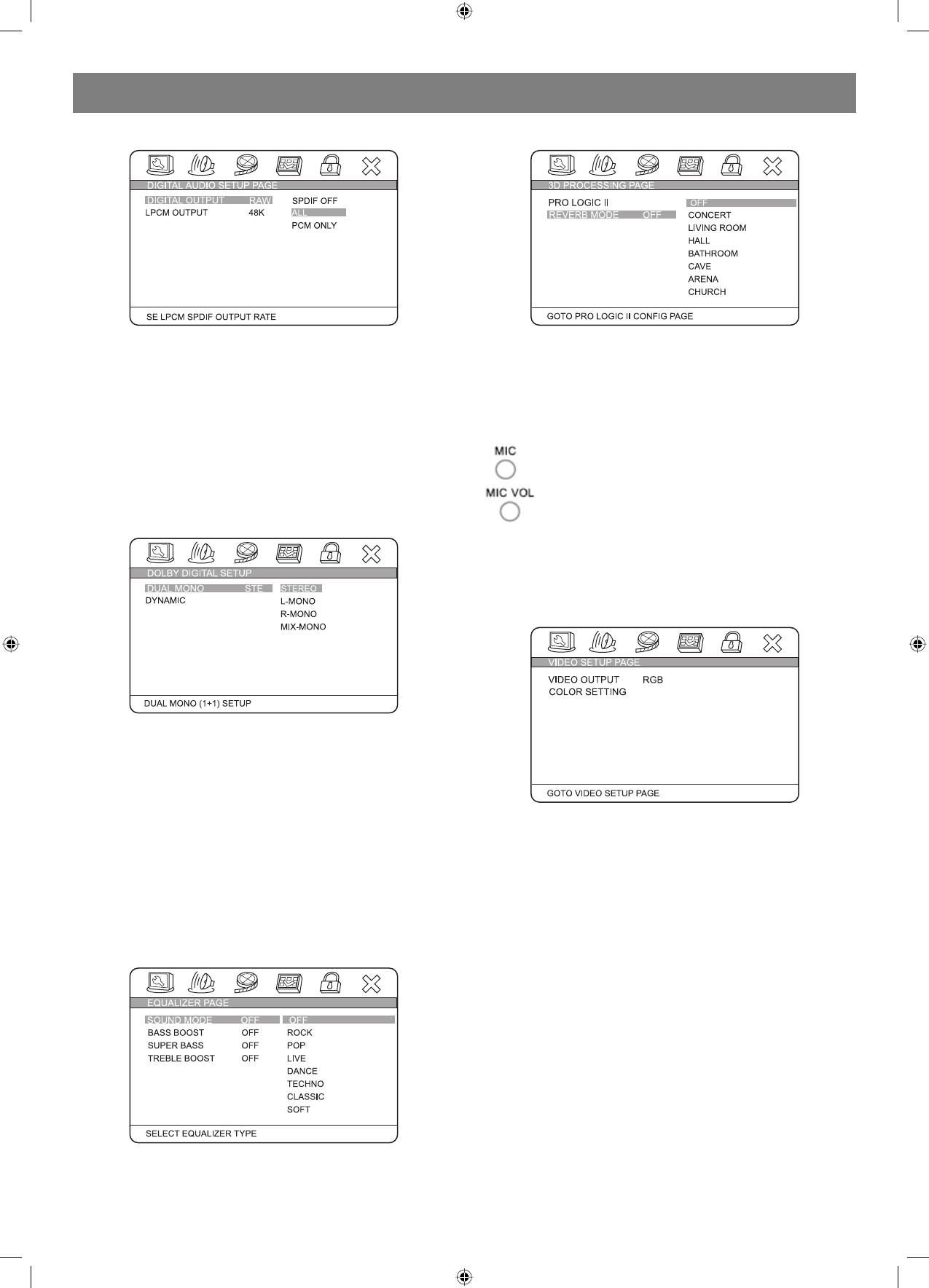
DIGITAL AUDIO SETUP PAGE
3D PROCESSING:
In PROLOGIC ON mode, the reverb mode setup is available.
DIGITAL OUTPUT:
SPDIF OFF:
HDCD SETUP:
No digital output (coaxial off), only analog audio output.
You can select the digital filter at off 1x and 2x.
ALL:
If this item is selected, you can set up RAW.
KARAOKE
PCM ONLY:
KARAOKE can be controlled to output by the setup menu. There are 2
In SPDIF/PCM mode, setup PCM channel according to your preference.
optional output modes: ON/OFF.
LPCM OUT:
Adjust microphone volume to the minimum level. Insert
Select PCM frequency at 48kHz or 96kHz.
microphone into the microphone jack.
Note: Some amplifiers don’t support 96kHz sampling, which will affect
the coaxial output.
Use the microphone volume knob to adjust the microphone
volume. Press up/down direction key to adjust the echo
DOLBY DIGITAL SETUP
level in the setup menu.
When playing karaoke disc, to eliminate the original singing, press [L/R/
ST] key on the remote controller to select left channel or right channel.
When playing DVD disc, press [AUDIO] to eliminate its original singing.
VIDEO SETUP PAGE
DUAL MONO:
Stereo: Set audio output to the stereo output.
Lmono: Set audio output to the monoleft channel.
Rmono: Set audio output to the monoright channel.
Mixmono: Set audio output to the mixmono channel.
DYNAMIC:
COMPONENT V IDEO:
Select this to reduce the overall volume and still keep defined audio
OFF:
sound.
Set video output to the composite.
YUV:
CHANNEL DELAY PAGE:
Set video output in analog component video format when connecting to
If the above setup is dissatisfying, you can set the speaker distances in
Y/U/V terminals.
the real conditions. Press up/down direction key to select the speaker,
PYUV:
and press left/right direction key to adjust the distance.
Set progressive YUV signals. Connection same as YUV.
RGB:
EQUALIZER:
Set video output in Red/Green/Blue format when connecting to SCART
terminal.
PRGB:
Progressive RGB signals. Connection same as RGB.
VGA:
Set to this item when connecting to VGA terminal.
Note: If the video setting differs with the physical connection, the TV set
may not have picture. In this case, you can RESET the machine, then
keep pressing key [V_MODE] until the picture returns again.
COLOR SETTING SETUP:
COLOR SETTING includes: SHARPNESS, BRIGHTNESS, CONTRAST,
GAMMA, HUE, SATURATION and LUMA DELAY.
SHARPNESS: There are three optional output modes: HIGH\MEDIUM\
In this item you can set sound mode, bass boost, super bass and treble
LOW.
boost. You can select one according to your preference and the disc
BRIGHTNESS: Use the left/right direction key to move the scroll and
content. You can press up and down direction key to adjust it.
adjust the brightness.
CONTRAST: Use the left/right direction key to move the scroll and adjust
8
4060.indd 84060.indd 8 23.10.2006 9:25:1323.10.2006 9:25:13


